Graph canvas
The graph canvas is the workspace where you create, edit, and run graphs.
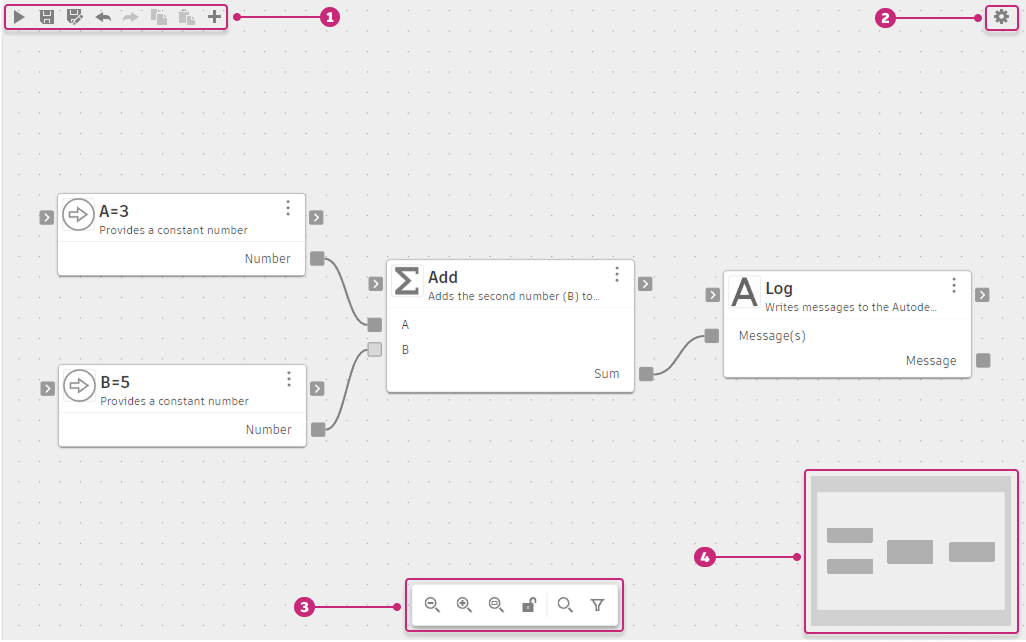
- Toolbar: Run, save, undo, and copy operations for the active graph. See Toolbar below.
- Settings: Open graph canvas settings. See Settings below.
- Canvas controls: Zoom and fit controls. See Canvas controls below.
- Minimap: Scaled overview of the full canvas. See Minimap below.
Toolbar
- Save and run the graph
 : Saves and runs the current graph. Press Ctrl+R (Windows) / Command+R (macOS).
 - Save graph
 : Saves the current graph. Press Ctrl+S (Windows) / Command+S (macOS).
 - Save graph as
 : Saves a copy with a new name. Press Ctrl+Shift+S (Windows) / Command+Shift+S (macOS).
 - Undo
 : Steps back through edit history. Press Ctrl+Z (Windows) / Command+Z (macOS).
 - Redo
 : Steps forward through edit history. Press Ctrl+Y (Windows) / Command+Shift+Z (macOS).
 - Copy
 : Copies the selected nodes. Press Ctrl+C (Windows) / Command+C (macOS).
 - Paste
 : Pastes copied nodes onto the canvas. Press Ctrl+V (Windows) / Command+V (macOS).
 - Add node
 (Space): Opens the Add node dialog.
During a graph run, all toolbar buttons are disabled. See Run a graph for details on the running state.
Settings
The Settings  button opens the Graph settings panel. It's in the top-right area of the canvas.
- Show Minimap: Shows or hides the minimap in the bottom-right corner of the canvas.
- Show Navigation Bar: Shows or hides the canvas view controls at the bottom of the canvas.
Canvas controls
Use the view controls at the bottom center of the canvas to adjust the viewport:
- Zoom out
 : Shows more of the graph by making nodes appear smaller.
 - Zoom in
 : Shows more detail by making nodes appear larger.
 - Zoom to fit
 : Fits the entire graph into view.
 - Lock

 : Switches to navigation mode. In navigation mode, panning and zooming work normally, but node selection is disabled. This is useful for exploring large graphs without accidentally selecting or moving nodes. Double-click the canvas to zoom in one step. Click the button again to return to normal editing mode.
 - Search
 : Opens a search box in the Navigation Bar to find nodes on the canvas by name.
 - Filter
 : Shows or hides nodes on the canvas based on type or status.
Pan the canvas using the scroll wheel or by dragging. The viewport position and zoom level are stored per tab.
Minimap
The Minimap in the bottom-right corner shows a scaled overview of the entire canvas and reflects the current viewport position.