Using the CharacterX Deformer
The CharacterX Deformer lets you replay a character's full Maya deformer graph (skinning, blend shapes, etc.) on the simulated crowd, beyond what the GPU Render Previz and the renderers' native skinning/blend shape support can reproduce. This page describes the complete workflow, from exporting the deformer to visualizing the result.
Export the CharacterX Deformer Assembly
In the Character Maker Geometry Tab, select the Geometry File's Character Node and click the Export CharacterX Deformer Assembly button (see CharacterX Deformer Assembly). This exports the current Maya deformer graph of the character's meshes to a .cxda file and links it on the Geometry Asset.
*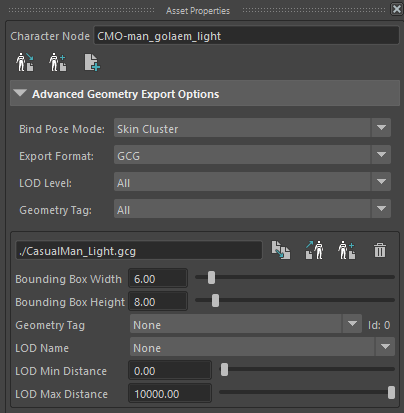
The Geometry File must already be exported (the character's meshes and skeleton must exist in a saved Geometry File) before its deformer graph can be exported and linked.
This step can also be scripted with the glmCharacterMaker -exportDeformerAssembly flag, see Scripting.
Check the Advanced Deformation blind data
Exporting (or relocating) the CharacterX Deformer Assembly automatically derives the Advanced Deformation blind data it needs: any deformer input that matches an existing bone of the character's base Skeleton is driven directly from the simulated/animated skeleton at render time; everything else (extra matrices, blend shape weights, custom scalar inputs...) becomes one Advanced Deformation blind data entry per input.
*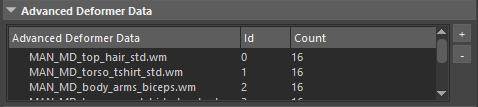
You can verify which blind data groups were derived with the glmCharacterFileTool -getAttr blindDataGroups command, and inspect the CharacterX Deformers Report in the Character Maker if a deformer did not export as expected.
Export motion with this blind data
Because the deformer needs per-frame values for its Advanced Deformation blind data, export your motion with the -animationInBlindData flag of the glmExportMotion command (or the equivalent option when saving from the Motion Tab), so the exported .gmo carries the full animation the deformer needs to be replayed.
Alternatively, or in addition, Advanced Deformation blind data values can be authored or driven without going back through Maya's deformer graph each time:
- manually, per Rendering Type, with a Blind Data Override Node in the Character Maker;
- procedurally, per entity, with a ChOp Output "Set Bone or BlindData" node or expression.
See Adding Blind Data to a Character for more general background on Blind Data.
Export a cache
Export the simulation as usual. There is nothing CharacterX-specific to configure here, but a cache export is required before the CharacterX deformation becomes visible (see warning below).
Visualize the result
Once in Cache Replay, set the Simulation Cache Proxy's Display Attribute to Mesh Render Previz, or render the scene (Arnold, VRay, RenderMan), to see the character deformed by the CharacterX Deformer.
The CharacterX Deformer is not evaluated during Simulation, nor in the Bounding Box, Skeleton Shapes, Physics Shapes or GPU Render Previz Cache Replay display modes. Only Mesh Render Previz display mode and an actual render (Arnold, VRay, RenderMan, using the cxdDeformerEnable / enableCxdDeformer attribute) show the full deformation.