When you create a deterioration model, Info360 Asset generates a survival curve to model the lifespan of each asset group based on the method and data you select. See About Survival Curve Method
Asset groups marked as "Undefined" don't have a survival curve method assigned. You can still run the model, but these groups will be excluded from it unless you select a method.

The method may be undefined if:
- You haven't selected a failure definition for your model. In this case, select a survival curve method for every group you want to include (see below for how to do this in bulk).
- A group has fewer than 5 failures for the failure definition you selected - not enough data to fit a survival curve. Select a different method to include these groups.
To select a survival curve method:
- Find the asset group you want, and click Show Method.
- Or, if you want to use the same method (the exact same curve) for several groups, you can select the checkboxes beside them and then click on Actions

 Change Survival Curve Method.
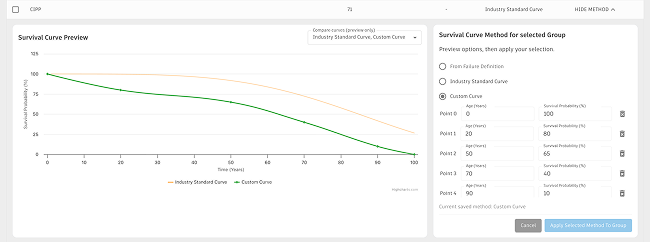
- Select one of the available survival curve methods:
- From Failure Definition: fits a curve to your recorded failures. (If you haven't added a failure definition yet, you can still do it - see the section below.) A Weibull model is fitted to the failure data, and at least 5 failures per group are required for the fit to be reliable. This method isn't available if no failure definition is set for the model, or if the group has fewer than 5 failures for the selected definition.
- Industry Standard Curve: pre-calculated curves based on failure data from 500+ utilities in the U.S. A proven, defensible benchmark you can use in its own right, or compare against your own history. To use them, make sure your
asset groups are set up by material and diameter. Learn more about the available
industry standard curves.
To use these, you'll need to make sure your asset groups are set up based on material and diameter.
- Custom Curve: define your own curve by entering (age, survival probability %) points; the model connects your points to form the curve. Add at least two points, using Add another point to add more.
Tip: to view an industry standard curve or another group's curve on the chart as a reference while building your own, select that method first, then switch back to Custom Curve.
- Copy Curve from another Group: Select the group whose curve you want to use for this group.
Note: You cannot copy a curve from a group that has an undefined curve or that itself is copying from another group.
- One Expected Useful Life: Enter a single expected useful life in years (e.g., 70 years). This will be treated as a straight line that starts at age 0 with a survival probability of 1, and ends at age X (the expected useful life you specify) with a survival probability of 0.
- Then click Apply Selected Method to Group.
- Make sure to save any changes you make.
- When ready, you can run your model.
To add or edit a failure definition:
- In the Configuration section, click on Edit.
- Select a failure definition from the drop-down and then click Update.
- If you need to create a failure definition, see Create a Failure Definition.
Warning: When you select or change a failure definition, you will lose any custom curve or expected useful life setups, as well as any industry standard curve or copy curve selections you have made for your groups.