To create tooltips for a feature class
You can create default tooltips for feature classes using the Model Explorer. Asset or subset selection-based tooltips created from the Properties pallette override default feature class tooltips created from the Model Explorer.
Click Manage
 Model
Model  in the Toolbar to display the Model Explorer.
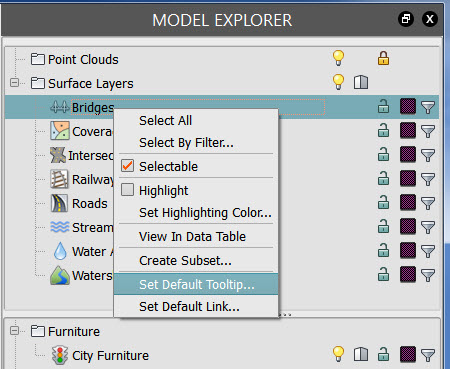
In the Model Explorer, right-click the row for the feature class whose tooltip you are creating.
For example, right-click Roads.
Click Select All to apply the Tooltip to all objects in the feature class.
Right-click the feature class row again and Click Set Default Tooltip to open the Edit Tooltip window.
Enter Tooltip content.
- See Create Tooltips for information on formatting Tooltip content.
- Optionally, Click Preview to see what the Tooltip will look like. Click Return to Editor to revise or to finish creating tooltip.
Click OK.
Click Update in Properties Palette to replace existing Tooltip content, if any.
Note: If you set Auto Update in Properties Palette, you do not need to update each time you make a change.