Access
Click Elasto-plastic analysis on the Standard and Parametric tabs in the Sections dialog. This option is available for steel sections.
Elasto-plastic Parameters Dialog
Use this dialog to specify parameters of the elasto-plastic analysis of a linear element with a steel section.
| Parameters | Description |
|---|---|
| Web division N | Enter a number of divisions along the length of the web of a section. |
| Flange division N1 | Enter a number of divisions along the length of the flanges of a section. |
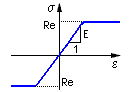
| Elastic - perfectly plastic | A material model. Stress and strain properties for this material model are illustrated in the following image. The elastic stress limit is based on the Re design strength of the material as defined in the material database.
 |
| Elastic - plastic with hardening | A material model. Stress and strain properties for this material model are illustrated in the following image. The elastic stress limit is based on the Re design strength of the material as defined in the material database.
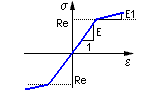 |
| E1/E = | This edit field is active when you select the material model: Elastic - plastic with hardening. Enter there a value for the plastic hardening parameter. This parameter is defined as a quotient of the material stiffness value (Young's modulus E) in the elastic range, and the stiffness in the plastic range (the linear material model is assumed). |
| Unloading method | You can select one of the following methods:
|