Export to CSV using the API
Enable API export for any grid page directly from Page Settings. Once enabled, the page becomes available for export through API endpoints in the CSV format, with all saved filters, sorting, and column configurations automatically applied. This is especially helpful if you want to set up automatic reports.
This feature lets you tag a page so that it's exposed for exporting using the Flow Production Tracking API. The code to retrieve the CSV data through the API will need to be created by your development team. See the Python API or REST API documentation for details.
There are benefits to using the API CSV export over the manual method:
- Automated data extraction: Programmatically export page data without manual intervention.
- Consistent exports: Saved filters and sorting are automatically applied for consistent results.
- Integration-friendly: Access page data through REST API or Python API for custom workflows.
- Layout support: Export specific layouts when multiple layouts are available for a page.
API Export is available only for grid-type pages. You must the permissions to edit the Page Settings to use this feature.
To tag a page for API export:
Navigate to the grid page you want to enable for API export.
Open Page Settings from the page menu.
Toggle API Export to enable the page for API-based exports.
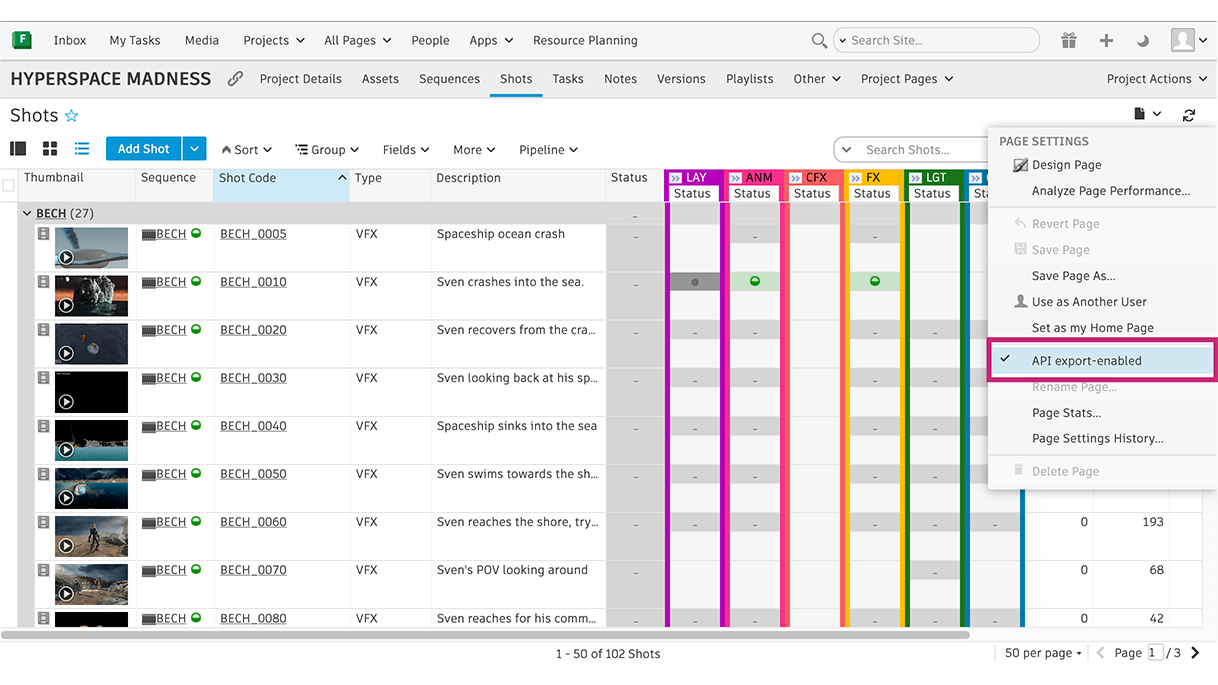
Configure your filters, sorting, and columns as needed.
Once enabled, any saved filters or sorting on the page are automatically applied to future API exports, ensuring consistent data extraction.
Documentation
- For more about CSV export, see Export table data as CSV.
- For the developer documentation, see Flow Production Tracking Devleoper Help center.
Release Information
Version:
8.80
Release Date:
December 2025