Compare permission roles side by side
The People Permissions page lists each permission role one after another, so checking how several roles compare means scrolling through a long vertical list of nested sections. Compare Permissions puts the roles side by side in one table and marks the settings that don't match, so you can confirm that a permission is on for every role that needs it, or that no role has access it shouldn't.
Select Compare Permissions on the People Permissions page to open the new Compare Permission Roles table. Instead of scrolling through each role's nested sections one at a time, you see the roles next to each other.
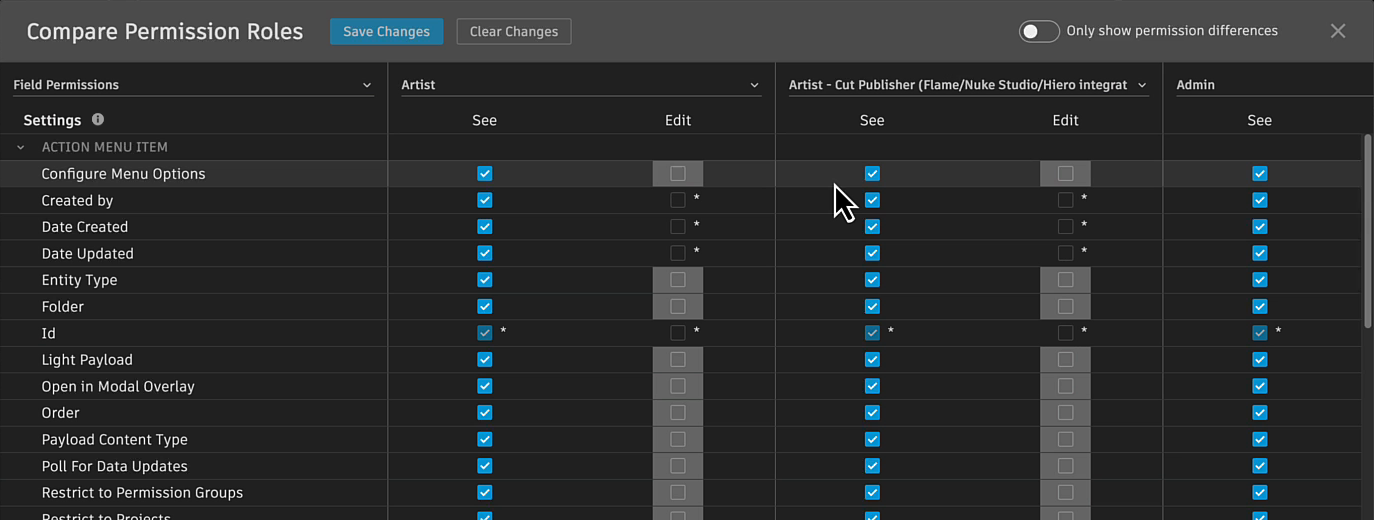
See where roles differ:
Flow Production Tracking shades the settings that don't match the rest of the row.
Turn on Only show permission differences to hide the permissions the roles agree on.
Edit without leaving the table:
- Select a checkbox to change a permission for any role. Changed settings turn orange. Click Save Changes to commit your edits, or Clear Changes to discard them.
You can compare Entity Permissions, Field Permissions, App Permissions, or Advanced from Permissions Type. Add more roles to compare with + Add Role.
Documentation
For more information, see Compare permission roles.
To learn what each permission type controls, see Permissions.
Release Information
Version:
8.90
Release Date:
November 2026