Compare mode (Beta) in Flow Generative Scheduling
In Flow Generative Scheduling, Compare mode (Beta) lets you view two schedule versions or two scenarios side by side so you can see differences in tasks, resources, and constraints.
You can enter Compare mode:
Anytime you Generate a new version to compare it to a previous one.
By opening the Version menu and selecting View version history.
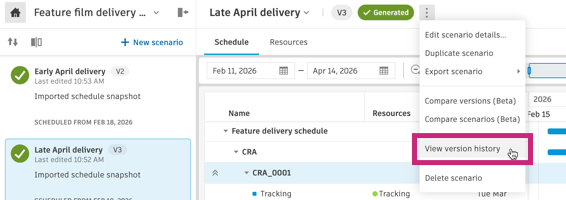
You can also compare two scenarios by clicking in the Scenarios panel.
In Compare mode you switch between the Schedule and Resources tabs: the Schedule tab shows the schedule grid and Gantt chart for both versions or scenarios, with Variance columns and the Activity panel for activity-level comparison. The Resources tab shows the resource overview graph, resource table, resource detail graph, and resource detail panel for both, with a Baseline column and highlighted differences.
Documentation
To learn more about Compare mode, including how to access it and how to navigate the Schedule and Resources tabs, see Compare mode (Beta).
Release Information
Version:
1.12
Release Date:
February 2026