Monitor Email Notifications in Site Activity Monitor
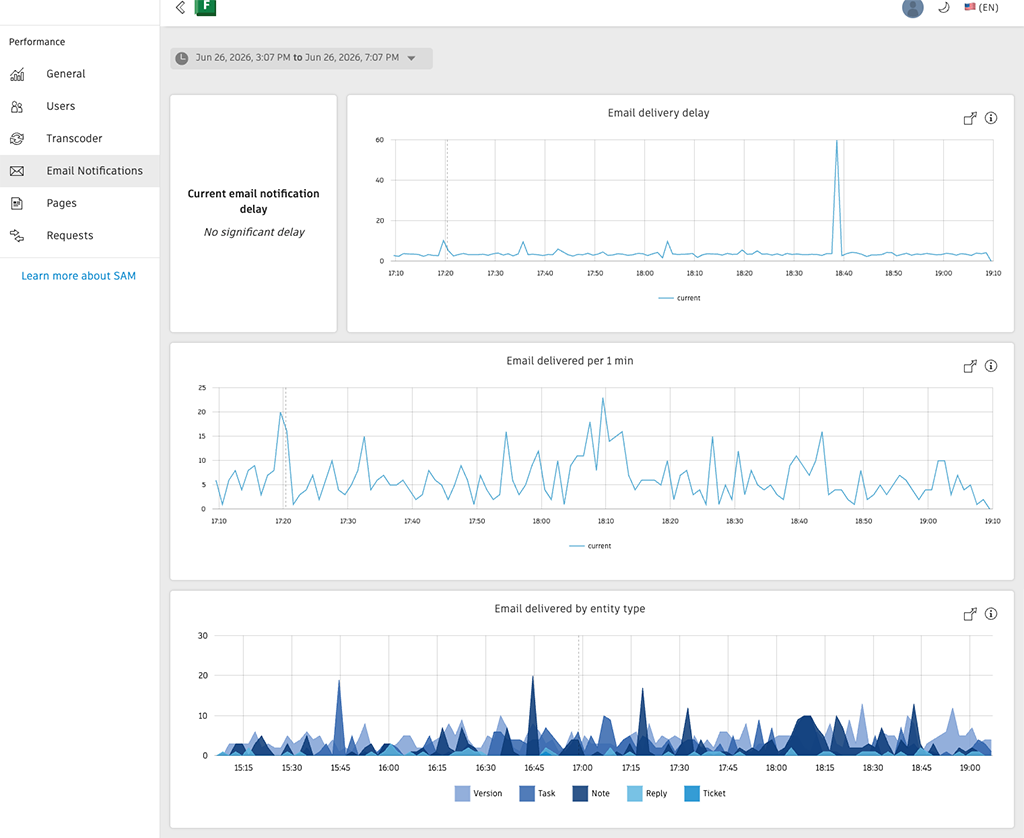
The Site Activity Monitor now includes an Email Notifications view that displays information about email delivery for your site. This helps administrators understand notification throughput and identify periods of high activity.
The Email Notifications view provides visibility into:
- Current email notification delay: See the current time between when a notification is triggered and when the email gets sent.
- Email delivery delay: View notification delay patterns over time to identify correlations with scheduled batch operations or heavy production activity.
- Emails delivered per 1 min: Monitor email notification throughput to understand whether delays are due to legitimate high usage or potential issues.
- Email Notifications by entity type: Breaks down the email notifications sent from the Flow Production Tracking site by the type of entity that triggered them. Use it to find out which entity types are generating the most email traffic.
Note:
This view provides visibility into delivery status but doesn't require administrator action. During periods of sustained high volume, the system may automatically optimise notification content to improve delivery times.
To access the Email Notifications view:
Navigate to the Site Activity Monitor from the Apps menu.
Select the Email Notifications view.
Documentation
- For more information about the Site Activity Monitor, see Site Activity Monitor (SAM).
Release Information
Version:
8.87
Release Date:
July 2026