Exclude statuses from summary calculations
Administrators can now exclude specific statuses from status summary roll-up calculations on a per-field basis. Statuses such as Not Required, Omit, and Hold often skew Status summaries because they don't represent actual in-progress or completed work. You can now mark those statuses to be ignored so that summaries more accurately reflect your studio's real progress.
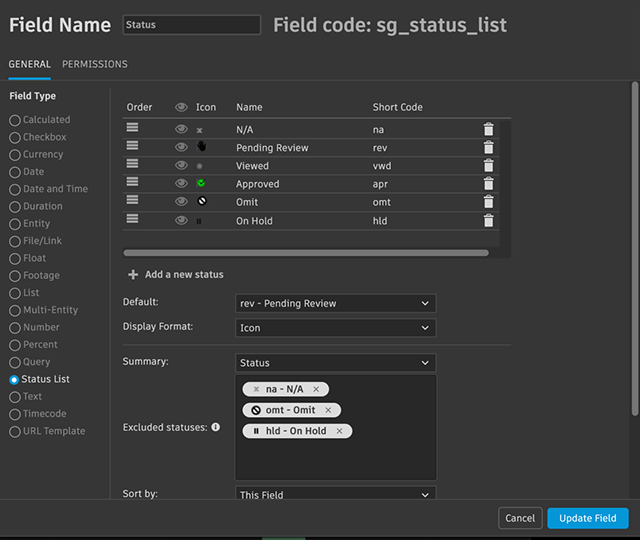
The Excluded statuses option appears in the Configure Field dialog for Status List fields that have the Summary option set to Status. Select the statuses to exclude from the summary calculation. When all child-task statuses on a record are excluded, the summary shows N/A.
In the contextual menu, the Summary's Status option displays an asterisk (*) when statuses are excluded from the calculation.
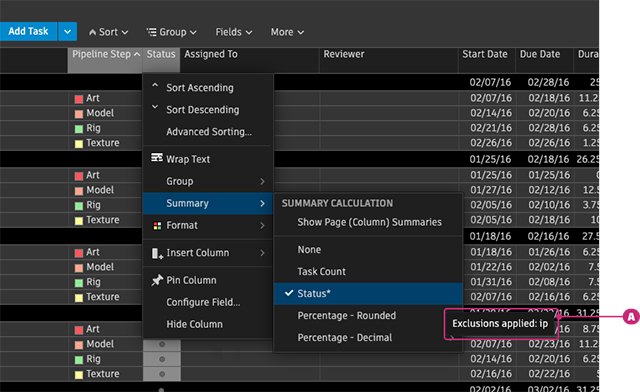
A. Status excluded from the calculation
Documentation
To learn how to configure status exclusions, see Excluding statuses from summary calculations.
Release Information
Version:
8.88
Release Date:
August 2026