Create or Select a Project
You can select an existing Autodesk Forma project or create a new project to use Forma Takeoff.
Create a Project
Hub administrators and project administrators can create new projects for Forma Takeoff.
Use a Project Template to Create a Project
Administrators can create project templates and use these templates to create new projects.
Project templates can be configured with Takeoff settings, so that new projects created from the template are ready to use Forma Takeoff with your company standards. See Configure Project Templates for Preconstruction to learn about takeoff settings for project templates.
To use a template to create a new project, you can select the template when creating the project.
Enable Preconstruction on an Existing Project
Project administrators can select an existing Autodesk Forma project and enable Preconstruction for members to access. Preconstruction is where Forma Takeoff is accessed from.
To enable Preconstruction:
Open an existing project.
Depending on what default product opens up, you may land in Build or Data Management. Click Members in the left navigation menu.
Find and click on your own name or your team members' names. Learn more about managing members.
In the Assigned products and permissions section, toggle on Preconstruction.
Note: If you turned on Preconstruction for yourself, refresh the page and you'll be able to select Preconstruction in the product picker.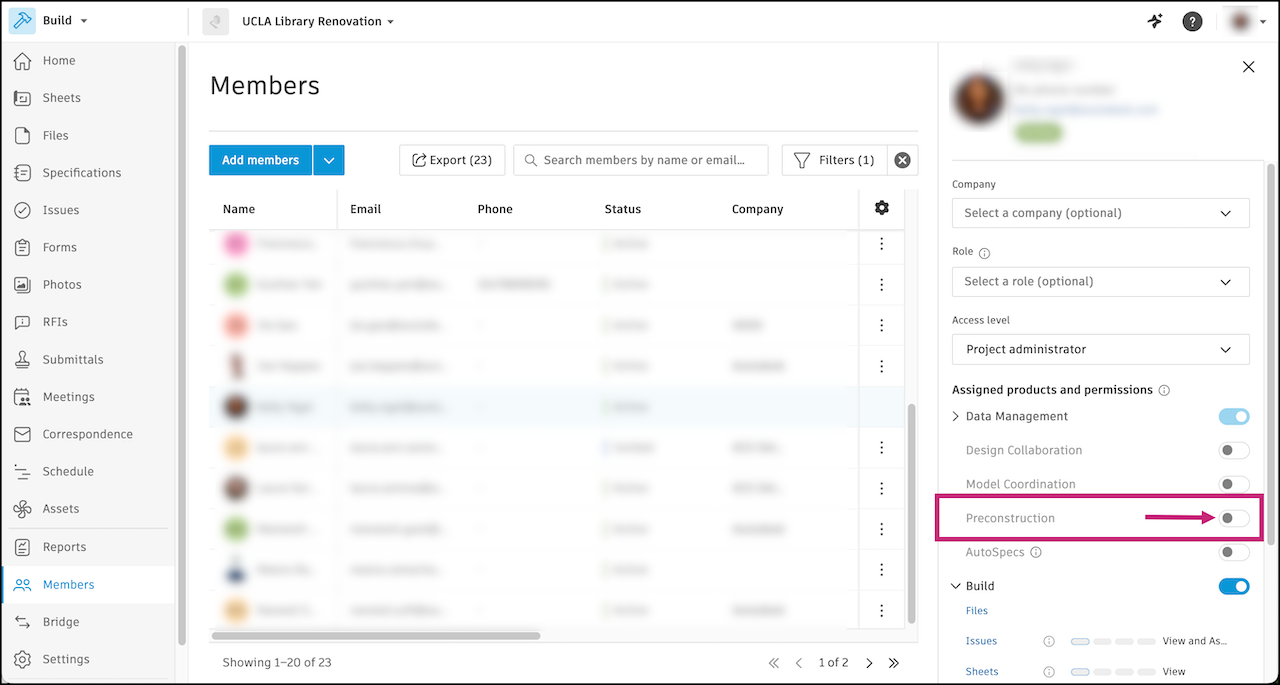
Members with access can click Preconstruction in the product picker drop-down at the top left of the page to open it.
