After installing Desktop Connector, you must set up a connected drive.
Set Up a Connected Drive on Windows ®
- In the taskbar, right-click on the Desktop Connector icon
 and select Sign In.
- On the Autodesk-Sign In screen, enter your Autodesk credentials and click Sign In.
A connected drive is created for each supported data source associated with your Autodesk credentials. The data source's icon is used to represent the associated connected drive (such as
 for Fusion 360). Any hubs inside the connected drive are marked with a
 icon.
icon.
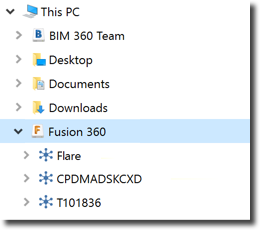
You are ready to start managing files and opening files from your connected drive.
Set Up a Connected Drive on macOS ®
- In the menu bar, click on the Desktop Connector icon
and select Sign In.
- On the Autodesk-Sign In screen, enter your Autodesk credentials and click Sign In.
A connected drive is created for each supported data source associated with your Autodesk credentials. The data source's icon is used to represent the associated connected drive (such as
for Fusion 360). Any hubs inside the connected drive are marked with a
 icon.
icon.
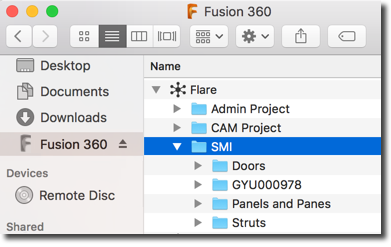
You are ready to start managing files and opening files from your connected drive.