
Specifies which symbols to include in the report, the symbol order, and the table dimensions.
FindCommand entry: AESCHEMATICREPORT
Select Symbol List from the report list. Run the report and click Put on Drawing on the Report Generator dialog box.
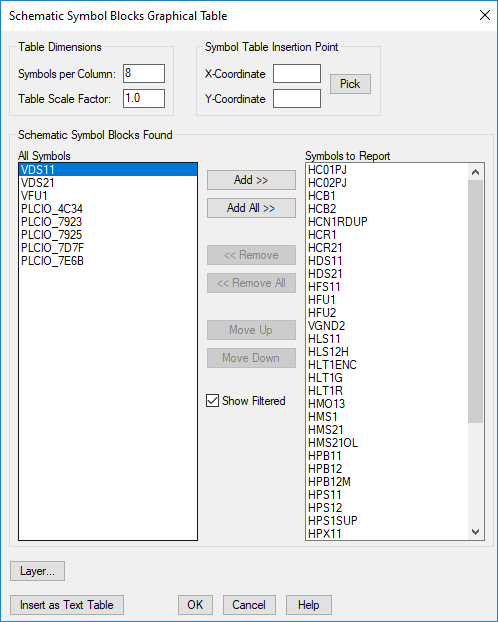
List of Options
The following options are displayed.
Table Dimensions
- Symbols per Column
- Specifies the number of symbols per column in the table when inserted in the drawing.
- Table Scale Factor
- Specifies the scale of the table when inserted in the drawing.
Symbol Table Insertion Point
- X-Coordinate
- Sets the X coordinate value for the upper-left corner of the table.
- Y-Coordinate
- Sets the Y coordinate value for the upper-left corner of the table.
- Pick
- Specifies where to place the table in the drawing.
Schematic Symbol Blocks Found
- All Symbols
- Lists the available symbols. Select a symbol from the list to add it to the cross-reference style.
- Symbols to Report
- Specifies the symbols to include, and the symbol order.
- Add
- Adds the selected symbol to the Symbols to Report list.
- Add All
- Adds all the symbols to the Symbols to Report list.
- Remove
- Removes the selected symbol from the Symbols to Report list.
- Remove All
- Removes all the symbols from the Symbols to Report list.
- Move Up
- Moves the selected symbol one level up in the Symbols to Report list.
- Move Down
- Moves the selected symbol one level down in the Symbols to Report list.
- Show Filtered
- Specifies whether the filtered items are displayed in the All Symbols list.
Layer
Specifies the layer assignment of the table to be inserted in the drawing.
Insert as Text Table
Displays the Table Generation Setup dialog box where you can insert the content as a text table.