
Run Heights
- Auto Fix Index Run >> Select possible index run nodes
Enables a user to manually select a number of "End node's" within the Design Line system, this will automatically determine the longest index run from the pre determined Source Node location. Once determined a singular fitting will maintain the required invert level set on the Elevation in relationship to the U/S of Slab level.
- Auto Fix Index Run >> Select All Open Ends And Stack Bases
Enables a user to automatically select all "End node's" present within the Design Line system, this will automatically determine the longest index run from the pre determined Source Node location . Once determined a singular fitting will maintain the required invert level set on the Elevation in relationship to the U/S of Slab level.
- Index Run Considered to be the run with the furthest horizontal path from the source node location.
-
Index Run Node
Considered to be the end node of the index run, where this could be a stack base, or opened.
Public Health Design Line system, illustrating a selection of all "End nodes" of a fitting
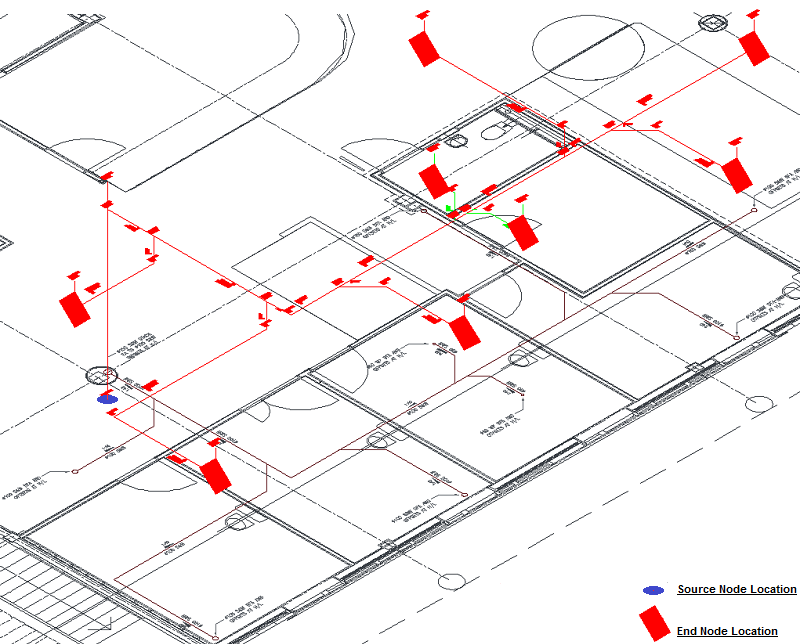
-
Public Health Design Line System, illustrating an example "End node" of a fitting Fall = Not Applied
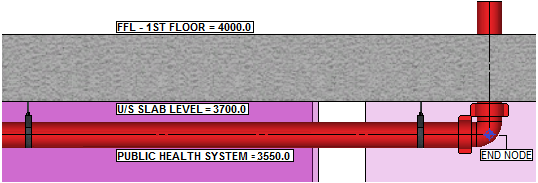
-
Public Health Design Line
System, illustrating an example Fixed "End node" of a fitting Fall = 1:40
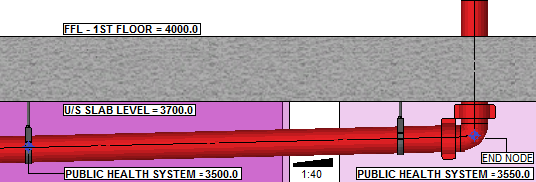
Fix Selection
- Select positions to fix
Functionality to enable a user to manually select end nodes situated at the base of a riser within the public health system. Once determined the fitting will maintain the required invert level based on the Elevation in relationship to the U/S of Slab level.
- Select All Open Ends And stack Bases
Functionality to enable a user to select all of the "open ends & nodes situated at the base of the riser within the public health system. Once determined the fittings will maintain the required invert level based on the Elevation in relationship to the U/S of Slab level.