• Help Home
  • English (US)
    1. English (US)
    2. 简体中文
    3. 繁體中文
    4. Čeština
    5. Deutsch
    6. Español
    7. Français
    8. Italiano
    9. 日本語
    10. 한국어
    11. Polski
    12. Português (Brasil)
    13. Русский
Factory Design Utilities 2026
    • What's New in Factory
      • What's New in Factory 2026.1
      • What's New in Factory 2026
      • What's New in Previous Releases
        • What's New in Factory 2025.1
        • What's New in Factory 2025
        • What's New in Factory 2024.1
        • What's New in Factory 2024
        • What's New in Factory 2023.1
        • What's New in Factory 2023
        • What's New in Factory 2022
          • Model States and Factory
          • iLogic Form Enhancement
          • Manage Revit AnyCAD references in Vault for Factory Layouts
          • Inventor BOM settings in FDU asset publishing
          • Control the BOM setting from the "Convert to Assets"
          • Create a sub-layout of selected assets in Inventor
          • Create a sub-layout of selected assets in AutoCAD
    • Release Notes
    • Factory Design Utilities Help
    • Installation
    • AutoCAD Installation
    Share
    • Email
    • Facebook
    • Twitter
    • LinkedIn

    iLogic Form Enhancement (What's New in 2022)

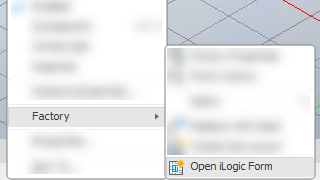
    Now you can access the iLogic Form from the asset's context menu.

    Select an asset or multiple assets.

    1. Right-click to display the context menu.
    2. Hover over Factory to display its drop-down menu.
    3. Click Open iLogic Form.

    For more information see Create an iLogic Form.

    Parent page: What's New in Factory 2022

    Was this information helpful?

    Except where otherwise noted, this work is licensed under a Creative Commons Attribution-NonCommercial-ShareAlike 3.0 Unported License. Please see the Autodesk Creative Commons FAQ for more information.

    • Privacy Statement
    • Legal Notices & Trademarks
    • Report Noncompliance
    • © 2025 Autodesk Inc. All rights reserved