
Scrubbing Clips, Sequences and Reels
Scrubbing a Clip or Sequence
You can scrub a clip or sequence by using the transport section under the reel or by dragging left or right on the lower third of a frame.
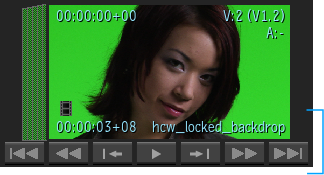
When scrubbing a clip, the selected clip outline disappears, giving you a cleaner interface. All clip information is hidden, except for the Current Frame / Timecode / Keycode and the File Format icon. This also applies to clips in the Media Panel (Tiles), the Freeform view and the MediaHub (Tiles and Preview Panel).
Scrubbing a Reel


To scrub a reel using the cursor:
Click the grey area on top of the reel to be scrubbed.
Place the cursor in the top third of the reel.
The cursor displays two white arrows on each side.
While holding the left mouse button, drag the cursor left or right.
Note: The closer you are to the edges of the screen, the faster the scrubbing speed. The closer you are to the centre of the screen, the slower the scrubbing speed.