
Quickstart Pack tutorial: Create the runner system
In this task, you create the runner system using the Runner Wizard.
Click
 (Geometry tab > Feed System panel > Runner Wizard).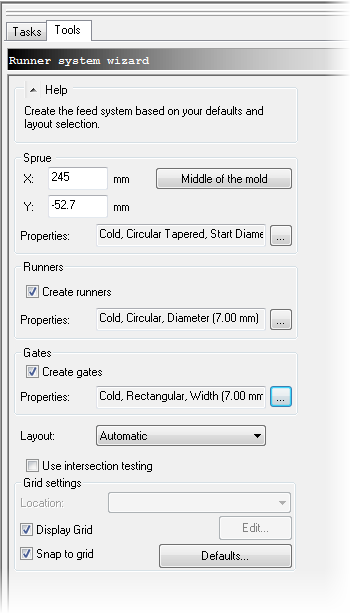
Click Middle of the mold.
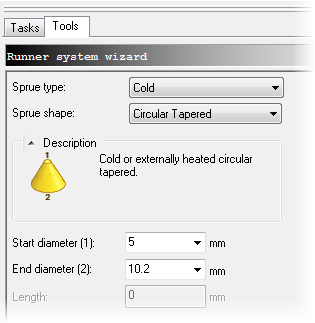
Click the Sprue Properties ellipsis.
- Ensure that the Sprue type is Cold.
- Ensure that the Sprue shape is Circular Tapered.
- Enter 5 mm as the Start diameter (1).
- Enter 10.2 mm as the End diameter (2).
- Click OK.
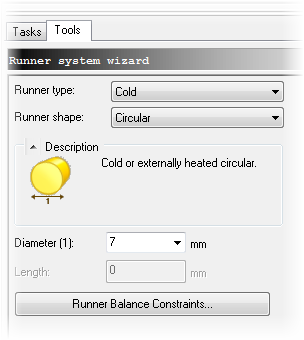
Click Runners Properties ellipsis.
- Ensure that the Runner type is Cold.
- Ensure that the Runner shape is Circular.
- Enter 7 mm as Diameter (1).
- Click OK.
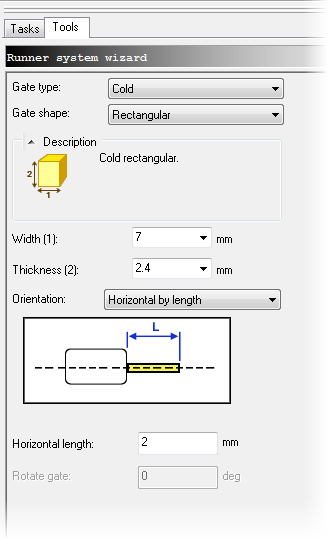
Click Gates Properties ellipsis. The gate connects the runner system to the Injection Location you defined.
- Ensure that the Gate type is Cold.
- Ensure that the Gate shape is Rectangular.
- Enter 7 mm as Width (1).
- Enter 2.4 as Thickness (2).
- Ensure that the Orientation is Horizontal by length.
- Enter 2 mm as Horizontal length.
- Click OK.
Ensure that the layout is Automatic.
Click OK.
The runner system is now created.