
How to Access
To access Autodesk Model Analytics, users must meet certain requirements and complete a few setup steps.
PC Pre-requisites
To find the Autodesk Model Analytics for Revit extension:
Revit Desktop must be installed.
The Revit Model Analytics add-in must be installed. Visit manage.autodesk.com and navigate to Product and Services > Product Updates > Extensions to find the Model Analytics for Revit Extension.
 For the best experience, use the latest version of the add-in. Refer to the Revit Extension release notes for the latest available version and recent updates.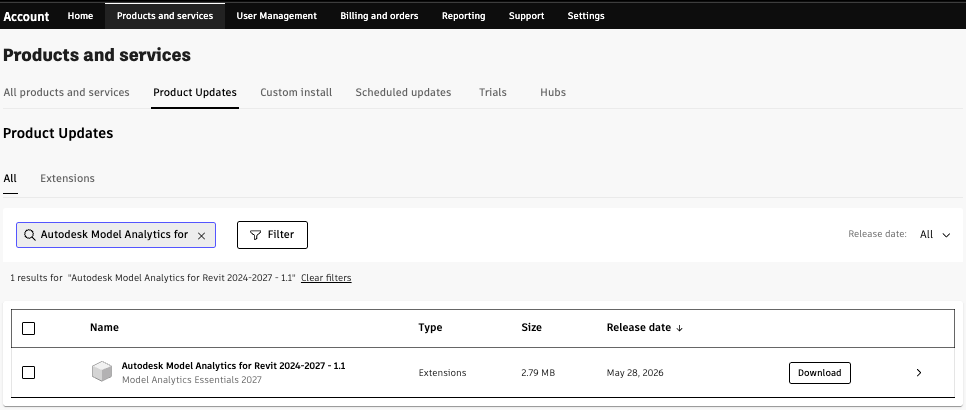
Autodesk Forma Role Pre-requisites
To activate Model Analytics
Your Autodesk Forma Hub access level must be set to Account Admin for access to Hub Settings. This is where you will activate Autodesk Model Analytics for the hub.
 Learn more about Hubs in Autodesk Forma
Roles and capabilities
Once activation is complete, users can access the different levels of Model Analytics (hub, project, and model) according to their roles. Access is available only for hubs with an active Forma Design Collaboration (formerly BIM Collaborate Pro) or Cloud Worksharing subscription.
Reports
| Role | Hub report (Executive Overview) — Overview of all projects and models in hub | Project report — Overview of all models in an Forma project | Model report — Overview of an Forma model |
|---|---|---|---|
| Account Admin | — | — | — |
| Standards Admin | — | — | — |
| Project Admin | — | ✓ | ✓ |
| Project Member | — | ✓ | ✓ |
| Executive | ✓ | ✓ | ✓ |
Manage Model Analytics Subscription and Data Collection
| Role | Activate Model Analytics (Forma Settings) | Manage Data Collection (Forma Library) |
|---|---|---|
| Account Admin | ✓ | ✓ |
| Standards Admin | — | ✓ |
| Project Admin | — | — |
| Project Member | — | — |
| Executive | — | — |
Getting Started
Turn data collection on for multiple projects
After activation, open Forma Hub Settings and navigate to the settings tab
In the Hub Admin, navigate to the Library and select the Model Analytics card

From here, you can select one project or multiple projects to enable or disable collection for those projects. Every project in the hub is set to the Essential tier upon activation.
Autodesk Model Analytics Project Tiers
- Essential tier enables data collection
- Disabled tier pauses data collection
Day-to-day Viewing Analytics
Access Autodesk Model Analytics as a Project Member or Project Administrator
After activation, Project Members and Project Administrators have read-only access to Model Analytics and are able to view analytics live.
Open the project you would like to view analytics for in Autodesk Forma
Go to My Home → Insights
In the left navigation, select Model Analytics
Now, you're ready to understand your Model Analytics data!