
Release Notes
A detailed description of the resolved issues and enhancements for the current release.
August 26, 2026
New features and enhancements
- Refreshed the Reports experience with a modernized interface for easier report management and creation.
August 19, 2026
Resolved issues
- Fixed an issue where My Outstanding Work failed to load on the Dashboard.
August 12, 2026
New features and enhancements
- Updated the Units of Measure Manager with a refreshed interface.
Resolved issues
- Fixed an issue where float fields displayed an incorrect number of decimal places in the UI, even though the correct value was saved and returned by the API.
- Fixed an issue where the workspace warning icon did not show missing task assignments for Grid Roles, Linked (Managed Items) Roles, Bill of Materials Roles, Sourcing Roles, Unassigned Field Validators, or Hidden Sections Inconsistency.
July 30, 2026
- Maintenance release - no changes to functionality.
July 29, 2026
Announcement
Starting September 1, 2026, new rate limits will apply to all REST APIs to help ensure the availability and reliability of the service. If your application exceeds the allowed request rate, the API returns an HTTP 429 Too Many Requests response.
For more information, see Read Me First for REST API v3 or The Basics for REST API v1.
July 23, 2026
Resolved issues
- Fixed an issue where Reminder Notifications for workflow states failed to save when the Repeat value was set to 1.
July 15, 2026
Announcement
Starting August 15, 2026, will strengthen the existing validation for 3-legged (3L) OAuth client IDs used by external applications by adopting the same allowlisting approach currently used for client IDs that generate 2-legged (2L) tokens.
Before that date, add the client ID for any application using 3L tokes to the Allowed client ID list on the General Settings page to avoid authentication failures.
See General Settings Reference for details.
Resolved issues
- Fixed an issue with Advanced Print Views where computed fields fail to correctly render an HTML image.
- Fixed an issue where users with Basic Access could not view Managed Items tab.
- Fixed an issue where imports failed to update item values for picklist fields with a picklist filter applied.
July 8, 2026
Resolved issues
- Fixed an issue which caused float field length and precision settings to be incorrectly applied.
June 18, 2026
New features and enhancements
- Refreshed the Delegation Manager and My Delegations pages with a modernized interface.
- Updated the Descriptor page in Workspace Settings with a refreshed interface.
- Updated the Tab Names page in Workspace Settings with a refreshed interface and added visibility of default tab names.
June 10, 2026
- Maintenance release - no changes to functionality.
June 3, 2026
Resolved issues
- Fixed an issue that affected the loading performance of the Item Details tab.
- Fixed an issue where the Add Related Items dialog failed to load related items or remained stuck in a loading state.
May 27, 2026
Resolved issues
- Fixed an issue where workspace views failed to load when a unit of measure (UOM) float field was converted from Metric to English.
May 21, 2026
- Maintenance release - no changes to functionality.
May 14, 2026
New features and enhancements
- Added support for additional date formats and aligned the date format options available in General Settings and user preferences.
May 11, 2026
Resolved issues
- Fixed an issue where single-line text fields continued to appear in the Managed Items tab even when their visibility was set to Never.
April 30, 2026
New features and enhancements
- Modernized the Workspace Manager interface with improved navigation and organization, including search and filtering by workspace name and the ability to organize workspaces directly in the main menu.
- Updated the Setup Log and System Log page with a refreshed interface for a cleaner, more consistent experience.
Resolved issues
- Fixed an issue where the Managed Items tab displayed revision control fields in workspaces that do not use revision control.
- Fixed an issue where Project Management fields remained editable even when the item was workflow-locked.
April 16, 2026
- Maintenance release - no changes to functionality.
April 9, 2026
Resolved issues
- Fixed an issue where the Item Details tab failed to load for users with basic access.
- Fixed an issue where drawing items did not load in the Viewer.
April 1, 2026
- Maintenance release - no changes to functionality.
March 25, 2026
New features and enhancements
- You can now sort and filter items, and configure columns in the Managed Items tab to better manage large item sets.
Resolved issues
- Fixed an issue where the My Recently Viewed Items list did not update, causing it to show outdated items despite recent activity.
- Fixed an issue in the Grid tab where items created via Quick Create from a picklist field were not automatically selected.
- Fixed an issue causing missing or duplicate items in filtered workspace views.
March 11, 2026
Resolved issues
- Fixed an issue where the Debug option within a script was not working.
March 4, 2026
- Maintenance release - no changes to functionality.
February 25, 2026
- Maintenance release - no changes to functionality.
February 18, 2026
Resolved issues
- Fixed an issue where search did not return results for some users, even though the items were visible in workspace views.
- Fixed an issue where drawing files would not load in the Viewer.
February 3, 2026
Resolved issues
- Fixed an issue where importing values into money fields failed if the field precision was set to zero.
- Fixed an issue where the item.release webhook event was not triggered during asynchronous item release.
- Fixed an issue where items could not be saved because of computed field validation.
January 27, 2026
Resolved issues
- Fixed an issue where Naviswork files (NWC and NWD) failed to load in the preview viewer.
January 19, 2026
Resolved issues
- Fixed an issue where administrators could not create, save, or update delegations on behalf of users.
January 12, 2026
Resolved issues
- Fixed an issue where the Save button disappeared in the Project Management tab after navigating to another tab.
- Fixed an issue where the Where Used tab incorrectly displayed BOM references on the latest revision when a superseded revision was pinned in a BOM.
December 22, 2025
- Maintenance release - no changes to functionality.
December 19, 2025
- Maintenance release - no changes to functionality.
December 11, 2025
Resolved issues
- Fixed a performance issue where text markups on attachments could take up to 10 minutes to save in the Viewer.
November 27, 2025
New features and enhancements
- You can now release items asynchronously for faster, scalable processing of multiple affected items by enabling Asynchronous item release in General Settings. For more information, see General Settings Reference.
Resolved issues
- Fixed an issue where administrators were unable to update or create delegations on behalf of users in the Delegation Manager.
- Fixed an issue where the wrong filter was selected when adding filters using a Firefox browser.
November 17, 2025
Resolved issues
- Fixed an issue where workflow escalations stopped triggering and didn’t run as expected.
November 10, 2025
Resolved issues
- Fixed an issue where flyouts for workspace view and filter options appeared behind the data grid, making them inaccessible.
November 6, 2025
- Maintenance release - no changes to functionality.
October 29, 2025
New features and enhancements
- You can now see up to 25 items in the My Recently Viewed Items section of the dashboard, an increase from the previous limit of 10.
October 23, 2025
Resolved issues
- Fixed an issue where required field validations were skipped when saving changes to items created through a script.
October 14, 2025
New features and enhancements
Advanced Search now supports classification-based search, enabling you to find items by their classification and classification properties. The updated interface includes a new Classification panel, where you can:
- Browse the classification tree.
- Filter results by classification property values.
- View selected filters as tags.
For more information, see Use Advanced Search.
October 9, 2025
- Maintenance release - no changes to functionality.
October 2, 2025
New features and enhancements
- Updated the General Settings page under Administration > System Configuration with a modern look and feel. Added support for descriptions to Client IDs in the Allowed Client ID List.
Resolved issues
- Resolved an issue where the text in tooltips on the Affected Items tab had poor contrast.
- Resolved an issue where the count displayed on the Where UUsed tab was incorrect.
- Fixed an issue where it took two attempts to move a workflow actions to a new state.
September 25, 2025
Resolved issues
- Fixed an issue that caused some users to be unexpectedly logged out.
September 10, 2025
- Maintenance release - no changes to functionality.
September 4, 2025
- Maintenance release - no changes to functionality.
August 27, 2025
- Maintenance release - no changes to functionality.
August 19, 2025
- Maintenance release - no changes to functionality.
August 11, 2025
- Maintenance release - no changes to functionality.
August 5, 2025
- Maintenance release - no changes to functionality.
July 31, 2025
- Maintenance release - no changes to functionality.
July 30, 2025
- Maintenance release - no changes to functionality.
July 22, 2025
- Maintenance release - no changes to functionality.
July 17, 2025
Resolved issues
- Fixed an issue that prevented item bookmarks from being removed from a workspace.
- Resolved an issue where IP restriction settings were not being enforced for API applications. This fix ensures that API requests are properly blocked for users restricted by IP addresses.
July 14, 2025
Resolved issues
- Resolved an issue where HTML code was being displayed incorrectly in tooltips for Computed fields.
- Fixed an issue where the Bill of Materials tab of an item failed to load content when viewed on iPhone or iPad devices.
July 9, 2025
- Maintenance release - no changes to functionality.
July 2, 2025
Resolved issues
- Saving items with outdated data on the Item Details page now correctly fails, showing a clear error message in the notification banner.
June 25, 2025
- Maintenance release - no changes to functionality.
June 17, 2025
- Maintenance release - no changes to functionality.
June 5, 2025
- Maintenance release - no changes to functionality.
June 4, 2025
New features and enhancements
Three new templates have been added to the Template Library:
- 8D Reports: Resolve recurring issues with this 8D report template, designed to help you identify, correct, and prevent problems through a clear, standardized process in a single workspace.
- First Article Inspection Reports: Standardize and streamline your First Article Inspection (FAI) process with this template, enabling you to manage everything from information gathering and item selection to inspection and review.
- Spare Parts Requests: Manage your spare parts requests efficiently by connecting them to relevant items and engineering data. Track everything from quote creations and submissions, to order status and delivery details.
The Create New Item form is now available in Split View, allowing you to create items while viewing existing ones on the side.
June 2, 2025
- Maintenance release - no changes to functionality.
May 28, 2025
- Maintenance release - no changes to functionality.
May 22, 2025
Resolved issues
- Resolved an issue where certain Japanese characters in a search term caused the search to fail.
May 13, 2025
- Maintenance release - no changes to functionality.
May 6, 2025
Resolved issues
- Fixed an issue that occasionally caused users to be logged out unexpectedly.
April 29, 2025
Resolved issues
- Resolved an issue that caused Charts to fail after sorting the Reports page.
April 15, 2025
Resolved issues
- Resolved an issue that caused slow performance when editing items used as a source for derived fields.
April 7, 2025
New features and enhancements
- Added a new column to the Related Attachments table in the Attachments tab to show other tabs where the related item appears.
- Updated the Related Attachments API (api/v3/workspaces/{workspaceId}/items/{itemId}/related-attachments) to return a new section indicating the source of related attachements.
March 31, 2025
New features and enhancements
- The attachment viewer now supports FBX, IFC, DDZ and IGS files.
Resolved issues
- Fixed an issue where the navigation buttons on the Preview card did not work while viewing previews from the Bill of Materials and Relationships tabs.
March 24, 2025
New features and enhancements
- You can now export to Microsoft Excel from the Managed Items tab.
- Updated the appearance of charts when accessed from the Reports page.
Resolved issues
- Fixed an issue where imports to Classification fields failed when a match was set on an Auto Number field.
- Resolved an issue where filtered picklists did not function correctly when special characters were present in the picklist options.
March 18, 2025
- Maintenance release - no changes to functionality.
March 14, 2025
New features and enhancements
Three new templates have been added to the Template Library:
- Engineering Project Management: Manage your engineering team activities efficiently by using milestone-based project management capabilities. Adjust your plans at any time using the interactive Gantt chart and automatic notifications.
- Innovation Project Management: Boost your engineering team's innovation by synchronizing activities within recurring sprint cycles.
- Pick List Values: Reduce implementation and administration efforts with this preconfigured workspace driving dynamic pick lists.
March 13, 2025
- Maintenance release - no changes to functionality.
March 10, 2025
- Maintenance release - no changes to functionality.
March 5, 2025
- Maintenance release - no changes to functionality.
February 13, 2025
Resolved issues
- Fixed an issue where the working versions of imported items were not searchable.
- Improved the responsiveness of workspace views when scrolling.
- Fixed an issue where an item displayed the Classification system name instead of the display name.
- Item preview is now available in the Affected Items, Relationships, and Bill of Materials tabs.
January 30, 2025
New features and enhancements
- The number of change log entries is now displayed in the Change Log tab name.
- Attachments can now be as large as 2 gigabytes.
January 22, 2025
Resolved issues
- Fixed an issue where tooltips displayed HTML tags in paragraph fields in workspace views.
January 16, 2025
Resolved issues
- Improved performance of workspace views that include parent assembly information.
- Improved performance when loading Item Details.
- Fixed an issue that caused updates in the Managed Items tab to fail in specific cases.
- Fixed an issue where Quick Create in the Item header was disabled in certain cases.
- Fixed an issue where some computed fields were not displayed correctly.
January 9, 2025
New features and enhancements
You can now access field descriptions, if they exist, when viewing the Item Details tab. Click the information icon
 to the right of the field in question.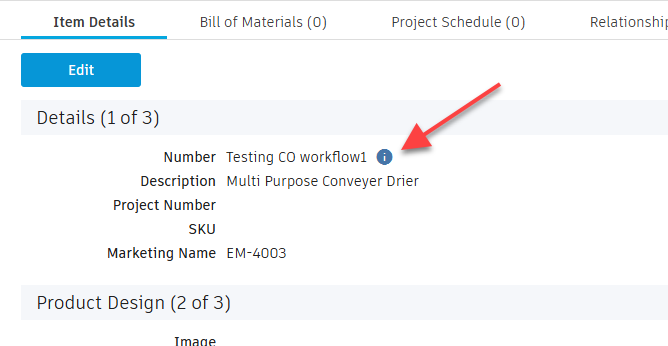
Resolved issues
- Improved the performance of loading the Lifecycle Transitions list while performing Bulk Lifecycle Assignment.
- Fixed an issue where the Preview link was causing the Item Descriptor to be cut off.
- Fixed an issue where the Advanced Print View did not display embedded images.
January 8, 2025
- Maintenance release - no changes to functionality.
December 18, 2024
New features and enhancements
- Adjusted hover and selection colors in workspace views to better align with striped tables.
- Adjusted hyperlink colors for improved contrast.
- Changed matrix headers to gray for better visual separation from matrix data.
- Enhanced performance while loading sub-assemblies in the Bill of Materials.
December 12, 2024
Resolved issues
- Fixed an issue where unpinning items from the Bill of Materials would not work.
- Fixed a usability issue while selecting radio buttons on Managed Items and grid rows at the bottom of the page.
- Improved performance of loading Paragraph fields while viewing Item Details.
December 9, 2024
New features and enhancements
You can now download selected files from the Attachments tab (Modern interface) individually or as a zipped file.
Download: Saves each individual file to the downloads folder on your device.
Bulk Download: Creates a zip of all the files and saves it to the downloads folder on your device.
See Download Attachments.
Resolved issues
- Fixed an issue where the Does Not Contain filter in workspace views returned incorrect results.
December 5, 2024
New features and enhancements
- In Workspace Views and the Bill of Materials, rows are now highlighted with alternating shades of colors.
Resolved issues
- Enhanced the loading performance of Workspace views that contain Current Workflow State information.
November 27, 2024
Resolved issues
Fixed these issues:
- The main menu would become disabled intermittently when bookmarking menu items.
- The Action Notifications tab would not load for certain users.
- The Page Up and Page Down keys would not work in the modern interface.
- The last row in the Where Used tab would sometimes be cropped.
- Filtered picklists did not filter correctly based on the selected revision of revision-controlled items.
- Print views displayed HTML characters in paragraph fields.
November 21, 2024
Resolved issues
- Fixed an issue where certain pages would not load occasionally due to partially formed URLs.
- Fixed an issue where Advanced Print views were not able to access Image fields from other workspaces.
November 18, 2024
New features and enhancements
- In the Grid tab, rows are now highlighted with alternating shades of colors.
- The Quick Create dialog now opens in expanded mode with all Save options visible.
Resolved issues
- The time required to load picklist options has been reduced.
November 11, 2024
- Maintenance release - no changes to functionality.
November 6, 2024
- Maintenance release - no changes to functionality.
October 28, 2024
New features and enhancements
- The state (expanded or collapsed) of Direct Attachments and Related Attachments is now preserved when refreshing the page or navigating to other items in the workspace.
Resolved issues
- Fixed an issue where if sections were collapsed by default on the Item Creation page, they could not be expanded.
- Fixed an issue where the Parent Assembly in the Workspace View did not match what was shown on the Where Used tab.
October 22, 2024
Resolved issues
- Fixed an issue where email addresses were not correctly displayed in workflow notification emails.
October 14, 2024
New features and enhancements
- Improved the calculation of Current State and Last Action displayed in Workspace View for better performance and consistency with Item Details.
October 10, 2024
Resolved issues
- In the Quick Create dialog, if clicking Save & Next didn't work, no error message was shown.
September 26, 2024
Resolved issues
- Resolved an issue that resulted in the last column of the BOM grid not being visible.
- Enhanced performance when scrolling through items containing multiple picklists on the Item Details and Create Item pages.
September 16, 2024
New features and enhancements
- Light and dark modes are now supported. Click the appropriate toggle button at the top right of the window to switch between light
 and dark
  . Light mode is the default.
 - Attachments now display with a lighter background.
- Welcome emails have been updated with current Autodesk branding.
- Improved performance of Bulk Lifecycle Change on Managed Items.
Resolved issues
- Fixed an issue on the Where Used tab where the BOM Quantity Precision set up under General Settings was not respected.
September 10, 2024
New features and enhancements
The LAST_MODIFIED_ON field in the V3 Report API supports a new Accept header that returns time as well as date.
Example:
GET: /api/v3/workspaces/{workspaceId}/reports/{reportId}
Accept: application/vnd.autodesk.plm.report.item.field.formatted+json`

Returns:

{
    "id": "CREATED_ON",
    "value": "05/21/2016",
    "formattedValue": "2016-05-21T16:25:08.563"
}
August 27, 2024
Resolved issues
- Improved scrolling performance when viewing item details or creating an item with multiple picklists present.
- Resolved an issue where archiving items through import did not archive all associated items in the lineage.
August 19, 2024
Resolved issues
- Fixed an error that occurred when updating the BOM Quantity through Level BOM import.
- Resolved an issue that prevented Print Views from loading under specific configurations.
August 12, 2024
New features and enhancements
- Added the ability to edit Direction Type in the Relationships tab.
Resolved issues
- Resolved an issue that resulted in unused white space appearing in My Outstanding Work.
July 31, 2024
- Maintenance release - No changes to functionality.
July 26, 2024
Announcement
We are sunsetting the Classic interface in Fusion Manage. The Classic interface will be retired as of January 31, 2025. From that point forward, users will see only the Modern interface.
There are a variety of reasons for doing this:
- The Modern interface provides better scalability and resiliency.
- The Modern interface already offers several advantages over the Classic interface, including improved workspace views and item details.
- The Modern interface aligns Fusion Manage with other Autodesk products.
- As Autodesk continues to make frequent improvements to Fusion Manage, it makes sense to focus efforts on one interface.
Note that Administration pages, Reports, Imports, and the My Profile page will remain in the Classic interface.
July 24, 2024
Resolved issues
- Fixed an issue where the attachment preview would not work for some users on certain revision-controlled items.
July 15, 2024
Resolved issues
- Fixed an issue where search results and My Outstanding Work did not load for some users.
July 11, 2024
- Maintenance release - No changes to functionality.
July 2, 2024
Resolved issues
- Fixed an inconsistency in Search where boolean properties (like
isDeleted) were not returning correct results.
June 25, 2024
New features and enhancements
You can now customize My Outstanding Work by setting filters, sorting, and changing the order and size of columns.
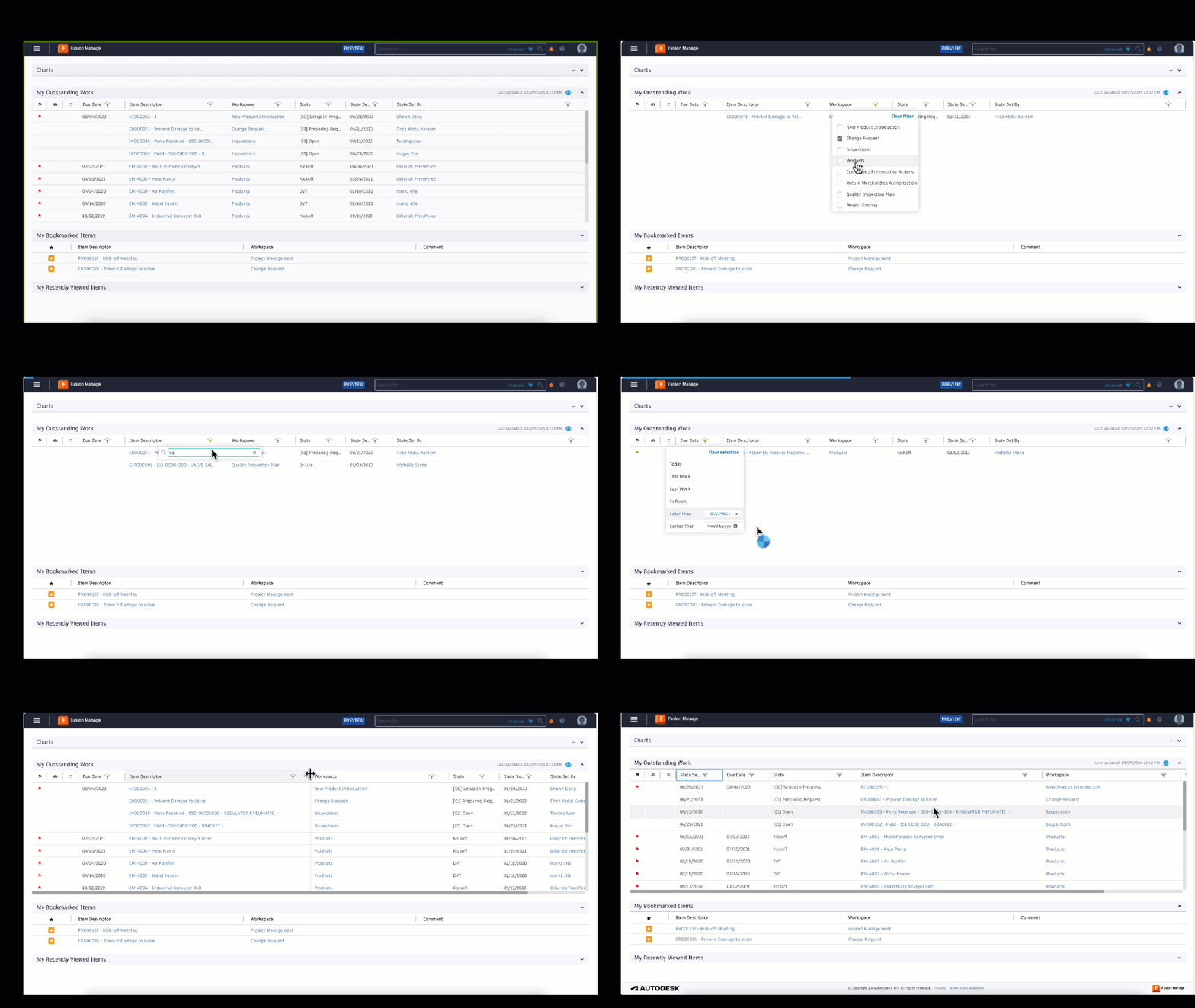
See My Outstanding Work.
Resolved issues
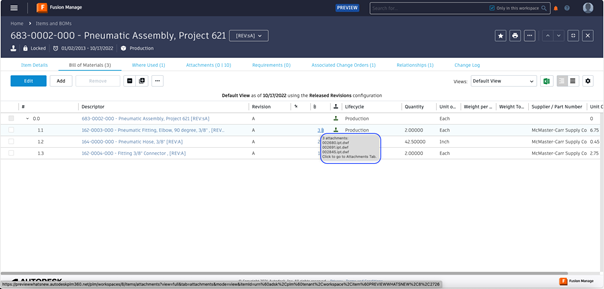
Resolved an issue that prevented the display of attachment file Names in an Excel file exported from the Bill of Materials. You can now view attachment names in:
The Excel file
The tooltip that opens when you place the pointer over the attachment count in the Bill of Materials tab.
June 18, 2024
- Maintenance release - No changes to functionality.
June 5, 2024
Resolved issues
- Fixed an issue where scripting allowed past dates to be set for effectivity date
(item.workflowItems[i].effectivityDate).
May 29, 2024
Resolved issues
- Fixed an issue where
PATCHcalls were not supported when usingXMLHttpRequest()in scripts.
May 22, 2024
- Maintenance release - No changes to functionality.
May 16, 2024
Resolved issues
- Fixed an issue where the buttons were not clickable in the Affected Items tab.
- Fixed an issue where the count was sometimes incorrect in the Where Used tab.
May 9, 2024
Resolved issues
Resolved an issue that prevented the update of Derived fields based on Latest Version picklists in Workspace views.
- Derived fields will now be refreshed automatically when the source picklist is revised.
- Refresh Derived fields with the Workspace Manager to push the update to all current derived fields.
April 30, 2024
New features and enhancements
- The Action Notifications tab is now available in the modern interface. See Action Notifications.
Resolved issues
- Improved the performance and reduced the loading time of the Affected Items tab.
- When adding to Affected Items, there is now a visual indicator that the process is underway.
- Fixed an issue where the Grid tab would sometimes not load.
April 17, 2024
Resolved issues
- Fixed an issue where the Workflow actions drop-down menu did not display all actions when more than 12 transitions were available.
- Enhanced the performance and scalability of the API used for adding affected items (
POST api/v3/workspaces/<workspace id>/items/<item id>/affected-items). - Enhanced the performance and resilience of the Search API for faster and consistent execution (
api/v3/search-results).
April 10, 2024
New features and enhancements
- Effectivity Date of Managed Items is now accessible within Scripts. Use the new property
item.workflowItems[i].effectivityDatewithin theworkflowItemarray for reading and writing the Effectivity Date. See item Workflow Items array.
Resolved issues
- When Delete permissions were enabled in the Project Management tab, the Edit button would be mistakenly enabled.
April 3, 2024
Resolved issues
- Improved error handling when updating workspace views (
api/v3/workspaces/<workspace_id>/tableaus/<tableau_id>). The API will now return the status code409when concurrent requests are trying to update the same tableau.
March 26, 2024
Announcement
Autodesk has rebranded Fusion 360 Manage as Fusion Manage. This aligns Fusion Manage with Fusion, Autodesk's integrated cloud CAD, CAM, CAE, and PCB software platform.
See also:
Autodesk Fusion Manage: Cloud PLM that connects your people, processes, and data
March 25, 2024
New features and enhancements
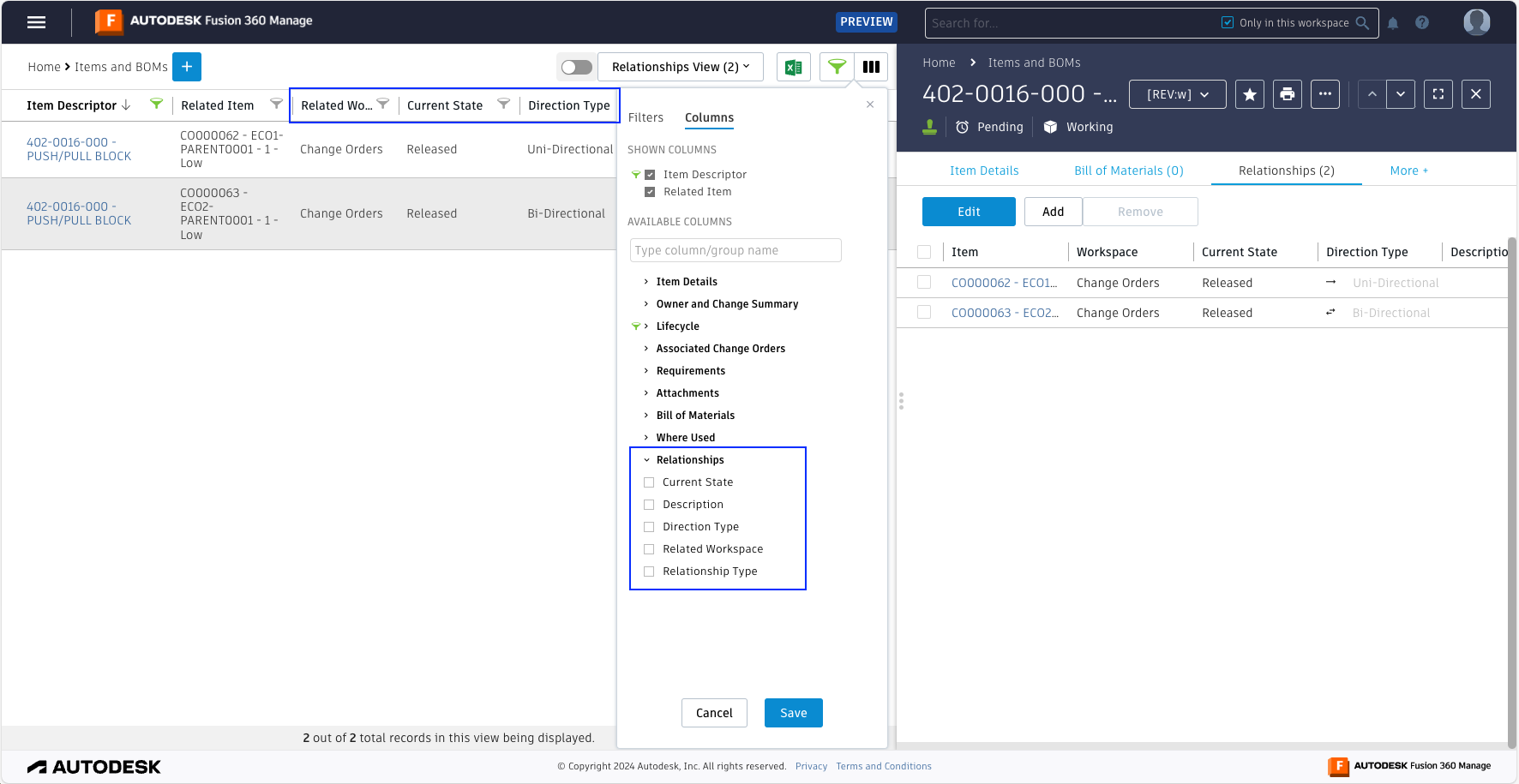
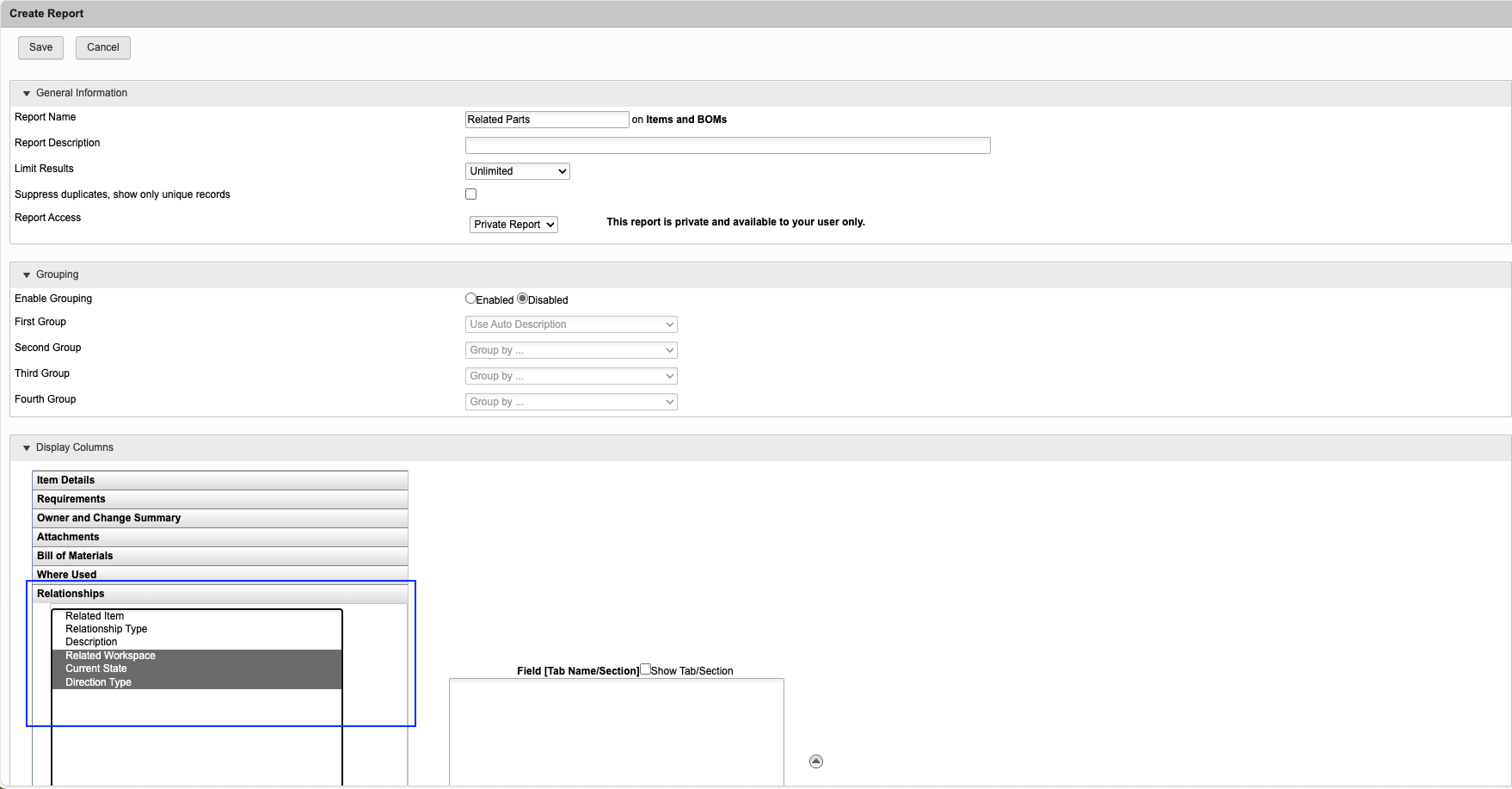
These fields have been added to the Reporting and Workspace views:
Related Workspace
Current State
Direction Type
Resolved issues
- Fixed an issue where scripts could not populate certain values on multi-select picklists in the Grid.
- Fixed an issue where you had to manually refresh a page after an edit for workflow actions to be updated.
- Fixed an issue that prevented creation of items due to an error on derived fields using the radio button as pivot.
March 13, 2024
- Maintenance release - No changes to functionality.
March 6, 2024
Resolved issues
- Fixed an issue where new Forge apps could not be added to the Allowed List.
February 27, 2024
Resolved issues
- Fixed a formatting issue with bulleted lists in paragraphs.
February 20, 2024
Resolved issues
- Fixed an issue where My Outstanding Work could not be sorted based on Date.
- Fixed an issue where Workspace View filters were not saved when pressing Enter.
- Fixed an issue where picking a date closed the Workspace View editor without saving the filter.
- Fixed an issue where derived fields were not updated based on Latest Version picklists.
February 6, 2024
New features and enhancements
Increased field length
Paragraphs and Single Line fields can now have a default value of up to 500 characters.
Release in Place
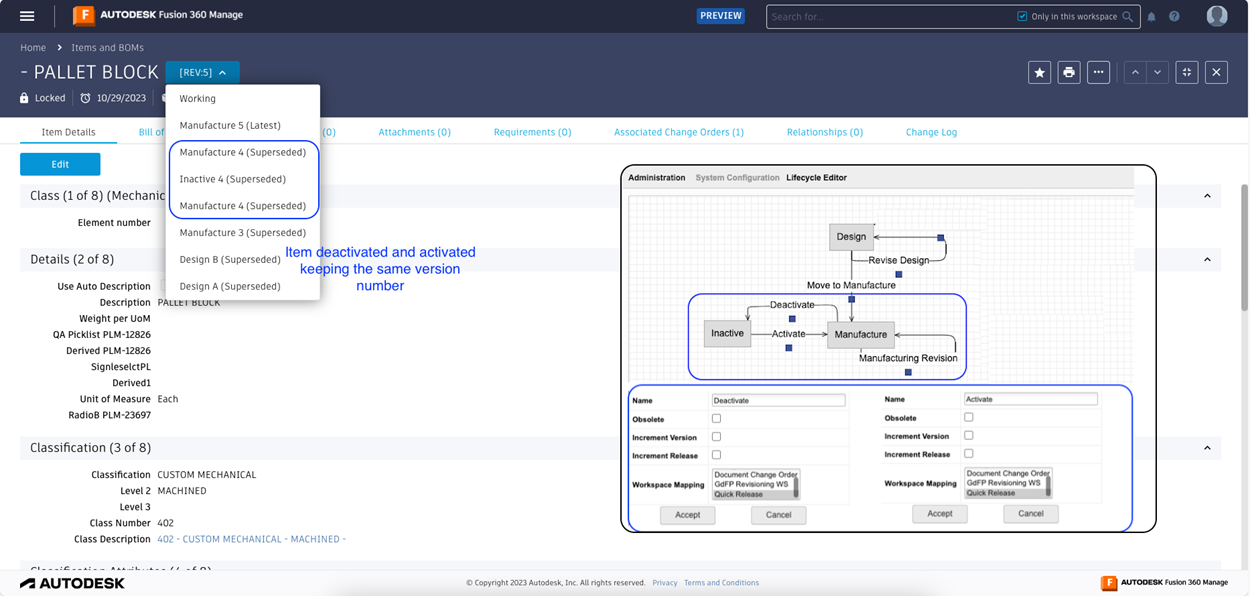
With release in place, you can deactivate the released version of a revision-controlled item without incrementing the version number or release letter. Deactivation is done through change control. If needed, the item can be activated again. Deactivating and activating the item, in this case, implies no change in form, fit, and function of the item.
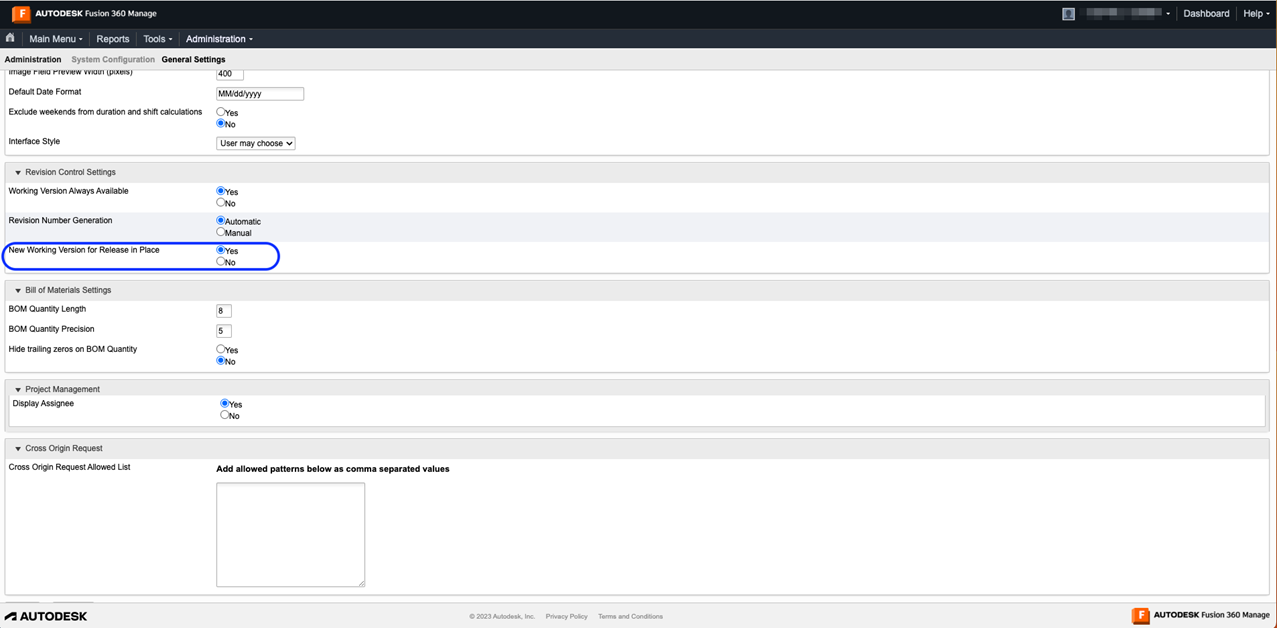
The option for this is at Administration-> System Configuration-> General Settings > New Working Version for Release in Place. It is disabled by default.
When enabled:
- A new working item is created when revision-controlled items go through a lifecycle change that does not increment the version or release.
- An item which is currently in a Production state can be deactivated for a brief period of time and brought back to Active, leaving the version number or release letter unchanged.
Resolved issues
- Fixed an issue where scripts did not retrieve deleted users saved in the Users, All by Name picklist.
- Fixed an issue where the new line character was not respected while displaying Paragraphs.
- Fixed an issue where searching for a string using double quotes (") resulted in an error.
- Fixed usability issues when opening workspaces from the main menu.
January 29, 2024
Resolved issues
- Fixed an issue where the Workspace list is cut off in Search Results page.
- Fixed an issue where right-click options are missing on the main menu.
January 23, 2024
- Maintenance release - No changes to functionality.
January 18, 2024
Resolved issues
- Fixed an issue where attachments that did not upload were displayed in Workspace Views.
January 9, 2024
New features and enhancements
Quickly bookmark frequently-used menu items:
Place the pointer over a menu item and click Bookmark (
 ) to add it to bookmarks.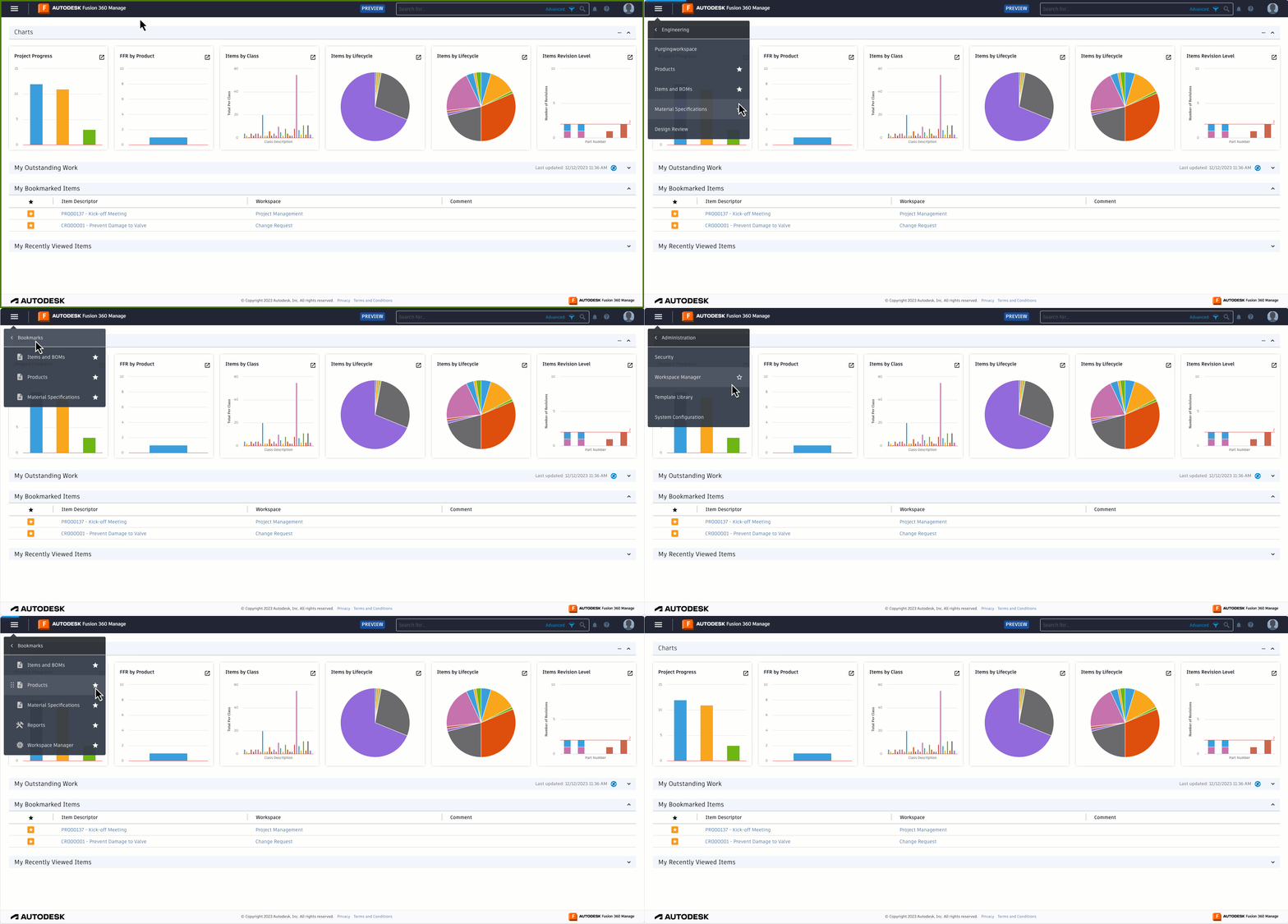
Resolved issues
- If there was a script error while performing workflow transitions with a password, the error would not display correctly in the notification banner.
- Mandatory fields within matrices are now indicated with red asterisks.