
- On the ribbon, click Home tab
 Project panel Project Manager Project Setup.
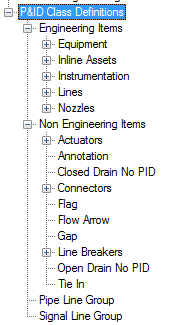
 - In the Project Setup tree view, expand P&ID Class Definitions.
- Continue to expand the list until you locate and click the component or line whose linetype you want to change.
- On the Class Settings pane, do one of the following:
- If you are modifying a component, under Symbol, in the drop-down list, click the symbol you want to modify. Click Edit Symbol.
- If you are modifying a line, under Line, click Edit Line.
- In the Settings dialog box, under General Style Properties, locate and click Tagging prompt. In the drop-down list, click one of the following options:
- Prompt for tag during component creation
- Automatically assign an auto-generated tag
- Not a tagged component