
Incremental Model Open (Tech Preview) introduces a new approach to opening Revit models.
Instead of processing the entire model at startup, Revit processes only the data required to display the initial view. Additional model data is processed as needed while you work.
This approach helps reduce the amount of data processed at open time, improving performance and reducing memory usage for large, complex models.
Incremental Model Open is the first step in a broader strategy to improve Revit performance and scalability by:
- Reading model data incrementally
- Working with subsets of model data without downloading and caching the entire model locally
- Streaming model data directly from the cloud
Working with subsets of model data can also reduce the need to divide disciplines into multiple smaller models for performance reasons.
The long-term goal is to reduce the time, effort, and system resources required to work with increasingly large, detailed projects while supporting improved collaboration workflows.
Revit File Open Pipeline
In the current Revit model open process, the entire model is read into memory during open, including data that may not be immediately required. This can increase load times and memory usage, especially for large projects.
With Incremental Model Open enabled, Revit processes only the data required to create the initial view. Additional data is loaded as it is accessed.
| Current Model Open Process | Incremental Model Open Process |
|---|---|
| Reads the entire model into memory at open time | Processes only the required data for the initial view |
| Processes all model data upfront | Additional data is processed as needed |
| Higher upfront memory usage | Reduced memory usage at startup |
| Open time increases with model size | Open time is more closely related to the data required for the starting view |
Model Open Stages
Opening a Revit model involves several processing stages before the first view is displayed.
Typical model open stages include:
- Reading model data from disk
- Rebuilding element relationships and dependencies
- Processing linked and externally referenced content, such as RVT links, DWG files, PDFs, images, keynotes, and point clouds
- Generating internal graphics data
- Drawing the initial view
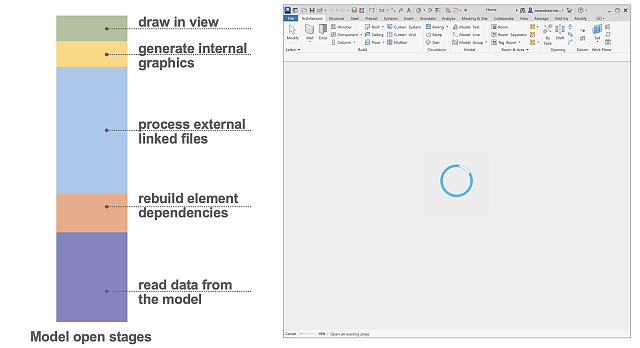
The amount of time spent in each stage varies depending on model structure, linked content, visibility settings, and overall project complexity. The distribution of time across these stages creates distinct model open performance patterns. Incremental Model Open provides the greatest benefit when most open time is spent reading and processing model data.
Key benefits
Incremental Model Open is designed to improve the experience of working with large, complex Revit projects.
Potential benefits include:
- Faster model open times, with initial testing showing up to 1.5–2x faster model open in some scenarios
- Reduced data processing at startup, with initial testing showing 60–80% less data processed at open
- Reduced memory usage during startup
- Improved scalability for large projects
- Reduced need to split models solely to manage open performance
- Improved ability to work with larger projects on systems with less available RAM
Current Limitations
Incremental Model Open is currently available as a tech preview and has known limitations.
Linked Models
The following workflows are not currently supported:
- Editing linked models that are already loaded in an opened host model from a separate Revit session
- Updating shared coordinates for a linked model while the link is open in the host model
- Linking IFC files when a corresponding RVT file already exists in the same location as the IFC file
Model Connectivity
Incremental Model Open reads data on demand directly from the model database. Losing access to the model is not yet handled gracefully and may result in crashes.
Cloud Model Download
Incremental Model Open does not reduce the time required to download and locally cache cloud-hosted models before opening.
For cloud-based workshared models, saving and syncing the link in a separate Revit session is supported. However, after you edit and sync the link in that session, you must reload the link twice in the host model because the first reload will fail.