Renumber
Description
This sub-form enables the reference numbers of rows/items in the table to be modified.
Outline Procedure
This sub-form is generally accessed by clicking with the mouse on Renumber in the 'Tasks' Menu (specific to each table).
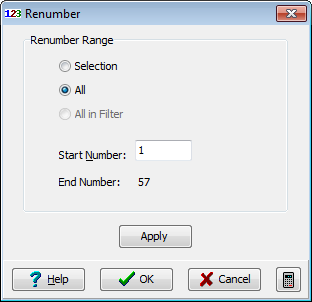
A 'Renumber' form is displayed with options of:
- Selection: The currently selected single item/row (or, if Select All has been used, all items/rows in the table).
- All: All items/rows that would be available if there were no member selection.
- All in Filter: All the members in the current member selection.
The required new reference number of the currently selected member (or the first member in the selection) should be entered into the 'Start Number' field. The 'End number' is automatically updated to show the new number of the final member in the selection.
Clicking on Apply renumbers the item/row references and the table content changes.
Several renumbering actions can be done without leaving this form.
Clicking on OK confirms the changes. Clicking on Cancel returns the table to its original state.
Form Graphic