
Issue:
Users reported that, when trying to create a project in Autodesk Fusion (Fusion), the operation fails and the following behaviors may occur:
- The project appears briefly and then disappears with no message.
- The project appears briefly and then disappears when selected, displaying "??" On a blue background.
- "Operation failed" is displayed on the project itself, after which the project disappears.
- "Not Allowed PUT /communities/api/user/" message appears.
- "You don't have required permissions to perform this operation" message appears.
- "ERROR_ENTITLEMENT_NOT_FOUND - Not Allowed PUT /communities/api/user/create for ###" message appears.
- "MESSAGE_SERVER_ERROR - Sorry the operation you requested couldn't be performed" message appears.
- Create Project button is dimmed or gray in Data Panel.
- Project keeps saying "undergoing updates"
Causes:
- Autodesk Fusion does not recognize a valid license.
- Inadequate privileges in the current Hub.
- Service Outage.
- Switching from hobby license to paid license.
Solution:
Configure antivirus and firewall for Autodesk Fusion
Use solution in these articles:
Create a project from Autodesk Fusion Web Client
- Navigate to the Autodesk Fusion web client
- Click Create project.
Verify that Cloud Services are working
Verify that the Autodesk Services are running normally on the Autodesk Heath Dashboard.
Sign out of Autodesk Fusion desktop
- Sign out of Autodesk Fusion in the desktop application.
- Close and restart Autodesk Fusion.
- Sign in to Autodesk Fusion and test project creation.
Verify the license
Verify that a "Fusion Contributor" product is assigned to the account:
- Sign in to the Autodesk Account.
- Once signed in, go to "All Products and Services".
- If "Fusion Contributor" is not listed in the products, then permission to create projects will not be available to the account.
- Reach out to the Primary Admin to assign the sub product.
Subscription Syncing
- It can take up to 24 hours for a recent subscription to update in the product.
- Reach out to a contract admin to unassign and then reassign the Autodesk Fusion license.
- In some instances, the old subscription status may be stuck in the sign in information (especially after switching from a Personal to a Commercial subscription). Try signing out and back in should clear the preexisting status.
Change Contribution Role in an Autodesk Fusion hub
If the Autodesk Fusion hub was created by someone else, the current ID may not have permission to create a project or save files.- Hub admin should change the members role from Project Contributor to member or hub admin.
- See the following articles:
Note: Folder level creation might need to be enabled to create Project in a different hub.
Transfer Single-User Storage data to an Autodesk Fusion hub
- Create an Autodesk Fusion hub and transfer the data to the new hub.
- See: How to transfer Autodesk Fusion projects from Single User Storage to a hub.
Uninstall and reinstall
Manually uninstall and reinstall Fusion: How to do a manual clean uninstall of Autodesk Fusion.
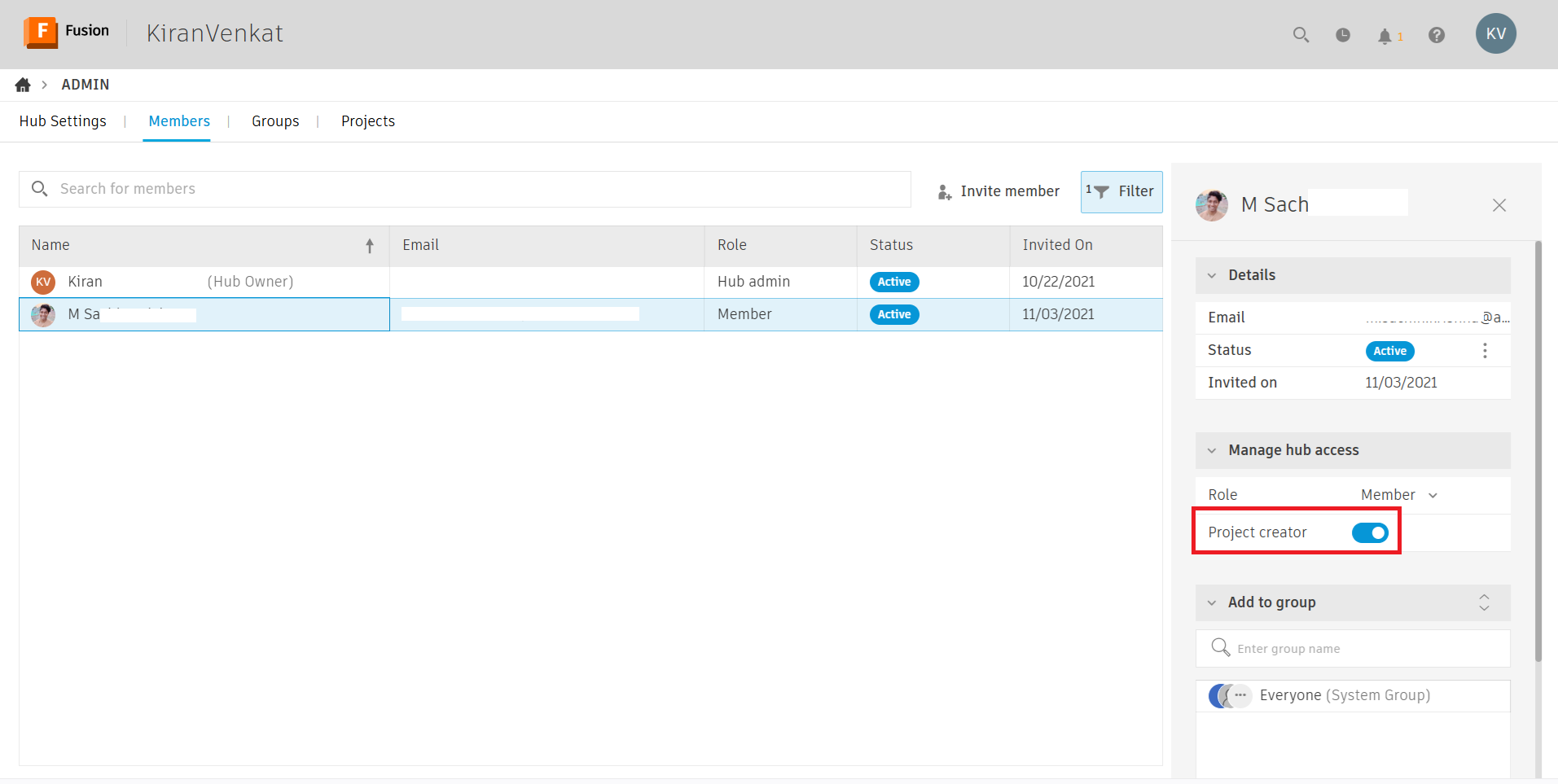
Enable the project creator option in the Autodesk Fusion hub
- Sign into the Fusion web client as the hub admin.
- Select the profile icon in the top right.
- Select Admin.
- Go to the Members tab.
- Select the member and enable Project creator.
See Also:
- The button Create Project is dimmed.
- "Usage..." or "Project limits exceeded" when trying to save or create a project in Autodesk Fusion Personal Hub
- Data Panel is missing or blank in Autodesk Fusion
- "The operation you requested could not be completed by the file server" when attempting to search in Autodesk Fusion Data Panel.
- "CB_URF - We're unable to synchronize your projects." When trying to access projects in Autodesk Fusion
- Autodesk Fusion shows "Basic Access"
- Moving everyone to fully featured hubs in Autodesk Fusion
- "You need permission to create new projects" when trying to create projects in Autodesk Fusion