Vault 2015 R2 introduces a brand new Copy Design application with enhanced flexibility and control over components, a new Vault Office thick client for non-CAD users, and an enhanced Item/BOM experience that supports BOM row groups and unifies lifecycle workflows across entity classes. In addition, the Vault Thin Client exposes more Item/BOM features, the ADMS Console allows for more nuanced control over re-indexing file properties, and the Revit Vault Add-in and Project Sync provide improved functionality.
- New Copy Design Experience
- New Item and BOM Features, Functionality, and Enhancements
- Vault Thin Client Enhancements
- New Vault Office Thick Client
- Project Sync Enhancements
- Control Open File Behaviors in the Vault Client Feature
- ADMS Console Enhancements
New Copy Design Experience
Autodesk Vault 2015 R2 introduces a brand new Copy Design experience that gives you more flexibility and control over how your designs are copied.

Copy at the Component Level
- Copy individual instances of a file instead of all instances of that component.
- Replace parts in the copied structure with files that are created as part of the copy operation.
- Configure separate actions for drawings.
- Use circular references, such as substitute parts and drawing overlays.
In previous releases, copy design could not copy at a component-level. The new Copy Design tool overcomes this limitation by allowing users to:
Copy Multiple Data Sets
Users can now copy more than one data set at the same time.
Support for non-CAD File Types
Copy any file in the Vault, including non-CAD files, using the Copy Design application.
Faster Performance
Copy Design runs from the Vault Server now, driving faster performance.
In previous releases, Copy Design was a part of the Vault Client and files had to be downloaded for copy which was time-consuming. Now Copy Design gets the files directly from the Server, eliminating much of the download time and optimizing Copy Design performance.
More Detailed Feedback
-
Determine Which File Properties Are Displayed
Users can add and remove property fields to the main grid, making it easier to gather important file data.
See Copy Design–Customize the View for more information.
-
Pending Actions
The Action column displays the current action assigned to a file so you can tell at-a-glance how the file will be handled. Actions include: Copy, Copy To, Reuse, Replace, Exclude, and Auto.
See Copy Design–Actions for more information.
-
Navigation Panels
Navigation Panels help users identify important information about their copied designs and apply certain actions to multiple files at once. Users can filter by file status, view the source and destination of copied files, and explore the folder structure of the copied design.
Copy Design supports a more robust feedback environment by allowing users to customize column fields, view pending actions, and review file data with Navigation Panels.
See Copy Design–Customize the View for more information.
Create Custom Copy Design Rules
Administrators can define rule sets that determine property values for the copied files when certain conditions are met.
Numbering Schemes
Vault numbering schemes can be shown and applied in the Copy Design application. Users can select from different numbering schemes so that each copied file adheres to a naming convention that suits their design environment.
Use the Numbering Scheme Panel to see the old file name, the new name, any prefixes, the base name, and any post-fixes.
Customize the Copy Design Interface
- Adding and removing column fields
- Controlling whether grid lines and banding are shown
- Enabling automatic column-sizing.
- Selecting which Navigation Panels display and which navigation buttons are displayed.
Customize the layout of the Copy Design application by:
See Copy Design–Customize the View for more information.
New Drawing View
See only the drawings in your Copy Design list with the Drawing View option.
Automatic Installation
Copy Design has been removed from the Vault client and is now a stand-alone application under the folder.
Copy Design is automatically installed when you install the Vault Client.
New Item and BOM Features, Functionality, and Enhancements
Vault 2015 R2 focuses on expanding the item/BOM management experience to include new functionality and feature enhancements, and on unifying data behaviors across all entity classes for both administrators and end users.
New Item Functionality and Enhancements
- The Items administration tab has been overhauled to introduce new functionality.
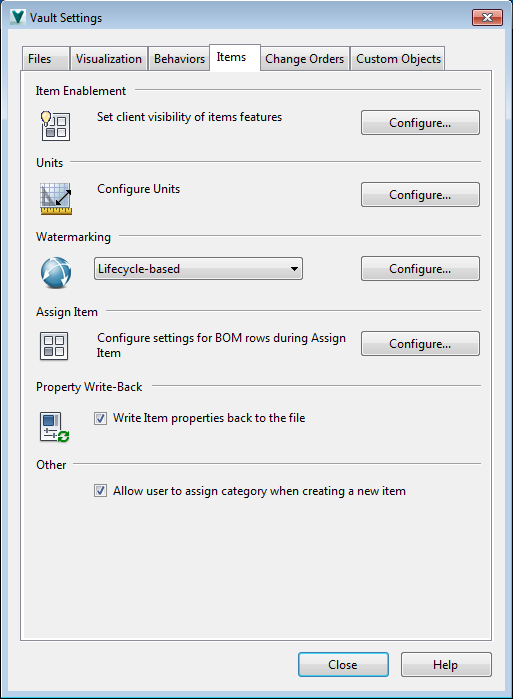
New Item Watermarking Workflow
- Lifecycle-based
- Property-based
- Custom
See Configure Visualization Watermarks for Items for more information.
Write Item Properties Back to the File
By default, item properties are written back to the associated file from Vault add-ins, Vault Explorer, and the Job Processor. Item properties take precedence over file properties and file mappings. If the file's properties are edited and properties are synchronized, the item properties will overwrite the file properties.
User can manually force item property write-back by right-clicking on an associated file and selecting Synchronize Properties.
The Write Item Properties Back to the File functionality can be disabled on the Items Administration dialog.
Allow a User to Assign Category When Creating a New Item
Administrators can determine whether or not a user is able to assign a category to an item when the item is created on the Items tab. By default, this option is selected.
Other Changes in Existing Administration Functionality for Items/BOMs
- Behavior definitions have been removed from the Items tab and are now consolidated on the Behaviors tab.
- Lifecycle options and change order numbering options have been removed from the Change Orders tab to accommodate the new unified workflow for behavior definitions.
- In an effort to simplify complex workflows, Effectivity has been removed from Vault 2015 R2. BOMs are immediately effective when the item is released.
New BOM Row Properties and User-Defined BOM Properties
- Vault 2015 R2 introduces new intrinsic BOM row properties that can be exposed in the BOM view for additional information about the rows. These properties (Unit QTY, Item QTY, and Row Type) can be added to the BOM view by customizing the fields that are displayed. Important: Modified property values are overwritten with CAD values the next time the item is updated.In addition, a new Bill of Materials association type has been created so administrators can define custom BOM row properties. These custom properties can be mapped to certain CAD properties and can be added to the BOM for greater transparency about item and BOM row data.Note: Properties with a Bill of Materials association cannot be associated with any other properties. These properties can only be displayed in the BOM view.
- Units in the BOM now show the unit of measure as well.
- A new Row Order column has been added to the BOM to make it easier to track the row's assigned location in the BOM list. This new field differs from the Detail ID field, which is a field that specifically identifies the BOM row, regardless of where the row is ordered in the list.
View All Item Iterations on the History Tab
Vault 2015 R2 now exposes all item iterations. In previous releases, users could only see item versions. Now users can see all of the item iterations in the History Tab.
Changes and Improvements to the BOM View
-
Grouped BOM Rows
In previous releases, if a CAD BOM was promoted into an item and some of the BOM rows were unmerged into individual rows, Vault automatically merged the rows as long as the Part Numbers matched.
Now grouped BOM rows from a CAD BOM can persist as a group in Vault.

A new Grouped Row
 icon has been introduced to indicate that a row consists of more than one item. The Item Qty value, if exposed in the BOM, indicates the number of rows that have been combined. Important: Administrators must enable Select Group BOM rows as per the design BOM on the Configure Assign Item dialog for grouped BOM rows to persist whenever a CAD BOM is imported into a vault.
 - The Save Item As process has been improved. In previous releases, when a user clicked Save As, the new item was immediately committed to the vault. Now when a user clicks Save As, the item is reserved but is not committed to the Vault until the user saves the new item.
- The Exit Edit Mode option has been added to the Item Record toolbar for a quicker way to switch an item back to read-only mode.
-
New BOM Reports
Vault 2015 R2 introduces a new BOM Report command in the BOM view. The BOM Report command generates a report based on the template you select. Vault 2015 R2 comes with three out-of-the box templates: Multi-Level, First-level, and Parts-only.
The Report Template Authoring Utility also supports BOM properties so that administrators can create custom BOM report templates.
Manage Item Security
Users can now manage Item Security with a new Details option on the right-click menu.
New Unified Lifecycle, Category, Numbering Scheme, and Revision Experience
- Administrators can now create and define item categories, lifecycle definitions, numbering schemes, and revision schemes from the Behaviors tab on the Administration dialog.
- Administrators can also edit the lifecycle state security for files associated with items.
- Administrators can now re-order Lifecycle States in the Lifecycle Definition dialog. The order in which the states are listed in the lifecycle definition determines how they are displayed on the Change State dialog.
- A new ECO Numbering Scheme setting has been introduced to help you manage Change Order numbering.
- A new lifecycle tab has been introduced to the Configure Categories dialog for items so that you can assign a default Item Lifecycles to a category.
- End users can change the lifecycle state of an item, assign a new category to an item, and revise an item using the same workflow as for files, folders, and custom objects. Note: Only BOM rows that are turned on show up in the end user operations.
In addition, users can revise multiple items or revise an item from a user-defined property.
- Legacy settings are still supported with five out-of-the-box lifecycle states under the Item Release Process lifecycle. These states include:
- Work in Progress
- In Review
- Released
- Quick-Change (new for 2015 R2)
- Obsolete.
In previous releases, users had to use a separate workflow to manage the revisions, lifecycle states, numbering schemes, and categories for Items and, in some cases, Change Orders. Vault 2015 R2 introduces a unified behaviors experience across all entity classes for both end users and administrators.
Administrator Changes
End User Changes
Vault Thin Client Enhancements
- A new Reference Designator View
 has been added to the BOM View list. Reference designators are properties that let Electrical users view the BOM in a way that's easier for them to process because they indicate how the item is tagged, its location, or installation information. Note: Non-electrical items do not display in the Reference Designator view.
Administrators also have the option of creating custom reference designator properties to include in this view. See Create User-Defined Property for more information.
- The Thin client now displays ON and OFF BOM rows as well as unassigned BOM Components.
- Vault 2015 R2 introduces new Grouped Rows for BOMs based on merged rows that have been imported from CAD Files. If a row is grouped in Vault, it is also visible as a group in the thin client.
- Vault 2015 R2 introduces new intrinsic BOM row properties plus the ability to create your own user-defined BOM row properties. These BOM Row Properties as well as other properties can be added to the BOM view for a completely customized experience.
- The Vault 2015 R2 release marks a transition away from effectivity scheduling, making items immediately effective once they are released. As a result, the Effectivity feature has been removed from the Thin Client.
- You can now view all versions of an item in the History tab, provided that the administrator has not restricted your view to the latest version only. In addition, you can alternate between viewing all versions and the latest version of an item by using the new toggle control.
- BOM Data Filters have been introduced so that you can filter whether ON rows and OFF rows show in the BOM view. In addition, you can specify whether the BOM view displays non-released items.
New Vault Office Thick Client
Vault 2015 R2 introduces a new Vault Office Client that provides many of the same Vault client features but has been slimmed down to focus on non-CAD design data management processes.
This client is ideal for users who do not need all of the CAD functionality of a the full Vault client, but who still need to manage documents in a vault by performing these tasks:
- Review and validate design data
- Participate in the change process
- Manage project data
- Communicate with external team members
- Create reports
- Consume released design data
- Manage additional non-CAD data and custom objects.
See the Vault Office Client for a complete feature list.
Project Sync Enhancements
Project Sync has been updated to allow more flexibility when sharing to Buzzsaw and using the Lifecycle Event Editor.
Share to Buzzsaw Enhancements
In previous releases, users would choose a selection set to map to Buzzsaw, and when Share to Buzzsaw was selected, every file within that mapped selection set would be uploaded. This led to unnecessary files being shared because of their location within the mapped directory.
Now users can specify which files to Share to Buzzsaw. A new user interface has been introduced that allows users to choose whether to share the original selection (same behavior as before), to share the original selection and any dependencies, and, if applicable, to include any attachments or related documents, making the share process much more concise.
Lifecycle Event Editor Update
The Lifecycle Event Editor can add jobs to the job queue when files go across certain transition states, such as moving from work-in-progress to released. In the previous release, this process was not optimal and has been updated for a smoother experience.
In Vault 2015 R2, all four jobs have been renamed and a fifth job has been introduced to allow for greater Share to Buzzsaw flexibility.
See the Job Types section in the Project Sync overview for more information.
Project Sync is now available only in Vault Professional for the 2015 R2 release.
Open File Behaviors in the Vault Client
Users can now control which version of a CAD application opens a file in Vault by configuring their preferences on the Open File Behaviors dialog.

Depending on the CAD application, users can determine whether CAD files are opened by the latest version, the last run version, or the version of the CAD Application that last saved the file.
ADMS Console Enhancements
Vault 2015 R2 introduces more flexibility in re-indexing files by introducing a third option that focuses on latest versions only. In addition, the original two options have been redefined in how they behave.
-
Re-index latest and released versions only
The latest versions, released versions, and pending released versions are re-indexed.
-
Re-index latest versions only
Only the latest file versions are re-indexed. This is the default behavior for Vault 2015 R2.
-
All versions
All files in the vault are re-indexed.
The command line control for Re-indexing File Properties has also been updated to allow this new option.