モディファイア キーとマウス ボタンの組み合わせを説明するクイック リファレンスです。
「ホットキーを作成、編集する」を参照してください。
カメラ移動キー
 +
+ (Mac では+
 )を押します。
| 作業 | ドラッグ |
|---|---|
| タンブル(パースビュー) |
 |
| トラック |
 |
| ドリー |
 |
マーキング メニュー
 キー(Windows)または+
 キー(Mac)を押しながらマウスボタンのいずれかを押します。
+キー+ (Windows)または+キー+(Mac)
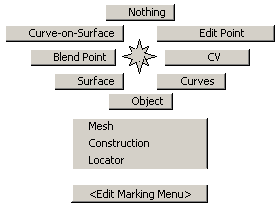
+キー+ (Windows)または+キー+(Mac)
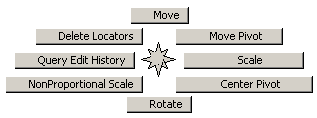
+キー+ (Windows)または+キー+(Mac)
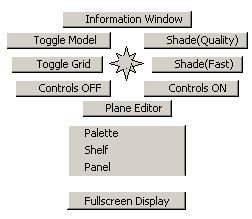
選択
| 作業 | クリックまたはドラッグ |
|---|---|
| 選択/選択解除切り替え |
 |
| 選択のみ |
|
| 選択解除 |
|
ヒント:
非 Pick ツール内でキーを押すと、一時的に選択モードに切り替わります。
変形
| 変形する場所 | クリックまたはドラッグ |
|---|---|
| X |
|
| Y |
|
| Z |
|
移動、スケーリング、回転、反転
| スナップ先 | キー | ボタン |
|---|---|---|
| カーブ、アイソパラメトリック カーブ、サーフェス エッジ、またはカーブオンサーフェス | +キー(Windows)+キー(Mac) |
 |
| グリッドの交点 |
|
 |
| CV、エディット ポイント、ピボット ポイント、ロケータ |
|
 |
スナップ
ヒント:
を使用して、水平方向のみにスナップします。 を使用して、垂直方向のみにスナップします。
ホットキー
以下が既定の設定です。
| メニュー/ツール項目 | ホットキー(Windows) | ホットキー(Mac) |
|---|---|---|
| File > Save As... |
[S]
|
++[S] |
| File > Import > File | +[R] |
+[R] |
| File > Show Image | +[7] |
+[7] |
| File > Exit | +[E] |
+[E] |
| Edit > Undo | +[Z] |
+[Z] |
| Edit > Reinvoke Last | +[1] |
 +[1] +[1] |
| Edit > Cut | +[X] |
+[X] |
| Edit > Copy | +[C] |
+[C] |
| Edit > Paste | +[V] |
+[P] |
| Edit > Cut Image | ++[X] |
|
| Edit > Copy Image | ++[C] |
|
| Edit > Paste Image | ++[V] |
|
| Edit > Ungroup | +[ |
+[U] |
| Edit > Group | +[G] |
+[G] |
| Delete > Delete Active | +[A] |
+[A] |
| Delete > Delete Active Image Layer | +[X] |
+[X] |
| Layouts > User Windows | F9(Windows) | F4 |
| Layouts > Perspective | F8 | |
| Layouts > Left | F6 | |
| Layouts > Back | F7 | |
| Layouts > Top | F5 | |
| Layouts > Paint | F3 | |
| Display Toggles > Model | F12 | |
| Render > Globals | +[6] |
+[6] |
| Animation > Set Keyframe | +[K] |
+[K] |
| Animation > Playback | +[P] |
+[P] |
| Windows > Information Window | +[5] |
+[5] |
| Preferences > Workflows > Default | +[1] |
+[1] |
| Preferences > Workflows > Paint | +[2] |
+[2] |
| Preferences > Workflows > Modeling | +[3] |
+[3] |
| Preferences > Workflows > Visualize | +[4] |
+[4] |
| Pick > Nothing | +[N] |
+[N] |
| Pick > Object | +[O] |
+[O] |
| Pick > Edit Point | ]+[E] |
+[E] |
| Transform > Move | +[M] |
+[M] |
| Paint > Clear Canvas Layer | +[K] |
+[K] |
| Paint > Toggle Marquee | +[H] |
+[H] |
| Paint Edit > New Image Layer | +[L] |
+[L] |
| Paint Edit > Merge Below | +[M] |
+[M] |
| View > Look At | +[L] |
+[L] |
| Display All、Off | +[O] |
+[O] |
| Display All, Current | +[C] |
[+[C] |
| Display Active、Off | ++[O] |
++[O] |
| Display Active、Current | ++[C] |
++[C] |
| ペイント モード時: | ||
| Paint > Cycle through brush mode | F | F |
| Brush mode: paint | 1 | 1 |
| Brush mode: eraser | 2 | 2 |
| Brush mode: show | 4 | 4 |
| Brush mode: hide | 3 | 3 |
| Brush mode: smear | 5 | 5 |
| Brush mode: blur | 6 | 6 |
| Brush mode: sharpen | 7 | 7 |
| Size | S | S |
| Radius | R | R |
| Opacity | O | O |
| Rotate | T | T |
| Aspect | P | P |
| Grab color | C | C |
| Cycle through brush snap | Z | Z |
| Reset brush options | X | X |
| Reset clone | L | L |
| Twist canvas | V | V |
| Marquee add | = | = |
| Marquee subtract | - | - |