Use this option to define a steel bar with a selected section. There are several ways to access this option:
- Menu: Reinforcement > Definition - steel profiles > Steel profiles
- Ribbon: ASD - Reinforcement > Definition - steel profiles > Steel profiles
- Toolbar: Definition - steel profiles > Steel profiles

- Command line: RBCR_CREATE_STEEL_VIEW.
The following dialog displays:
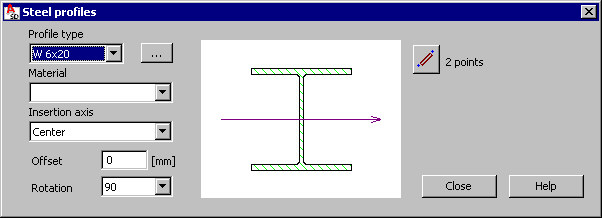
The Steel profiles dialog is divided into three parts:
- The left side of the dialog defines the basic information regarding the section of a defined steel bar:
A steel profile type is selected from the Profile type list (the list proposes the last-defined profile of a steel bar); clicking (…), opens the Profile list dialog where profiles from databases available in the program are added to the list of available profiles (the profile database that profiles will be selected from can be set in the Job preferences dialog).
The Material list enables selection of a material type assigned to the defined steel profile (the material list can be defined in the Job preferences dialog).
The Insertion axis field specifies the axis of definition of a steel profile:
 center
  top
top  bottom
 It is also possible to define an offset (shift) of the point of insertion of a steel profile; the offset denotes a shift of the profile center with respect to the insertion axis. An offset value may be positive (offset upwards) or negative (offset downwards).
The Rotation list specifies an angle of rotation of the cross-section of a steel profile; the following typical values of the rotation angle are available: 0, 90, 180 and 270 degrees.
- The central part of the dialog displays a graphic field presenting a selected steel profile
- The right side of the dialog displays the icon used for definition of a steel profile:
 - By means of 2 points (the beginning and end of a steel profile)
The dialog opens showing bar profile parameters defined recently.
See also: