The Behaviors tab on the Vault Settings dialog contains options for editing lifecycle definitions and managing revisions, administrating categories and rules, creating and modifying properties, defining customized numbering schemes, and assigning colors in reports.
Access the Behaviors Tab on the Vault Settings Dialog
- Click Tools
 Administration Vault Settings.
 - In the Vault Settings dialog box, select the Behaviors tab.
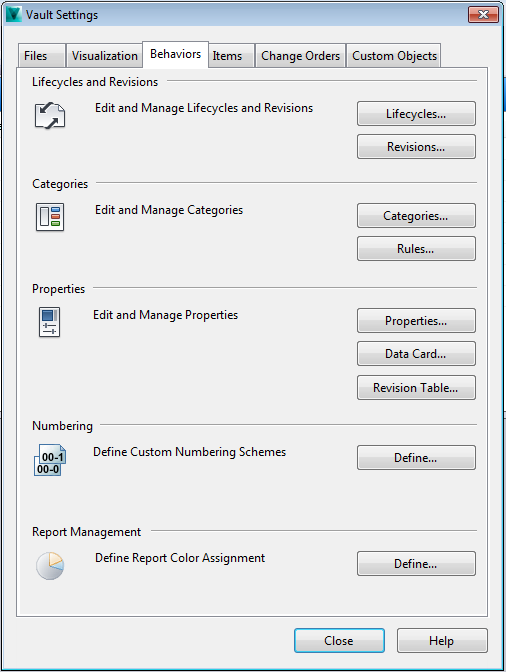
Lifecycles and States
Products have defined lifecycles from inception through production. You can edit and assign lifecycle definitions and configure state comments, security, and transitions on the Lifecycles Definitions dialog box.
Revision Schemes
Revision schemes allow you to manage assign sequence values, formats, and comments to files and items that have been revised.
Categories
Category management provides a way to group properties logically and assign sets of behaviors and rules to one or more files or items.
Category Rules
Rules allow you to automatically assign categories to files or items with particular properties.
Properties
Click Properties to manage user-defined properties. All of the extracted properties being tracked by the vault can be managed using the Property Definitions dialog box.
- Click File Properties to display the Property Definitions dialog box.
Data Cards
Click Data Cards to configure the data card layout in Inventor, including the number of pages and the properties displayed on each page.
- Click Data Cards to display the Configure Data Card dialog box.
Automatic Numbering
Numbering schemes used in the Rename wizard can be defined using the Numbering Schemes dialog box.
- Click Define to create and manage numbering schemes.
Report Management
Color assignments for data mapping and reports are configured on the Assign Color dialog box.
- Click Define to manage color assignments.