Configure item behavior on the Items tab of the Vault Settings dialog.
Access the Items Tab on the Vault Settings Dialog
- Click Tools
 Administration Vault Settings.
 - In the Vault Settings dialog box, select the Items tab.
Items Tab for Vault 2015
The Items tab on the Vault Settings dialog contains options for configuring units of measure, categories, lifecylce revisions, managing item properties, and defining custom numbering schemes. You can also disable the items feature.
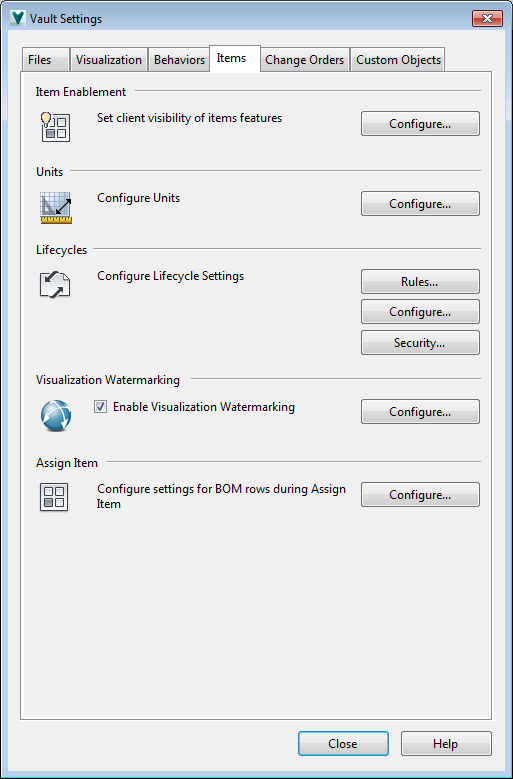
Item Enablement
Enable or disable the Items feature to better control user access.
- Click Configure to display the Enable Items and Change Orders dialog box.
Units
The units of measure are displayed in the Units of Measure dialog box. New units can also be defined.
- Click Configure to display the Units of Measure dialog box.
Lifecycles and Revisions
Rules for bumping the revision can be specified as well as the default revision sequence to use. New revision sequences can also be defined. Automatic file locking can also be enforced on the Items tab.
- Click Rules to display the Administer Lifecycles dialog box and review the bump revision rules.
- Click Configure to change the display name of a lifecycle state.
- Click Security to configure user access to files associated to released items.
Visualization Watermarking
The lifecycle state of an item can be indicated using a watermark on the associated visualization file. The watermark text, style, and position can be customized.
- Click Enable Visualization Watermarking to watermark visualization files associated with items.
- Click Configure to specify watermark options.
Assign Item
You can specify the rules for creating BOM rows when assigning items.
- Click Configure to display the Configure Assign Item dialog box.
Items Tab for Vault 2015 R2
The Items tab on the Vault Settings dialog contains options for configuring units of measure, managing watermarking preferences, configuring settings for BOM rows, and enabling items to write back properties to associated files. You can also disable the items feature.
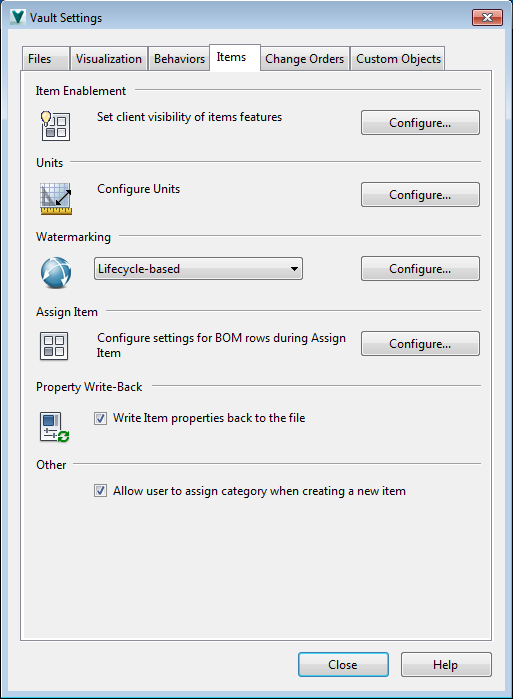
Item Enablement
- Click Configure to display the Enable Items and Change Orders dialog box.
Enable or disable the Items feature to better control user access.
Units of Measurement
- Click Configure to display the Units of Measure dialog box and to modify the default settings.
Define and edit units of measurement for items.
Watermarking
- Select a Watermark source from the Watermarking drop-down.
-
Lifecycle-based
The Watermark value is based on the current lifecycle state of the item.
Note: By default, an out-of-the-box lifecycle called Item Release Process is used.To select a new lifecycle, make sure Lifecycle-based is selected in the drop-down menu and click Configure.
-
Property-based
The Watermark value is based on a specific item property you have identified on the Property-based Watermark Settings dialog.
Note: You are automatically prompted to identify an item property the first time you select this option.To select a new item property for the watermark value, make sure Property-based is selected in the drop-down menu and click Configure.
-
Custom
The Watermark value comes from a value you enter on the Custom Watermark Settings dialog.
Note: You are automatically prompted to identify a text value for the watermark the first time you select this option.To select a new custom value for the watermark, make sure Custom is selected in the drop-down menu and click Configure.
-
None
No Watermark is applied to items.
-
Lifecycle-based
Item watermarks can automatically be generated based on an item's lifecycle state, a specified item property, or customized text. In addition, administrators can configure the watermark style and position.
Assign Item
- Click Configure to access the Configure Assign Item dialog.
Configure whether BOM rows are automatically turned on or not during item assignment.
Property Write-Back
- Clear the Write Item properties back to the file check box to disable item property write-back.
By default, item properties are written back to the associated file from Vault add-ins, Vault Explorer, and the Job Processor.
Item properties take precedence over file properties and file mappings. If the file's properties are edited and properties are synchronized, the item properties will overwrite the file properties.
Other
- Clear the Allow user to assign category when creating a new item check box to disable this option.
Determine whether or not a user is able to assign a category to an item when the item is created. By default, this option is selected.