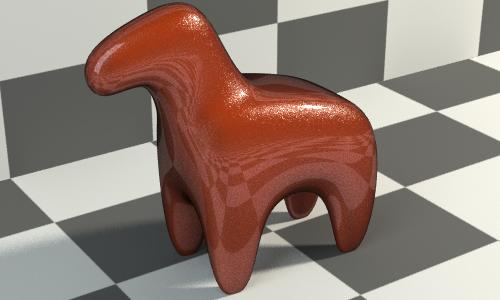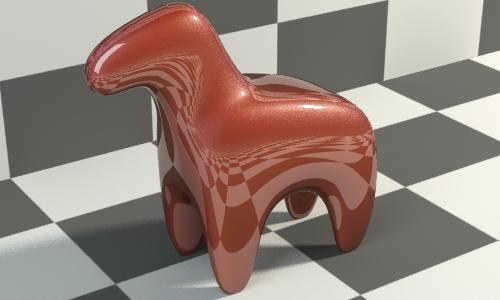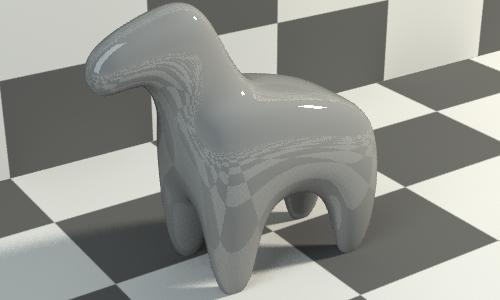
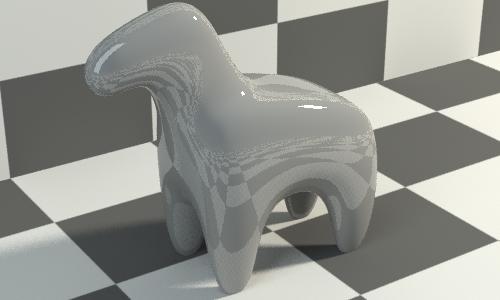
如我们在上一页所见,mia_material 反射行为可以精确模拟。实际上,几乎每个方面都可以模拟,并且对于大多数设置而言,都可以构建现象来模仿 mia_material 的行为。
技巧可能在于 mia_material 中包含几个可以打开或关闭特征的开关,而且通常这可能需要使用不同分层设置进行模拟。例如,在“thin_walled”模式为开或关时,mia_material 本身会产生不同的行为 - 对于分层着色器而言,“thin_walled”选项在 mila_material 上为开裁切功能将实现为可见性,而任何给定层可以将透明度视为一种组件。
以下是 mia_material“类似行为”现象 mila_layer_mia_material 的列表。
这只是引用一个示例来说明可以创建类似于 mia_material 的行为。直接使用分层着色器可能会更好,但如果希望在场景中混合现有 mia_materials,则这种做法可能会有所帮助。
declare phenomenon
    color "mila_layer_mia_material" (
        scalar  "diffuse_weight"      default 1.0, #: min 0.0 max 1.0
        color   "diffuse"             default 0.5 0.5 0.5,
        scalar  "diffuse_roughness"   default 0.0, #: min 0.0 max 1.0

        scalar  "reflectivity"        default 0.6, #: min 0.0 max 1.0
        color   "refl_color"          default 1.0 1.0 1.0,
        scalar  "refl_gloss"          default 1.0, #: min 0.0 max 1.0
        scalar  "refl_gloss_quality"  default 1.0, #: min 0.0 softmax 4.0

        scalar  "transparency"        default 0.0, #: min 0.0 max 1.0
        color   "refr_color"          default 1.0 1.0 1.0,
        scalar  "refr_gloss"          default 1.0, #: min 0.0 max 1.0
        scalar  "refr_ior"            default 1.4, #: min 0.1 softmax 2.0
        scalar  "refr_gloss_quality"  default 1.0, #: min 0.0 softmax 4.0
        boolean "refr_translucency"   default off,
        color   "refr_trans_color"    default 0.7 0.6 0.5,
        scalar  "refr_trans_weight"   default 0.5, #: min 0.0 max 1.0

        scalar  "anisotropy"          default 1.0, #: min 0.1 softmax 10
        scalar  "anisotropy_rotation" default 0.0, #: softmin 0 softmax 1
        integer "anisotropy_channel"  default -1,  #: min -1  softmax 64

        integer "brdf_fresnel_mode"    default 1,  #Custom curve (aka manual), while 0 Fresnel uses refr_ior
        scalar  "brdf_0_degree_refl"   default 0.2, #: min 0.0 max 1.0
        scalar  "brdf_90_degree_refl"  default 1.0, #: min 0.0 max 1.0
        scalar  "brdf_curve"           default 5.0, #: min 0.1 softmax 20

        # Reflection/Refraction optimizations & falloffs

        boolean  "refl_falloff_on"       default off,
        scalar   "refl_falloff_dist"     default 0.0,
        boolean  "refl_falloff_color_on" default off,
        color    "refl_falloff_color"    default 0 0 0,

        boolean  "refr_falloff_on"       default off,
        scalar   "refr_falloff_dist"     default 0.0,
        boolean  "refr_falloff_color_on" default off,
        color    "refr_falloff_color"    default 0 0 0,

        # Factors

        scalar   "indirect"              default 1.0,  #: min 0 softmax 1.0

        # Built in AO

        scalar   "quality"        default 1.0,          #: min 0.0 softmax 2.0

        # Only one bump input
        vector   "overall_bump"
    )

    shader "refl_roughness" "mila_get_roughness" ("glossiness" = interface "refl_gloss")
    # Reflections
    shader "reflection" "mila_glossy_reflection" (
        "roughness"       = "refl_roughness",
        "quality"         = interface "refl_gloss_quality",

        "anisotropy"      = interface "anisotropy",
        "aniso_angle"     = interface "anisotropy_rotation",
        "aniso_channel"   = interface "anisotropy_channel",

        "use_max_dist"       = interface "refl_falloff_on",
        "max_dist"           = interface "refl_falloff_dist",
        "use_max_dist_color" = interface "refl_falloff_color_on",
        "max_dist_color"     = interface "refl_falloff_color",
    )

    shader "refr_roughness" "mila_get_roughness" ("glossiness" = interface "refr_gloss")
    # Refractions
    shader "refraction" "mila_glossy_transmission" (
        "roughness"       = "refr_roughness",
        "quality"         = interface "refr_gloss_quality",
        "ior"             = interface "refr_ior",

        "anisotropy"      = interface "anisotropy",
        "aniso_angle"     = interface "anisotropy_rotation",
        "aniso_channel"   = interface "anisotropy_channel",

        "use_max_dist"       = interface "refr_falloff_on",
        "max_dist"           = interface "refr_falloff_dist",
        "use_max_dist_color" = interface "refr_falloff_color_on",
        "max_dist_color"     = interface "refr_falloff_color"

    )

    # Translucency
    shader "translucency" "mila_diffuse_transmission" (
        "tint"            = interface "refr_trans_color",
        "indirect"        = interface "indirect_multiplier"
    )

    # Diffuse
    shader "diffuse" "mila_diffuse_reflection" (
        "roughness"        = interface "diffuse_roughness",
        "indirect"         = interface "indirect_multiplier",
        "quality"          = interface "quality"
    )

    # Transparency and Translucency live in a
    # separate "sub layers" because they steal
    # energy from eachother

    shader "transmission" "mila_layer" (
        "layers" [
            {
                "shader" "translucency",
                "weight_tint" 1 1 1,
                "weight"  = interface "refr_trans_weight",
		"use_directional_weight" off,
                "on"      = interface "refr_translucency"
            },
            {
                "shader" "refraction",
                "weight_tint" 1 1 1,
                "weight" 1,
		"use_directional_weight" off,
                "on" on
            }
        ]
    )

    #
    # The main layers, mimicking mia_materials
    # energy conservation logic
    #

    shader "mia_layers" "mila_layer" (
        "layers" [
            {
                "shader" "reflection",   # Reflection layer
                "weight_tint"          = interface "refl_color",
                "bump"                 = interface "overall_bump",
                "weight"               = interface "reflectivity",
		"use_directional_weight" on,
                "directional_weight_mode" = interface "brdf_fresnel_mode",
                "normal_reflectivity"  = interface "brdf_0_degree_refl",
                "grazing_reflectivity" = interface "brdf_90_degree_refl",
                "exponent"             = interface "brdf_curve",
                "ior"                  = interface "refr_ior",
                "on" on
            },
            {
                "shader" "transmission", # Transparency+Translucency
                "bump"                 = interface "overall_bump",
                "weight_tint"          = interface "refr_color",
                "weight"               = interface "transparency",
		"use_directional_weight" off,
                "on" on
            },
            {
                "shader" "diffuse",      # Diffuse
                "bump"                 = interface "overall_bump",
                "weight_tint"          = interface "diffuse",
                "weight"               = interface "diffuse_weight",
		"use_directional_weight" off,
                "on" on
            }
        ]
    )

    root = "mia_layers"

    apply material, texture, shadow, photon
    version 1
end declare
mia_material_emulator 与 mia_material(_x) 具有相同的参数,以下参数除外。其中的某些差别在用户界面中或是使用简单的映射着色器时可能体现不出来
mia_material 中缺少以下参数或是以下参数有所不同:
模拟车漆着色器实际上更困难,但这通常是由于车漆着色器更老、物理真实性较低。此模拟看起来并不是非常精确 - 它看起来更逼真,并且更加具有物理真实性。旧车漆现象具有以下问题:
更有意义的做法是尝试克隆更“合理”的车漆参数并构建更具物理真实性的新现象,新现象会保留旧着色器的一些特征,但逼真效果将会大大提高。下面就尝试构建这种现象 - 可能会存在其他版本:
declare phenomenon
    color "mila_layer_car_paint"
    (
        color   "base_color"             default 0.8 0.1 0,
        color   "edge_color"             default 0 0 0,
        scalar  "edge_color_bias"        default 1.0,
        color   "lit_color"              default 0.6 0 0.2,
        scalar  "diffuse_weight"         default 1.0,

        color   "flake_color"            default 1 1 1,
        scalar  "flake_weight"           default 1.0,

        scalar  "flake_density"          default  0.8,
        scalar  "flake_strength"         default  0.8,
        scalar  "flake_scale"            default 0.1,
        integer "flake_type"             default  0,
        integer "flake_cell_style"       default 0,
        scalar  "flake_cell_size"        default  0.3,

        # New - more physical - parameters
        scalar  "flake_roughness"        default 0.4,

        scalar  "glossy_paint_weight"    default 0.1,
        scalar  "glossy_paint_roughness" default 0.6,

        color   "clearcoat_1_color"      default 1 1 1,
        scalar  "clearcoat_1_weight"     default 1.0,
        scalar  "clearcoat_1_roughness"  default 0.0,

        color   "clearcoat_2_color"      default 1 1 1,
        scalar  "clearcoat_2_weight"     default 0.0,
        scalar  "clearcoat_2_roughness"  default 0.4,

        scalar  "clearcoat_ior"          default 1.8,

        scalar  "quality"                default 1.0,
        scalar  "max_distance"           default 0.0,

        # Dirt
        color   "dirt_color"             default .3 .3 .3,
        scalar  "dirt_weight"            default 0.0,

        scalar  "irradiance_weight"      default 1.0,
    )

    shader "flakes"  "mila_bump_flakes" (
        "weight"    = interface "flake_weight",
        "scale"    = interface "flake_scale",
        "perturbation" = interface "flake_strength",
        "density"  = interface "flake_density",
        "type"    = interface "flake_type",
        "circle_size"  = interface "flake_cell_size",
        "cell_style" = interface "flake_cell_style",

    )

    shader "dirt" "mila_diffuse_reflection" (
        "tint"  = interface "dirt_color",
        "indirect" = interface "irradiance_weight"
    )

    shader "clearcoat_2" "mila_glossy_reflection" (
        "roughness" = interface "clearcoat_2_roughness",
        "quality"   = interface "quality"
    )

    shader "clearcoat_1" "mila_glossy_reflection" (
        "roughness" = interface "clearcoat_1_roughness",
        "quality"   = interface "quality"
    )

    shader "flakes_gloss"  "mila_glossy_reflection" (
        "tint"      = interface "flake_color",
        "roughness" = interface "flake_roughness",
        "quality"   = interface "quality"
    )

    shader "glossy_paint" "mila_glossy_reflection" (
        "roughness"      = interface "glossy_paint_roughness",
        "quality"        = interface "quality"
    )

    shader "edge_diffuse" "mila_diffuse_reflection" (
        "tint"   = interface "edge_color",
        "indirect"  = interface "irradiance_weight"
    )

    shader "main_diffuse" "mila_diffuse_reflection" (
        "tint"   = interface "base_color",
        "indirect"  = interface "irradiance_weight"
    )

    shader "mia_layers" "mila_layer" (
        "layers" [
            {
                "shader"               "dirt",
                "weight"               = interface "dirt_weight",
                "weight_tint"          1 1 1,
                "on" on
            },
            {
                "shader"               "clearcoat_1",
                "weight"               = interface "clearcoat_1_weight",
                "weight_tint"          = interface "clearcoat_1_color",
		"use_directional_weight" on,
                "directional_weight_mode" 0,
                "ior"                  = interface "clearcoat_ior",
                "on" on
            },
            {
                "shader"               "clearcoat_2",
                "weight"               = interface "clearcoat_2_weight",
                "weight_tint"          = interface "clearcoat_2_color",
		"use_directional_weight" on,
                "directional_weight_mode" 0,
                "ior"                  = interface "clearcoat_ior",
                "on" on
            },
            {
                "shader"               "flakes_gloss",
                "weight"               = "flakes.visibility",
                "weight_tint"          1 1 1,
                "bump"                 = "flakes.normal",
                "on" on
            },
            {
                "shader"               "glossy_paint",
                "weight"               = interface "glossy_paint_weight",
                "weight_tint"          = interface "lit_color",
                "on" on
            },
            {
                "shader"               "edge_diffuse",
                "weight"               = interface "diffuse_weight",
                "weight_tint"          1 1 1,
                "use_directional_weight" on,
                "directional_weight_mode" 1,
                "normal_reflectivity"  0.0,
                "grazing_reflectivity" 1.0,
                "exponent"  = interface "edge_color_bias",
                "on" on
            },
            {
                "shader"               "main_diffuse",
                "weight_tint"          1 1 1,
                "weight"               = interface "diffuse_weight",
                "on" on
            }
        ]
    )

    root = "mia_layers"

    apply material, texture, shadow, photon
    version 2
end declare
该现象通过以下 7 个层(从上到下)构建: