Add drainage network structures anywhere, one or a few at a time, apart from a design road or as additional structures to a design road drainage network.
- Click


 .
.
- Follow the in-canvas prompts to add drainage structures.
For example, if you right-click before placing an a structure, the menu of structures displays:
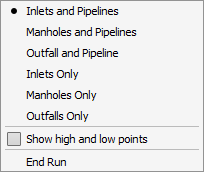
Select the structure or combination you want and proceed.
- Click to place a new structure(s).
- If placing pipelines, click points to draw the pathway between inlets or manhole features. Right-click to show the roadway high and low points. Double-click to end the run.
- If placing inlets or manholes only, double-click to place each one.
Note: Use
Add Drainage Network from a selected design road's right click menu (Edit mode) to add a drainage network automatically to a design or component road.