Assigns class, drawing, and project properties to a new tag format based on an existing tag format, or modifies an existing tag format.
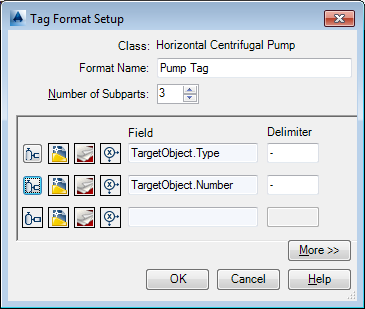
Expressions can be used to format the properties used to construct the tag format.
Class
Displays the class previously selected for the tag format.
Format Name
Displays the name of the tag format that is being created or modified.
Number of Subparts
Selects the number of subparts for the tag format. Click the Up or Down arrow to add or subtract the number of subparts.
Icons
Displays icons that you click to further define the tag format.
-
 Class icon
 -
Displays the Select Class Property dialog box.
-
 Drawing icon
 -
Displays the Select Drawing Property dialog box.
-
 Project icon
 -
Displays the Select Project Property dialog box.
-
 Expression icon
 -
Displays the Define Expressions dialog box.
Field
Displays the class and property information you defined in the Select Class Property dialog box.