HumanIK roll node additions
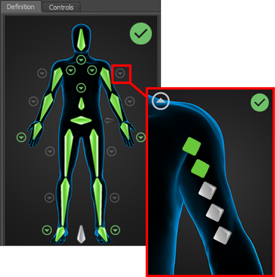
HumanIK 2016 now includes leaf roll nodes, which extend the roll extraction capabilities of HumanIK control rigs. When defining HIK characters, you can map up to five leaf nodes per limb. These additional nodes provide more control over the rotations of your character's limb bones, making deformations in character skins more precise and realistic.
For example, you can add leaf roll nodes to a character's lower arm so that wrist rotation only affects specific areas of a jacket sleeve. They can also let you accurately target areas of rotation to create wrinkles or other types of skin deformations.
Leaf roll nodes are mapped to mid limb bones like In-Line roll nodes. Leaf nodes are all directly parented to the same limb bone so the node hierarchy is flat rather than nested.
 to begin mapping leaf roll nodes to the upper arms, lower arms, upper legs and lower legs of your character. To map leaf roll nodes:
- The Character Solver must be set to HIK 2016.
- Your skeleton must have the additional joints to map as leaf roll nodes.
Retarget character extension animation
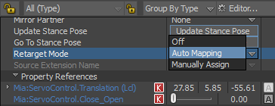
You can now retarget character extension animation using new Retarget Mode options. Like character-to-character retargeting, you use the Character Controls to select the target and source characters for the animation. You can then select a Retarget Mode, either Auto mapping or Manually Assign, to add animation your target character extension.
Auto Mapping mode, automatically detects the joint, or the best match, for the target on the source rig that the extension is connected to. It then retargets the animation to the same joint on the target rig.
Manually Assign mode lets you select animation from any joint on the source character to drive the extension animation.
Mirror character extension animation
Character extensions now support the Mirror Animation options in the Modifiers section of the Character Settings and in the Story clip Properties. For example, you can now mirror character extension animation when you Bake (Plot) animation or when you retarget character animation.
Turn on Mirror Animation while baking /plotting (Bake (Plot) to apply mirrored animation to another extension on the same character. To see the mirror result, you must use the Character Controls to first bake/plot the animation to the skeleton (Bake > Bake(Plot) Skeleton) and then bake/plot the animation back to the control rig (Bake > Bake(Plot) To Control Rig.
Turn on Mirror Animation when you retarget animation to apply mirrored animation from another character's extension to a target character's extension. You must set an Character Extension Retarget mode and select the source character.
See Mirror character extension animation and Retarget character extension animation.
Motion Reduction for character-to-character retargeting
Character-to- character retargeting now supports Motion Reduction. This new implementation works the same way as Motion Reduction for actor-to-character retargeting.
Other HumanIK 2016 updates
- For HIK 2016, when in Body Parts mode, a pull iteration count of 0 disables solving on the active node. In HIK 2014, a pull iteration count of 0 still generates some pulling.
Full Body - No Pull Manipulation mode
A new
Full Body - No Pull Manipulation mode has been added to the
Character Controls. Use this mode to manipulate the character in Body Part mode along with the additional functionality of adding keys on the entire body. You can access this mode by clicking this icon:
 .
.
Full Body - No Pull Manipulation mode is supported by the HIK and MotionBuilder Character solvers.
See Controls tab toolbar.