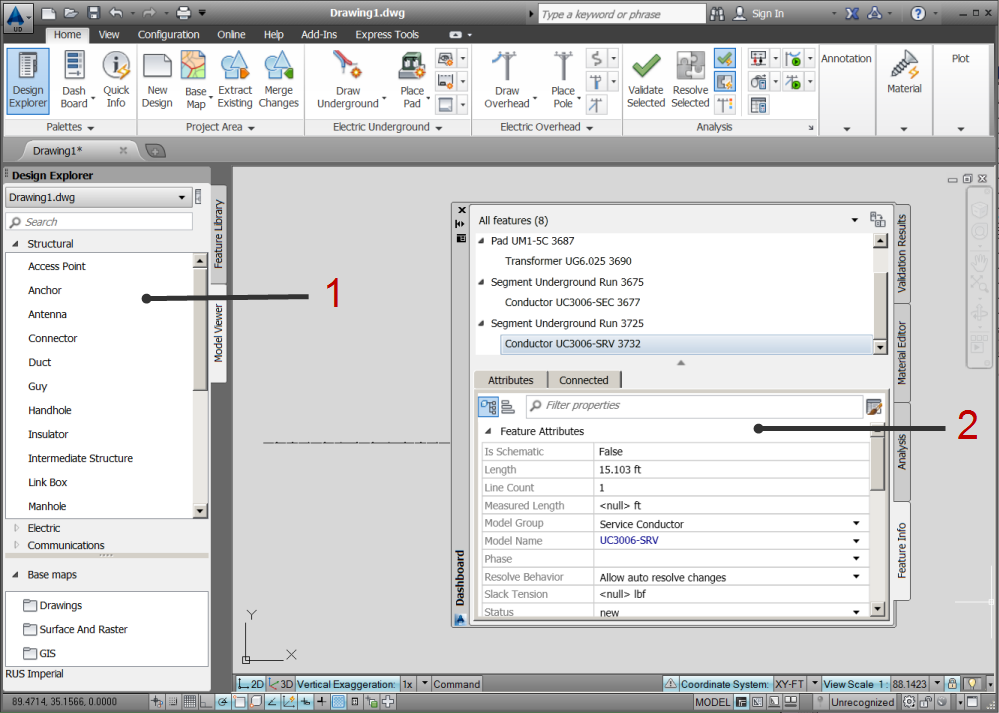
This topic shows the work area and provides some explanations.
- Design Explorer—The Design Explorer contains two palettes. The Feature Library tab provides access to frequently used features. Categories organize features into large groups. Folders organize features into smaller groups. You can select features in the design and add them to any selected folder. You can also create categories and folders that organize features as needed for your work. For more information, see About the Feature Library.
The Model Viewer tab lists all the feature classes in the industry model in your design drawing. You can toggle the display to list only the feature classes used in your design. For more information, see About the Model Viewer.
- Dashboard—The Dashboard contains the following four palettes:
- Feature Info—Displays information about the selected features in your design. Contained features are displayed in a hierarchical view under the parent feature. Features that are connected to other features are indicated by the Connected To icon.
- Validation Results—As you create features, validation rules check for issues and display them in the Validation Results palette.
- Material Editor—As you create features, the Material Editor generates a dynamic material list.
- Analysis—Displays the available analysis operations, the features included and excluded from each operation, variables and rules that define the analysis, and results after the analysis is complete.
For more information, see About the Dashboard.