The Autodesk Factory Design Utilities for Inventor are an add-in to the assembly environment. They provide design tools and an optimized environment for factory floor layout.
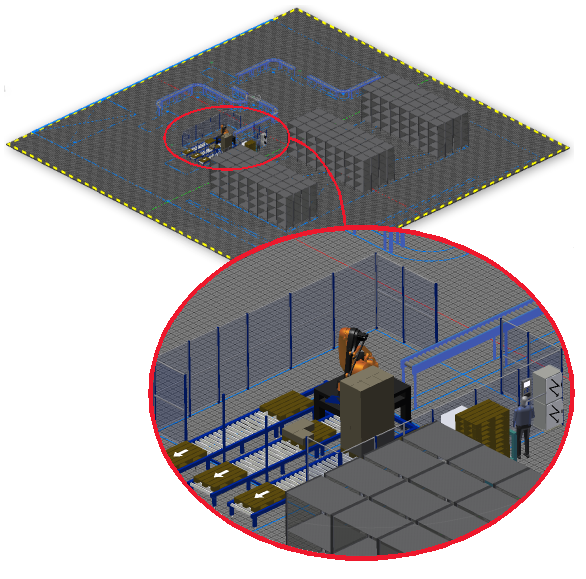
A factory floor layout is a 3D model of a factory, warehouse, or office environment. The size and complexity can range from a work cell to an entire factory. The layout can contain building elements such as walls, columns, and utilities. You can check for interference and plan how individual pieces of equipment connect to power, data, compressed air, or other resources.
The Factory Assets library contains models of standard factory components such as conveyors, ductwork, and walls. You can publish your frequently used models to the library. You can also use Inventor part and assembly files or imported models.
Sync Workflows
Inventor Factory provides Sync Workflows tools that enable you to create a bidirectional associative link between a 3D factory layout and a 2D AutoCAD drawing. This link, called Layout Sync, can be established between Inventor and AutoCAD Architecture or AutoCAD Mechanical.
The five Inventor workflows associated with AutoCAD are:
- Sync AutoCAD - Starts AutoCAD and creates a 2D drawing layout from an open Inventor Factory 3D layout.
-
Create from AutoCAD - Creates a new 3D factory layout from an existing 2D AutoCAD layout. Any 2D assets and asset chains are replaced with their 3D equivalents.
Note: This command performs the same function as the New Layout from DWG command found on the Factory Launch panel.
- Update from AutoCAD - Any changes made in a 2D AutoCAD layout are reproduced in the Inventor Factory layout.
- Break Link with AutoCAD - Breaks the associative link between the AutoCAD and Inventor layouts.
- Sync Navisworks - Inventor Factory also includes Sync workflows for Navisworks. Sync Navisworks opens the active Inventor file in Navisworks so that you can visualize your layout and run clash detections.