In this task, you interpret the Temperature, mold (averaged) result.
-
Activate only the Mold Tetras layer.
-
Select Temperature, mold (averaged).
To view the temperature inside the mold you will employ cutting planes.
-
-
Select Plane YZ, then click Make active.
-
Select the To a Point tab.
-
Enter 0 100 in the Point (x, y, z) field and click Apply.
-
Uncheck Show Active plane and close the dialog.
-
Click
 ().
().
-
Select Plane YZ, then click Flip.
-
-
Select
().
-
Select Plane ZX, then click Make active.
-
Select the To a Point tab.
-
Enter 0 100 in the point field and click Apply.
-
Uncheck Show Active plane.
-
Click
().
-
Select Plane ZX, then click Flip.
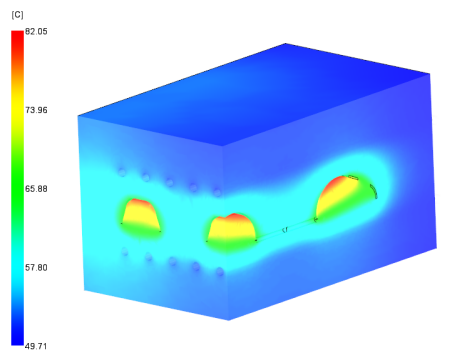
-
- Right click the material in the Study Tasks pane and select Details .
- Select the
Recommended Processing tab.
The target Mold surface temperature for this material is 60 C. For an amorphous material the mold temperature should be within +/- 10 C of this target.
The mold temperature around the bottom of the part is approximately 60 C, which is outside this target range.