When installing the application for use with Real-Time Deliverables, it is important to use the settings in the new version of the init.cfg file. These settings specify the new hardware to be used as your preview device. For example:
VideoPreviewDevice 1920x1080@23976psf, nvidia, 1, 1920, 1080, 23976psf, DTVsync
If there are settings in your previous init.cfg file that you want to keep, port them to the new version during installation.
To use Real-Time Deliverables, make sure the appropriate SDI card is selected in the Output Clip menu.
To select the appropriate SDI card in the Output Clip menu:
- Open the Output Clip menu as described in Outputting Clips To a VTR.
- From the Graphics Card box, select GFX SDI.
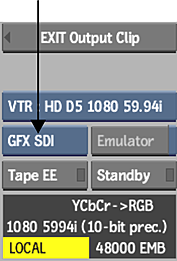
When GFX SDI is selected, the installed SDI card is automatically used for video output.
When AJA_OEM2K is selected, the AJA OEM-2K is used for video output.
GFX SDI is not an available option in the Graphics Card box if:
- The SDI card is not installed.
- The SDI card is not set up or configured properly.