Split meshes into halves
During a plane cut, you define the cutting plane first. Then you can adjust the cutting scope, if needed, and select any required additional options that modify the surfaces after cutting.
Jump to:
- Define the cutting plane
- Optional: Adjust the cutting plane
- Optional: Specify the behavior during cutting
- Perform the cut
Define the cutting plane
Begin by intersecting any of the clipping planes with a part.
- Move the
clip planes so that at least one of them intersects with the parts to cut. There are multiple ways to specify the clip plane position:
- Move the sliders.
- Enter a numerical value into the input fields. The numbers set here are absolute and refer to the whole buildroom.
- Right-click the slider of the desired axis, choose Set cut in X, Y, or Z, depending on the clicked slider, and then click on the part to set that plane to the clicked position.
- Enter cutting by clicking on the
 Plane Cut button in the context area, or choosing
Modify > Cut > Plane Cut from the main menu.
Plane Cut button in the context area, or choosing
Modify > Cut > Plane Cut from the main menu.
Optional: Adjust the cutting plane
If the plane is already at the right position, you can proceed to cutting. If not, adjust the plane using any of these methods:
Rotation and size
- Optional: Using left-click, drag the corner points of the plane to rotate the plane about its normal axis. This sets the plane's rotation axis for the next step:
- Using left-click, drag the edge points to rotate the whole plane about the axis tangential to the edge point.
- Using right-click, drag the edge and corner points to resize the plane. Useful if you want to cut only a section of a part while leaving the rest alone.
Automatic placement
 Create Cutting Plane by 3 Points: Click on three positions on a mesh surface through which the plane should go.
Tip: The cutting plane is generated when you release the mouse click from placing the final point, the cut plane is created. To see a preview of the plane keep the mouse button held down for the last point. The center of the plane is placed at the same location as the final point.
Create Cutting Plane by 3 Points: Click on three positions on a mesh surface through which the plane should go.
Tip: The cutting plane is generated when you release the mouse click from placing the final point, the cut plane is created. To see a preview of the plane keep the mouse button held down for the last point. The center of the plane is placed at the same location as the final point. Create Cutting Plane Tangential to Surface: Click on a single location on a mesh surface. This places the cutting plane flatly onto the location (the triangle) that you clicked.
 Create Cutting Plane Vertical to Surface: Click on a single location on a mesh surface. This places the cutting plane vertically onto the location (the triangle) that you clicked.
Note: The initial orientation of the plane around the vertical (the normal) of the selected triangle is dependent on your current camera orientation. You can still adjust it further.
Create Cutting Plane Vertical to Surface: Click on a single location on a mesh surface. This places the cutting plane vertically onto the location (the triangle) that you clicked.
Note: The initial orientation of the plane around the vertical (the normal) of the selected triangle is dependent on your current camera orientation. You can still adjust it further.
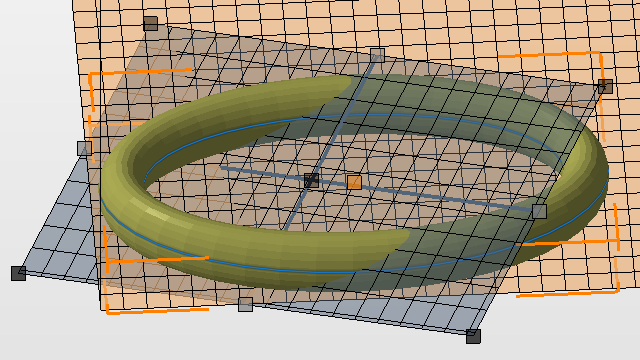
The cutting plane cuts at any angle you require.
Optional: Specify the behavior during cutting
With Netfabb's cutting, you don't just insert new border edges to split meshes, you can also choose how to proceed with the newly generated halves.
- Put halves into a group
- Close holes created by cutting meshes. Complicated cross-sections may confuse the automatic closing of holes in rare cases. In such cases, try cutting without closing, then close the holes manually.
- Generate surface features for alignment and assembly, like
pins & holes, or
 groove joinery.
To learn more about the switches and options to customize cutting, consult the Cutting Reference.
TopPerform the cut
In the context view, click Cut.
Cutting always generates new parts. Use Remove original parts to control what to do with the original ones.
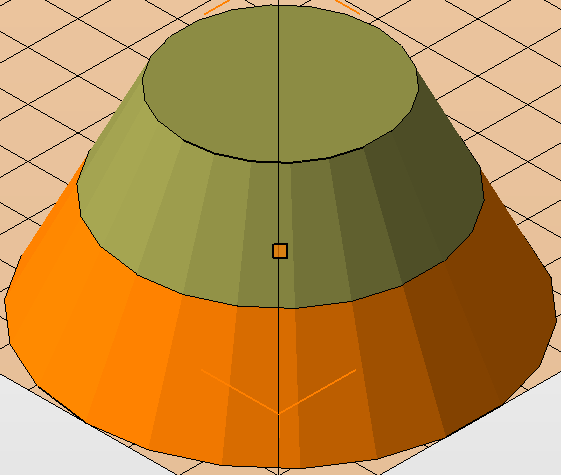
This cone frustum has been cut in half.