An overview of different tools available for simplifying, cleaning, and repairing meshes.
- Sometimes, a mesh might contain more triangles than are necessary to accurately represent its shape. The Mesh Reduce tool lets you reduce the number of triangles in a mesh (while attempting to preserve its shape) according to two different methods:
- Based on chordal deviation, given a maximum deviation value.
- Down to a given percentage (fraction) of the original number.
- Use the Mesh Hole Fill tool to fill small holes, or holes located in an area of the mesh which is relatively flat and has no features.
- Use the Mesh Patch tool to fill large holes, or holes located in an area of the mesh with features or abrupt changes in curvature. This tool fills holes in meshes while recognizing the curvature characteristics of the surrounding area. As with the Mesh Hole Fill tool, the boundary of a hole must be a closed region.
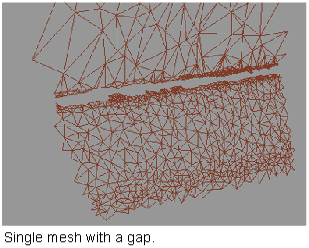
- Use Mesh > Mesh Stitch
 to seal gaps between the boundaries of components in a mesh. This tool works best to eliminate narrow gaps between boundaries. To fill larger openings, use Mesh > Mesh Cleanup > Mesh Hole Fill
 .
. - Build small “bridges” across gaps within a mesh, so that Mesh > Mesh Cleanup > Mesh Hole Fill can be used to fill up the remaining holes.
- The Mesh Repairtool identifies and repairs meshes that are degenerate, non-manifold, non-oriented, self-intersecting, or that contain folded edges. The tests are executed sequentially, and feedback is provided through the option window and prompt line after each repair step. Meshes are repaired by removing the troublesome triangles. Many tools that act on meshes such as Mesh Cut, Mesh Offset and Mesh Collar will fail on meshes that are non-manifold, non-oriented or self-intersecting. You will be asked to repair the meshes first.
- Use Mesh > Mesh Cleanup > Mesh Weld Vertices
 to merge coincident vertices and average normals at the merged vertices. This tool is only needed in rare cases. For example, a file imported from a different system, in a format other than STL, could have all its shared vertices stored twice. This could be detected within the Mesh Repair tool by the presence of a red boundary surrounding each triangle. In that case, the vertices must be merged with Mesh Weld Vertices before using any other Mesh tool.
 - Some tools such as Mesh > Mesh Offset, require that all components of a mesh have their normals pointing in the same direction. Use Mesh > Reverse Mesh Orientation
 to work with normal directions.