Welcome to the 2021.2 Update release of the Flame Family products!
|
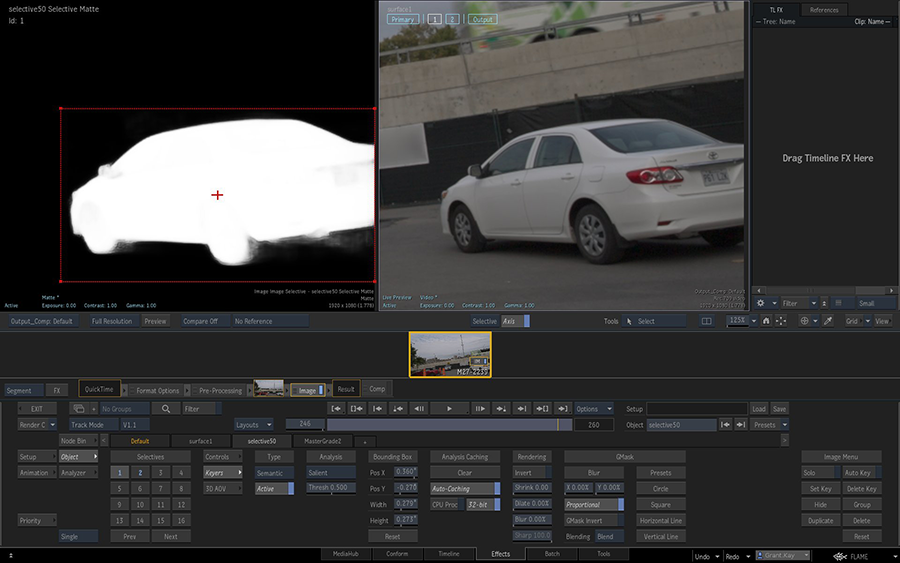
AI-Powered Salient keyer. Building on previous releases of Semantic keying for sky, human body, head, and face part extraction, the Salient Keyer uses object recognition machine learning technology to identify and provide a matte for the most obvious object within a bounding box. For more information, see Salient Keyer. |
|
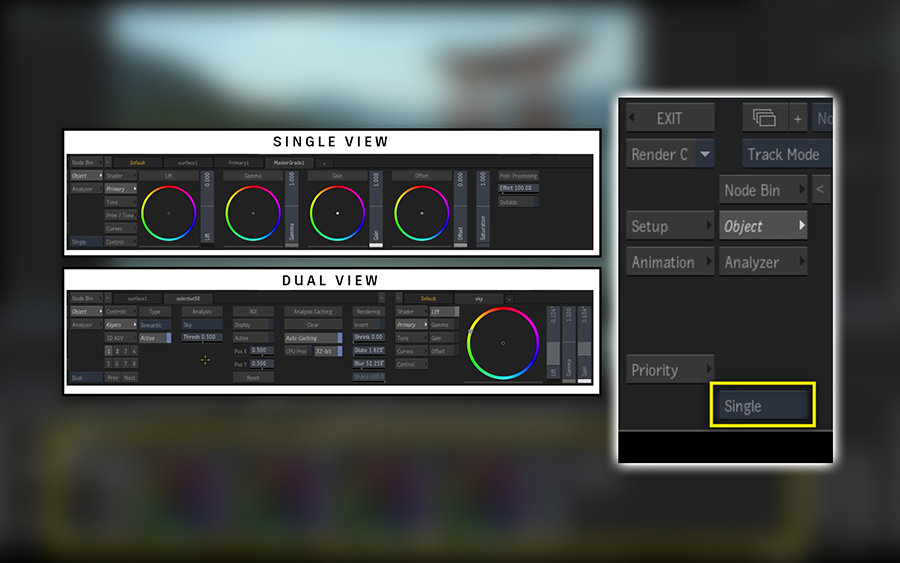
Navigation Improvements.This release dramatically enhances the speed of interaction for navigating and scrubbing larger, more complex timelines. Additionally, machine learning models now load on-demand, caching is improved, and storyboard thumbnail generation is optimized. A new Single vs. Dual panel UI layout is also now available, intuitively displaying all the tools at the artists' disposal. For more information, see Single and Dual view and Serialization, Caching, and Archiving. |

|
Search Tools. A new, fast-access Search has been added to allow users to easily add nodes in the Batch, BFX, and Action Schematics, as well as in the Image node and Gmask Tracer tools. This allows Flame artists to quickly search through all addable nodes and intuitively attach them to schematics. For more information, see Search for Tools. |
Additional information:
- Many new feature videos (as well as other workflow videos) are available on the
Flame Learning Channel. This channel is updated frequently, so be sure to subscribe.
Links to videos are denoted by this icon:

- In this What's New topic,
 indicates a new feature or enhancement that was suggested and voted up by Flame Family users on the
Feedback portal (also accessible directly from
).
indicates a new feature or enhancement that was suggested and voted up by Flame Family users on the
Feedback portal (also accessible directly from
).
- Make sure to check out Flame Central, the hub for all your Flame family links.
- Looking for the Release Notes for Flame Family 2021.2? Click here: Flame Family 2021.2 Release Notes.
Welcome Screen
Want to get only the highlights of the release? Let the Welcome Screen show you to the new features. It opens the first time you launch a Flame Family product.
Or access it anytime from .
For details on all the new features and enhancements in this release, follow these links:
- Action
- Action & Image
- Salient Keyer
- Action, Image, & GMask Tracer
- Archive
- Batch
- Bookmarks
- Conform
- Effects Environment
- Image
- Machine Learning
- Matchbox
- MediaHub
- Media Export
- Media Import
- Project Management
- Resolutions
- Python API
- Resource Manager
- Search for Tools
- Tangent Panels
- Timeline
Action
Flame family products now support FBX 2020.1.
Action & Image
Machine Learning initializing. A message window now appears while the software initializes the Machine Learning models required by features such a semantic keyers.
From Explorer to Action & Image. You can now load a Selective setup directly from the Explorer to an Image or Action schematic.
Name the Selective. The Custom Name of a Selective now appears in its tab in the Object menu.
Salient Keyer
The new Salient keyer helps you isolate an object in an image. This new keyer is not object specific (as opposed to other semantic keyers such as Sky or Human Head), and tries to isolate any object within a bounding box.
Action, Image, & GMask Tracer
The Left Expanded, Both Panels, and Right Expanded options are now replaced by a Single/Dual mode in the Object menu.
IMAGE
The selected mode is now global to all Action, Image, and GMask Tracer nodes, as well as Timeline FX.
Keyboard shortcuts:
- Set Object Menu in Single Panel: Alt+Shift+Left
- Set Object Menu in Dual Panels: Alt+Shift+Down
Archive
Clearer archive options. Archive options have been updated to make it easier to understand what will be archived. The Include Options have been reworked to offer individual controls over what you can include or exclude from an archive, while the Media Options a now clearer. For more information, see Archive Options.
CLI archiving. A new option for the flame_archive command line tool. You can now add maps to the list of media to omit when using the -O switch in flame_archive. Using this option, all the Maps and Machine Learning media caches attached to clips are excluded from the archive.
Batch
Improved Elbows. You can now add elbows to links between the following nodes:
- Action and Media Input nodes
- Image and Media Input nodes
- Paint and Source Media nodes
Better socket colours. New colours make the Z-Depth and UV sockets easier to identify in the Render Pass list of the Action Output menu.
Keyboard shortcut updates. The Expand/Collapse Current Node keyboard shortcut changes from ALT+C to Shift+C in the Smoke Classic and Smoke FCP user profiles.
As a result, the following shortcuts have also been updated:
- GMask (node, tool, timeline FX): Close is now Alt+Shift+C (All profiles)
- Distort (node, tool): Close is now Alt+Shift+C (All profiles)
- GMask (Action, Image, GMask Tracer): Close/Open is now Alt+Shift+C (All profiles)
- Auto Stabilize: Set Centre is now Alt+Shift+C (Smoke FCP only).
- General: Draw Shape is now Alt+Shift+C (Smoke FCP only).
Bookmarks
Bookmarks with Visibility set to
MediaHub - Files are now available from the following locations:
- Search Location in Conform
- Media Path in Batch Write File node
Conform
When you use the Update Sources Sequences or Update Shots Sequences, the updated sequence is now placed in the same Reel as the sequence being replaced.
Effects Environment
More performance. More improvements to the performance of the Effects environment when initializing, jogging/scrubbing, and navigating shots.
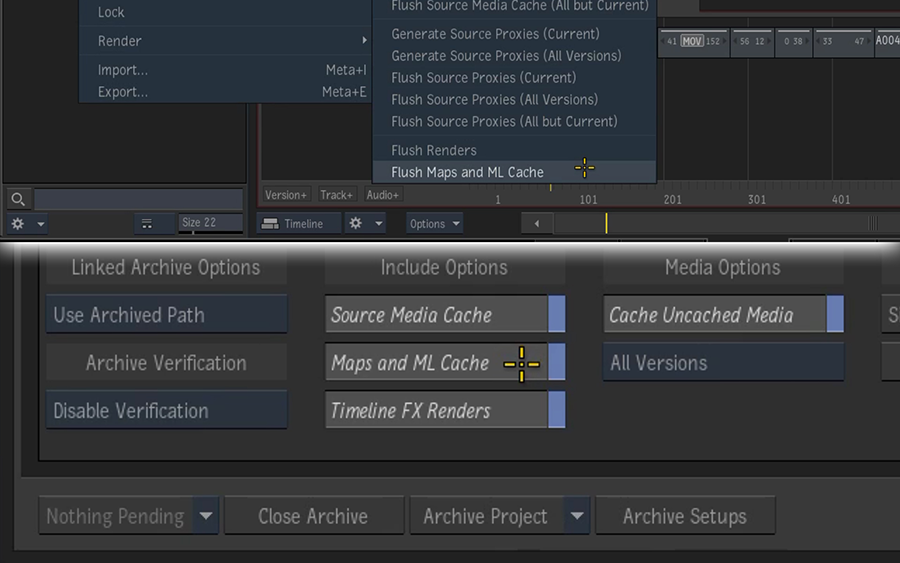
Persistent Motion Vectors. The Motion Vectors and Machine Learning caches are now persisted so you no longer have to recreate these caches after re-opening a project. Also, these caches are now included in the archive when you enable
Maps and ML Cache in the Archive menu.
Segment Navigation
Faster segment-to-segment navigation. You no longer have to wait for all segment thumbnails to appear before selecting the previous or next segment.
- This is useful when you quickly press one of the Go to Previous / Next shortcuts numerous time in a row
- This behaviour can be disabled from the Preferences panel using the Skip Shot in Navigation button located in Tools / TL FX > Effects Storyboard
Asynchronous segment thumbnails. Storyboard thumbnails are now generated asynchronously. This improves shot-to-shot navigation as you no longer need to wait for the every thumbnail to appear on-screen before switching to another segment.
Generate thumbnails on demand. Use , to force in the foreground the generation of all thumbnails.
- Starting a session by generating thumbnails ensures that the shot-to-shot navigation is as fast as possible as thumbnails don't need to be generated while you navigate.
- Thumbnails are cached, so they are persisted when you restart the application.
Making a modification to a Timeline FX requires the thumbnail to be regenerated.
Image
In Image, the MasterGrade node connected to the Primary surface is now selected by default, making it easier and faster to start working on the primary grade.
Machine Learning
On CentOS, the machine learning models are now serialized on the system disk the first time they are used. Serializing reduces the time spent waiting for the machine learning tools to load.
Media Panel
Flush maps and cache. You can now flush the Maps and Machine Learning Caches from a clip.
- The option is available from the Clip contextual menu, inside the Media submenu.
- The operation is performed on all selected clips at once.
Search for maps or cache. In the Media Panel Search, you now search for clips that have maps or machine learning cache using the new Maps and ML Cache option.
Timeline
Flush maps and cache. You can now flush the Maps and Machine Learning Caches from a timeline segment.
- The option is available from the Timeline Segment contextual menu, inside the Media submenu.
- The operation is performed on all selected clips at once.
Search for maps or cache. You can now search for segments with map or machine learning cache by using the new Has Maps or ML Cache option in the Timeline Search window.
Matchbox
ActionPunchBack. Use the new ActionPunchBack shader to prevent shaders upstream from affecting the background image. The PunchBack shader available in previous versions has been renamed SelectivePunchBack.
Custom paths in node bins. Matchbox and Lightbox shaders located in subdirectories of the defined Shader Paths are now listed in their Node bin tabs.
MediaHub
You can now enable and disable Pattern Browsing from the top level of MediaHub, next to the Scan Subdirectories and Refresh buttons. You no longer have to open the Pattern Browsing menu.
Media Export
Sony XDCAM HD Update
When exporting as XDCAM HD, you can now easily switch between exporting an XDCAM compatible file or a broadcast compatible one. Open the Media Export Advanced options and set the profile in .
The XDCAM HD and XDCAM HD 422 export presets now encode broadcast-compatible files by default.
For more information, see Setting Sony XDCAM 422 Compatibility
Sony XAVC in QuickTime
You can already export XAVC content in an MXF wrapper. But starting with Flame Family 2021.2 Update, you can export Sony XAVC Intra and Long-GOP codecs as a QuickTime file.
The following codec profiles are now available for QuickTime:
- XAVC HD Long GOP
- XAVC 4K Long GOP
- XAVC HD Intra VBR
QuickTime files encoded with XAVC HD and 4K Long GOP are supported on most media players. XAVC Intra might require additional professional codec packs on macOS and Windows.
The following movie presets are also available for export:
Available movie export presets in
- QuickTime (XAVC Intra 1080p 8-bit)
- QuickTime (XAVC Intra 720p 8-bit)
- QuickTime (XAVC Long GOP 1080p 8-bit)
- QuickTime (XAVC Long GOP 720p 8-bit)
- QuickTime (XAVC Long GOP UHDTV 8-bit)
Export as PNG
You can now export your content as Portable Network Graphics (PNG) files, from Media Export or the Write File node in Batch. The PNG file can be 8 or 16 bits RGB or 8 bits RGBA, and you can set the compression level.
Available file sequence export presets in
-
PNG (8-bit)
-
PNG (8-bit RGBA)
-
PNG (16-bit)
Compression level goes from 0 to 9, with 4 being the default. PNG compression is lossless and affects only file size and export time, not quality: level 9 creates the smallest files but takes the most time to export, while 0 doesn't compress the exported files but exports the fastest.
OpenEXR DWA Compression
You can now use OpenEXR DWAA and DWAB Compression level options in Media Export and the Write File node in Batch. Compression levels go from 1 to 999, with 45 being the default and the value used in previous versions.
Media Import
Affinity Photo. PSD files from Affinity Photo now show the correct media when channels are not named.
Sony colour space default. The default colour space for imported SonyRAW or X-OCN files is now Slog3 / S-Gamut3.cine (was Scene Linear / Rec.709 primaries in previous versions). This default applies to files imported in projects created in Flame Family 2021.2 Update products: import options are saved per project and old projects use the previous default of Scene Linear/Rec.709).
RED Updates
This Update fixes two RED defects:
- Potential performance drop in CPU decompression.
- Incorrect or missing REEL_ID_8_CHAR / REEL_ID_FULL metadata if the Komodo camera position setting was changed.
Pixspan Update
Pixspan Compression Library is now at version 3.4.30. The updated library adds support for compressed ARRIRAW media files from the following cameras:
- Alexa Mini
- Alexa Mini LF
- Alexa LF
- Alexa 65
- Alexa SXT
- Alexa XT
The updated library is backwards compatible with frames compressed with all previous versions. This version also includes a fix to a crash during GPU selection when not enough pinned memory is available.
ARRIRAW Update
You now have access to two new import options for ARRIRAW media files. The Sharpness and Detail options are available in
- Sharpness: Amplifies or attenuates the contrast of edges, without introducing or removing fine details in the image. Small values of this parameter are reflected in smoother images and high values are reflected in crisper images.
- Detail: Works on fine details in the image. This parameter is reducing or maintaining the fine details depending on the ratio of the rescaling. A negative value of this parameter removes fine details and could, for instance, be used to remove some unwanted types of fine skin details. On the other hand, a positive value enhances fine details in the image, but, in case of high rescaling ratios, could increase the possibility to have Moiré effects in the image.
These options replace the Crispness option available in previous Flame Family releases.
HDE Update
X2X HDE decoder is now at version 3.4.2. This update fixes bugs and improves performance.
Project Management
Starting large Flame Family projects can take time takes longer than small projects. To speed things up, you can open Flame Family applications with every Library closed. Once the application is started, you can open Libraries as needed.
For more information, see Speeding Up Flame Launch.
Resolutions
More resolution presets. The resolutions lists available throughout the application now include Blackmagic Design's new 12K camera resolutions and Canon's EOS-1D X Mark III and EOS R5 resolutions.
Blackmagic Design
- 12288 x 6480 (12K DCI)
- 11520 x 6480 (12K 16:9)
- 12288 x 5112 (12K 2.4:1)
- 7680 x 6408 (12K Anamorphic)
- 8192 x 4320 (8K DCI)
- 7680 x 4320 (8K 16:9)
- 8192 x 3408 (8K 2.4:1)
- 5120 x 4272 (8K Anamorphic)
- 6144 x 3240 (6K Super16)
- 4096 x 2160 (4K Super16)
- 4096 x 2160 (4K DCI)
- 3840 x 2160 (4K 16:9)
- 4096 x 1704 (4K 2.4:1)
- 3072 x 2560 (3K Anamorphic)
- 2560 x 2136 (4K Anamorphic)
Canon
- 8192 x 4320 (8K DCI)
- 5472 x 2886 (5.4K DCI)
Aspect Ratio Updates. The aspect ratios listed in the resolutions.cfg file change: aspect ratios for square pixel resolutions are no longer required, or a specified using a new PAR parameter.
Be aware that if you keep using an older version of Flame Family products on a system with version 2021.2 Update, you might see RES_POPUP errors on the application console or log file. You can safely ignore these errors. For more information, see Specifying Aspect Ratios .
Python API
The Python API is augmented with additional attributes and functions in some Batch nodes and MediaHub.
For more information, see Python API documentation.
Resource Manager
A key press away. A keyboard shortcut can now be used to open the Resource Manager. It is unassigned by default.
Search for Tools
Use Search to quickly add nodes to your Batch, Batch FX, Modular Keyer, GMask Tracer, Image, and Action schematics.
With Search, you can add to your schematic any tool from any node bin. This includes all of the tools, Matchbox, OpenFX, Sparks, even setups from User and Project bins. For more information, see Searching to Add and Connect Nodes in Batch and Searching to Add and Connect Nodes in Action.
Tangent Panels
The supported version of Tangent Hub is updated to 1.6.4.3. This version includes the following improvements:
- Support for plugins which communicate with Tangent panels independently of the Host application
- Support for dark mode on macOS
- Alt-lock functionality
- Improved application focus tracking
- General bug-fixes
See Tangent Hub documentation for more details.
Tangent Hub is automatically installed with Flame Family products installation on CentOS. For macOS, download Tangent Hub from Tangent web site.
New User Preferences Menu
There are new options in .
- Enable ALTernate Function Lock: When this is enabled, you can use a rapid double press of any button mapped to the Select ALTernative Function control action to switch to the alternate mappings for all controls until the lock is released by another single tap of the button. A single tap of any button mapped to the Select ALTernative Function control action will always release the lock and return to showing the standard control mappings on the panels. You can still temporarily switch to the alternate control mappings with a press and hold of the same button at any time.
- Follow Application's Active Mode: If this option is enabled the mode tab in the Mapper will follow all mode changes in the active application to show the current control mappings. The active mode is always indicated with the small tag next to the name (see section 2.5.1) and with this option enabled it will always be displayed when changed by the application. You may still click on any mode tab at any time to view the control mappings in that particular mode. However, if the application changes its mode with this option enabled, that newly active mode will have priority over the user's choice and the mapping area will follow the mode of the application.
Timeline
Limiting search scope. The scope of a Timeline search preset can be set within the Timeline search drop down button. Switch between
Select on Current Track and
Select on All Tracks(default). The option is set per Flame user profile.
Timeline FX. The Toggle Timeline FX Pipeline keyboard shortcut is no longer assigned to a keystroke by default.
Marker Improvements
Defaults for segment markers. You can now set Default Segment Marker Name and Default Segment Marker Comment in .
Rename marker on add. The Rename Marker dialogue for markers and segment markers now appears whenever you add a marker. You can change this behaviour with
. The Rename Marker dialogue never appears when you add markers during playback.
More tokens for markers. You now have more tokens for the Name and the Comment of Segment Markers.
New tokens
- Source Name
- Segment Index
- Segment Name
- Shot Name
- Background Index
- Background Name
- Background Shot Name
- Track Name
- Event Number
- Tape/Reel/Source
- Resolution
- Width
- Height
- Depth
- Colour Space
- Source Versions Name
- Source Version ID