The latest workflow improvements for deformers and performance customisation.
The following improvements and updates have been made to the 2024.2 update of Maya:
New Proximity Wrap Bind options
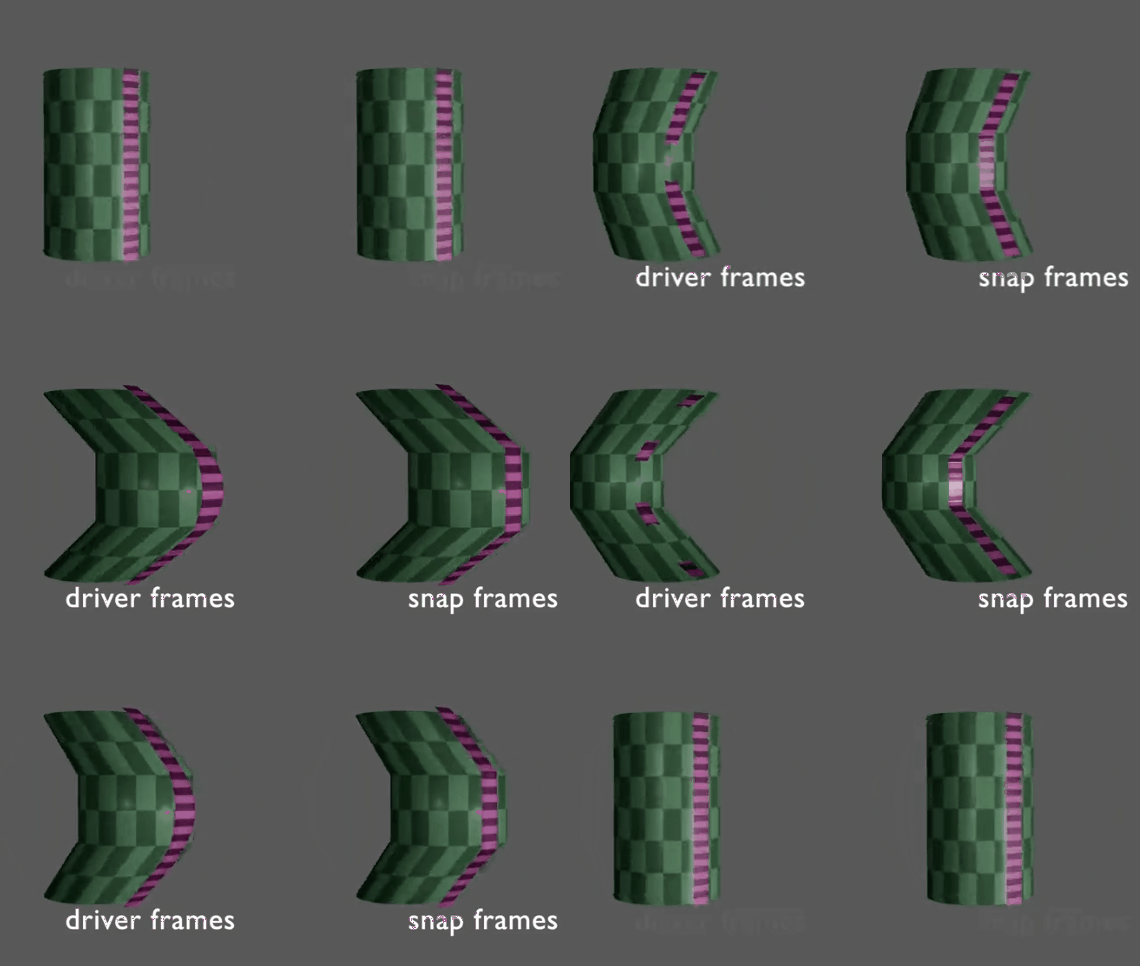
Proximity Wrap Coordinate Frames options: Driver (left) and (Snap)
Now, a new Coordinate Frames drop-down menu in the Attribute Editor Proximity Wrap options gives you the option to choose from the default Driver-based method or use the new Snap option. which sticks the deformation to a single polygon of the driver to make the geometry less wrinkled.
GPU Cache Offset
The GPU Cache (gpuCache.mll) plug-in now lets you start the GPU cache at a specific frame, similar to an audio file offset. You can specify the GPU Cache start frame for existing cache files in the Attribute Editor GPU Cache section Cache Start Frame field.
You can also set the value by selecting the Cache Start Frame label in the Channel Box, then holding the middle mouse button in the Viewport, and moving the mouse left and right.
Additional Rigging Math Nodes
More math nodes have been added to the 2024 expanded list of new rigging math nodes. Some of these new nodes are matrix nodes, while others have been taken from the vectorProduct node by dividing it into separate capabilities:
- axisFromMatrix
- columnFromMatrix
- crossProduct
- divide
- dotProduct
- multiplyVectorByMatrix
- multiplyPointByMatrix
- rotationFromMatrix
- rowFromMatrix
- scaleFromMatrix
- subtract
- translationFromMatrix
These base functions are now individual nodes, letting you easily search and add them in the Node Editor. See Matrix Utility Nodes for more.