Data Translation Additions and Improvements
In the Alias 2026.1 Update, we've provided updates to data translation as well as new import and export formats.
New Data Translator Now Default
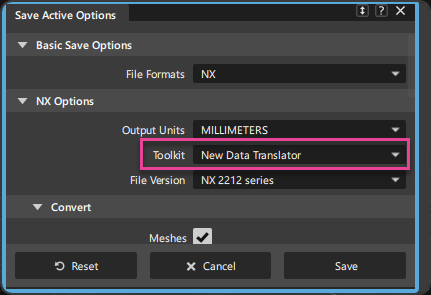
The New Data Translator that we introduced as an alternative to our Legacy translator in Alias 2026 is now set as the default option for CATIA 5, CATIA 4, NX, and SolidWorks data translation.
We strongly encourage you to take this opportunity to become familiar with our New Data Translator. Please report any New Data Translator issues you experience to the Feedback Forum.
Multi-byte Character Support
We have added support for multi-byte characters for file, folder names and more. This enhancement allows you to use file and folder names that include most characters and glyphs used in languages like Chinese, Japanese, Korean, Arabic, and Polish. This update ensures that Alias can handle a wider range of character sets, improving compatibility with international file systems. See General Improvements for more information.
New Import and Export Formats
We have added support for the following new import and export formats:
- CATIA V5 6R2025 for import (New Data Translator and Legacy) and export (Legacy only)
- Granite 18 for import and export
- NX 2412 Series for import for both the New Data Translator and Legacy translators.
- NX 2506 Series for import using the New Data Translator only.
- Creo Parametric Version 12.0 for import.
 For more information, see Alias supported file formats.
Updates to the JT Translator
We have switched the JT Export translator from the Alias legacy translator to the Autodesk Translator Format (ATF) version of the translator. This means that some options may have changed including the following:
- The Polygon and Polygon + Brep options have been replace with Tessellated Data Only, BRep Only, and Tessellated and BRep Data.
- The JT BRep definition has been replaced with the newer XT BRep definition. When selecting an export option that creates BRep data, the XT BRep definition is now used exclusively. In JT files version 10.3 and newer, the XT BRep is the supported definition to store BReps inside a JT file
- New Divide MultiKnots and Divide Periodic options that allow you to control how surfaces with multiknots and periodic surfaces are exported. Both options are turned off by default.
- A new Use Tighter Edge Curve Tolerance option which increases edge accuracy and reduces the gaps between surfaces while maintaining continuity. This option is off by default.
- A new Allow Leaf Nodes to Be Collapsed option which allows you to choose whether nodes for individual surfaces are included as selectable sub-nodes in the resulting JT file. This option is off by default.
- A new Repair Option which allows you to choose whether or not to repair Alias geometry before the JT export. This option is off by default.
- A new Export Instances option.
- A new Export Textures option which allows you to choose whether or not to include assigned textures in your exported file. Turning this off to prevent textures from being translated during JT export and ensures that the translator chooses the closest of the 216 standard colors when there is no texture in the Diffuse channel.
- The Scale Factor and Stitch Surfaces options are no longer available.
- For JT imports, the Merge Vertices option is now off by default.
ATF_JT_EXPORT_ATF=false or ATF_JT_EXPORT_ATF=0 For more information, see the following:
Improvements to Import Subdiv
When importing .obj files that contain Subdivision geometry, using File > Import > Subiv, Alias now attempts to resolve any non-manifold geometry issues in the.obj files. This is especially useful when importing models that may have been created in Blender or applications that do not enforce strict topology rules. In cases where the topology needs to be repaired, you are in informed in the prompt line.
This update ensures that imported subdivision geometry is cleaner and more usable, reducing the need for manual cleanup after import. You can now try importing .obj files that previously failed to import in previous versions of Alias.
Updates to NX Export
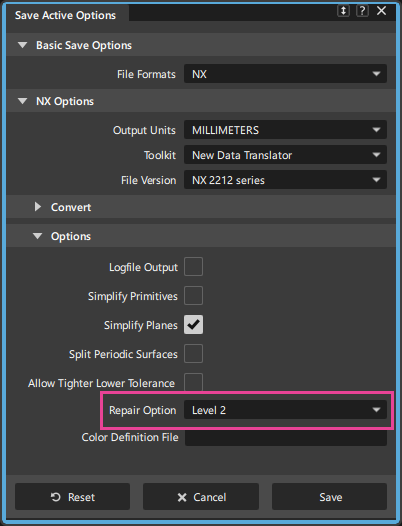
We've added Repair Options, which let you choose whether or not to repair Alias geometry before exporting to NX. In previous versions of Alias, geometry was always repaired before export. Now, you can choose from Repair Level 1, Level 2, or Level 3, which represents increasing degrees of geometric correction applied during export. Setting it to None turns off all repair operations during export. Use this option to preserves CV integrity when exporting and re-importing geometry to the NX .prt format, ensuring accurate geometry round-tripping. This option is set to Level 2 by default, which applies a repair tolerance of 1e-7 meters and offers a balanced trade-off between quality and performance, making it the most practical choice for most scenarios.
Updated OBJ Import and Export Options
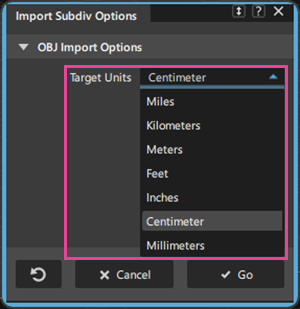
When importing (File > Import > Subdiv) or exporting (File > Export > Active as Subdiv) subdivision objects, a new Target Units option now lets you can now specify the working units for the resulting imported or exported geometry. Using this option can help you reduce making manual scaling adjustments to the output geometry when transferring subdivision data between Alias and other applications.
Other Data Translation updates and improvements
- If you select Cancel in the file browser window when importing or exporting files, the Import and Export options windows now remain open, allowing you to quickly return to the window for further selections. In previous versions of Alias, when you selected Cancel in the file browser window, the import and export options windows closed, requiring you to reopen the windows using the File menu.
- STEP Import - Alias now supports importing annotations from .step files directly into .wire files. Note that this capability is on all the time. There is no import option that needs to be turned on to bring the annotations into Alias.