This dialog allows you to centre the GeoPlan View on a specified point, and zoom in or out on that point if required. It also lets you use a selected online map application to find the address of the specified point.
It is displayed when you click on the Find XY button
 on the
GeoPlan Toolbar
.
on the
GeoPlan Toolbar
.
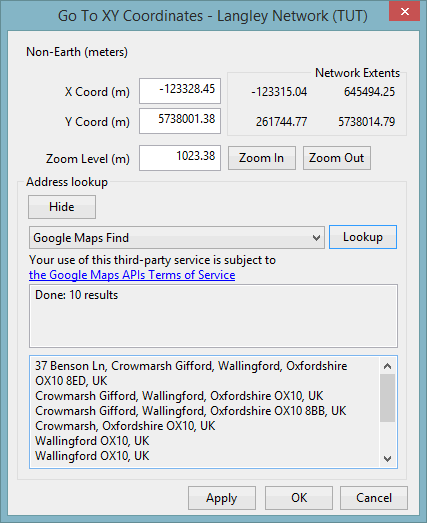
Dialog description
| Item | Description | ||||||||
|---|---|---|---|---|---|---|---|---|---|
| Projection | The read-only current map projection for the GeoPlan. | ||||||||
| X Coord | Chosen X Coordinate. The default is the centre of the current view. | ||||||||
| Y Coord | Chosen Y Coordinate. The default is the centre of the current view. | ||||||||
| Zoom Level | The selected zoom level. The default is the current zoom level. | ||||||||
| Network Extents | The read-only maximum and minimum X and Y extents of the network. | ||||||||
| Zoom In |
Adjusts the zoom level. Each click doubles or halves the zoom level. |
||||||||
| Zoom Out | |||||||||
| Address lookup | Finds the address for the chosen location (X,Y coordinates) using a web map application.
|
||||||||
| Apply | Applies changes without closing the dialog. | ||||||||
| OK | Saves any changes and closes the dialog. | ||||||||
| Cancel | Discards any changes and closes the dialog. |