Create New Animation Layer Dialog (Layer Controller)
This dialog lets you choose both the name and controller type of the new layer.

- Right-click an unused area of any toolbar. > Animation Layers > Create New Animation Layer
Interface
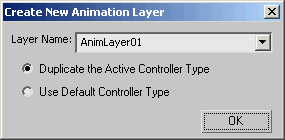
Layer Name
Lists all available layers in your scene. You can use the default name, enter a custom name, or pick one from the list. If you choose an existing layer from the list, it inherits that layer's name and weight properties. Refer to Working with Animation Layers for more details.
[controller type]
Determines the controller type to assign to each track within the animation layer.
Duplicate the Active Controller Type The new layer's controller type becomes the same as the one from the active layer, on a per-track basis.
For example, if a track in the active layer has a Noise controller, adding a new layer copies that controller type.
Use Default Controller Type When chosen, the new layer's controller does not take into account the active layer's controller type and instead uses the original track's type.