Layer Properties Dialog (Layer Controller)
This dialog provides global options for collapsing animation layers and isolating the active layer from the rest. The settings apply to all layers of all layer-enabled objects in the scene.

- Animation Layers Toolbar > Anim Layer Properties
- Track View > Highlight a transform track (such as Position) that's the parent of layer tracks. > Right-click > Properties
Interface
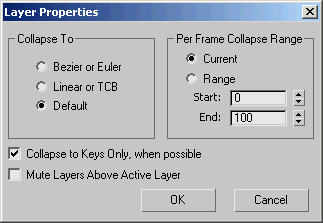
Collapse To group
The controller type for when you collapse a controller track onto a non-keyable controller track, such as a Noise controller.
- Bezier or Euler On collapse, the resulting track is assigned either a Position XYZ controller (for a Position track), a Bezier Scale controller (for a Scale track), or an Euler XYZ controller (for a Rotation track).
- Linear or TCB On collapse, the resulting track is assigned either a Linear controller (for Position and Scale tracks) or a TCB controller (for a Rotation track).
- Default On collapse, the resulting track is assigned a default controller based on the original controller track. Refer to Specifying Default Controllers for more details.
Per Frame Collapse Range group
Sets the range to cover when you collapse a layer.
Current When chosen, a key is set on every frame of your scene's animation range when you collapse a layer.
Range When chosen, a key is set on every frame of the animation range you specify. #### Start/End
Sets the collapse range boundaries.
Collapse To Keys Only, When Possible
When you collapse a layer, the keys are merged only when the respective controllers are of the same type, same tangent types, and Blend Eulers As Quats is on. Default=on.
Mute Layers Above Active Layer
When on, you see the effects of the layers only up to the active layer, inclusively. This is similar to the Visible Before/After options of the biped Layers rollout.