Camera Tracker: Move Smoothing Rollout
Because the match-move algorithm is not always exact and is highly susceptible to field measurement error or feature tracking errors, and because the match for each frame is computed independently, the results can be "noisy", particularly if field of view is estimated. In match-move situations where the real camera performs smooth moves, it might be useful to filter the match results to eliminate this noise.
 Utilities panel > Utilities rollout > More button > Utilities dialog > Camera Tracker > Move Smoothing rollout
You use the Move Smoothing rollout to control and perform these smoothing operations after a match has been created.
Interface
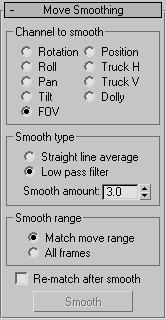
Channel To Smooth group
Lets you choose which parameter or set of parameters to smooth. You can choose to smooth the entire Rotation or all the Position tracks at once, or you can smooth individual parameters or axes.
- Rotation Pan, Tilt, and Roll.
- Position Dolly, Truck-H, and Truck-V.
- FOV Camera FOV (field-of-view).
- Pan Rotation about the local camera Z axis.
- Tilt Rotation about the local camera X axis.
- Roll Rotation about the local camera Y axis.
- Dolly Movement along the local camera Y axis.
- Truck-H Movement along the local camera X axis.
- Truck-V Movement along the local camera Z axis.
Smooth Type group
Straight line average Causes Move smoothing to generate a straight line average for each of the selected parameters. This is useful when you know a parameter is fixed, but don’t know its actual value. Examples might include field-of-view or vertical position. Use the camera matcher to initially estimate the parameter, then construct a straight line average fit and rematch the remaining parameters.
Low pass filter
Causes Move smoothing to apply a low-pass filter to the selected parameters, eliminating high-frequency noise.
Smooth amount
Implements smoothing using a Gaussian low-pass filter whose width and variance are controlled by the Smooth Amount spinner. Increase this value to increase the smoothing.
Smooth Range group
Controls the range of frames over which the smoothing will be performed.
- Match-Move Range Applies the smoothing to the range of animation frames specified in the Match Move rollout. This allows you to break up a match-moving job into several frame ranges. Use this to isolate and experiment on a troublesome range of frames, without disturbing other satisfactory frames.
- All Frames Applies the smoothing to all the keyframes in the selected parameters.
Rematch After Smooth
Controls whether a compensating match-move is performed after the filtering. If this is turned on, the parameters that were smoothed are disabled in the Match rollout and another match-move is performed. Performing this rematch again is advised because it adjusts the other camera parameters to compensate for the smoothing and often results in a smoother estimation for the unsmoothed parameters.
Smooth
Performs the move smoothing based on the smooth type, range, and amount settings. If this button is disabled, no current match camera is assigned.