Weld Vertices/Edges (Polymesh)
Use this caddy for setting the weld threshold for vertices and edges and previewing the number of sub-objects to be welded.
- Select an Edit Poly or editable poly object. >
 Modify panel > Vertex or Edge sub-object level > Edit Vertices/Edges rollout > Weld >
  (Settings)
 - Select an Edit Poly or editable poly object. > Vertex or Edge sub-object level > Quad menu > Tools 2 quadrant > Weld > (Settings)
- Select an Edit Poly or editable poly object. > ribbon > Modeling tab > Polygon Modeling panel >
 (Vertex) or
  (Edge) sub-object level > Vertices or Edges panel > Shift+click
  (Weld) or choose Weld Settings from the drop-down list.
Interface
Weld uses the caddy interface when Enable Caddy Controls is on; when off, the standard settings dialog is used. For details on using the caddy controls, see The Caddy Interface.
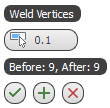
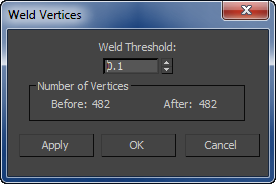
Left: the caddy interface; Right: the standard dialog
 Weld Threshold
Specifies the maximum distance, in scene units, within which selected sub-objects will be welded.
Any vertex or edge that lies outside this threshold (that is, it's farther than this from the nearest vertex or edge) will not be welded.
Before/After
Shows the number of vertices before and after the weld.
The After quantity updates dynamically as you change the setting.
_____
 OK
OK
Applies the settings to the current selection and closes the interface. Keyboard equivalent: Enter
 Apply and Continue
Applies the settings to the current selection, retaining them for the preview if you then change the selection. Keyboard equivalent: Ctrl+Enter
 Cancel
Closes the interface without applying the settings to the current selection. Does not reverse previous uses of Apply And Continue. Keyboard equivalent: Esc