Tessellate (Polymesh)
Use this caddy to specify how Tessellate subdivides polygons.
- Select an Edit Poly or editable poly object. >
 Modify panel > Polygon sub-object level > Edit Geometry rollout > Tessellate >
  (Settings)
 - Select an Edit Poly or editable poly object. > ribbon > Modeling tab > Polygon Modeling panel >
 (Polygon) sub-object level > Subdivision panel > Shift+click
  (Tessellate) or choose Tessellate Settings from the drop-down list.
Interface
Tessellation uses the caddy interface when Enable Caddy Controls is on; when off, the standard settings dialog is used. For details on using the caddy controls, see The Caddy Interface.
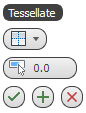
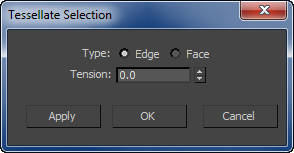
Left: the caddy interface; Right: the standard dialog
Type
Choose the tessellation type from the drop-down list or radio buttons:
 Edge Inserts vertices in the middle of each edge and draws lines connecting those vertices. The number of polygons created equals the number of sides of the original polygon.
 Face Adds a vertex to the center of each polygon and draws connecting lines from that vertex to the original vertices. The number of polygons created equals the number of sides of the original polygon.
 Tension
Lets you increase or decrease the Edge tension value. Available only when the Edge tessellation method (see preceding) is active.
A negative value pulls vertices inward from their plane, resulting in a concave effect. A positive value pulls vertices outward from their plane, resulting in a rounding effect.
_____
 OK
OK
Applies the settings to the current selection and closes the interface. Keyboard equivalent: Enter
 Apply and Continue
Applies the settings to the current selection, retaining them for the preview if you then change the selection. Keyboard equivalent: Ctrl+Enter
 Cancel
Closes the interface without applying the settings to the current selection. Does not reverse previous uses of Apply And Continue. Keyboard equivalent: Esc