Point Select Modifier
The Point Select modifier lets you quickly select and edit points. You can use the Point Select modifier to work with 3DGS data, or create your own point data directly in 3ds Max.
The modifier works with any Point data type, like an Editable Point object or an object with the Turn to Point modifier applied, but it can also be applied to other data types. For example, if the Point Select modifier is applied to a primitive object, its vertices are automatically turned into points, and the modified object is converted to a Points object type.
You can also use Point Select to drive a point selection into another modifier. For example, if you select a specific set of points, you can affect them with the Point Instance modifier.
 Modify panel > Make a selection > Modifier List > Object-Space Modifiers > Point Select
- Default menu: Make a selection > Modifiers menu > Selection Modifiers > Point Select
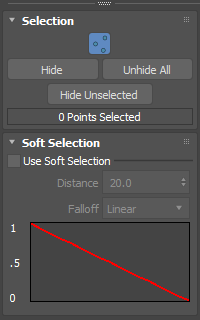
Interface
Selection rollout
Point icon: Click
 to enter Point sub-object mode, letting you select individual points in your 3DGS data.
Hide: Hides the selected point(s) from the viewport.
Note: This parameter does not delete the points, it only hides them.Unhide All: Displays all the hidden point(s) in the viewport.
Hide Unselected: When a selection of points is made, all the points that are not selected are hidden in the viewport.
Soft Selection rollout
Lets you select points using the Soft Selection controls. For more information about the controls, see Soft Selection Rollout.
Procedures
The following workflow example highlights the parameters available in the Selection Rollout and explains how to use them with 3DGS points:
- Edit 3DGS data