Point Flatten Modifier
The Point Flatten modifier flattens all point data on the object it's applied to, so each point can be edited separately. This is especially useful if the object you want to edit uses referenced instance data, which is controlled by another modifier. When working with a scattered or instanced set of points, Point Flatten provides more control, such as simplifying a stack of points or adjusting lower sections of the stack non-destructively.
The modifier works with all Points Object types: Editable Point, Gaussian Splat, Point Sphere, Point Grid, and Point from Mesh.
For an example of a Point Flatten workflow, see Edit individual trees in a point-instanced forest using the Point Flatten modifier.
 Modify panel > Make a selection > Modifier List > Object-Space Modifiers > Point Flatten
- Default menu: Make a selection > Modifiers menu > Point Editing > Point Flatten
Interface
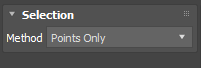
Selection rollout
- Method: Determines the point data that the modifier flattens. Select from the following options:
- Points Only: Flattens only the point data on the object, creating a simplified, static snapshot of the point stack at the moment the modifier is applied.
- Point Cloud with Instances: Flattens the point data on the object as well as the referenced instance data. For example, if another modifier further up the stack, like the Point Instance modifier, controls an object's points, this method also flattens the instanced object's point data.