Delete Patch Modifier
Delete Patch provides parametric deletion based on the current sub-object level in the stack. The possible choices are vertices, edges, patches, and elements. Apply the Delete Patch modifier to delete the geometry specified at that sub-object level.
 Modify panel > Make a patch selection. > Modifier List > DeletePatch
- Default menu: Make a selection. > Modifiers menu > Patch/Spline Editing > Delete Patch
- Alt menu: Make a selection. > Modifiers menu > Patch > Delete Patch
For example, you can apply a Patch Select modifier, select a row of patches in a patch sphere, and then apply a Delete Patch modifier to delete those patches. To undo the deletion, remove the Delete Patch modifier.
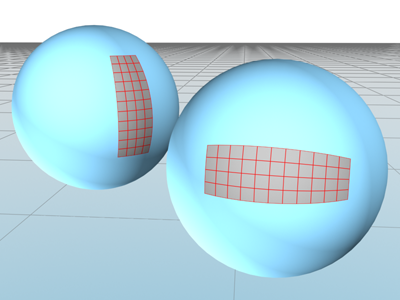
Delete Patch used to remove sections of a patch sphere.
Procedure
Example: Delete a patch in a sphere:
Create a sphere.
Right-click the sphere, and on the quad menu, choose Convert To > Convert To Editable Patch.
On the
Modify panel, in Editable Patch, choose the Patch sub-object level, and  select a patch.
In the Modifier List, choose the Delete Patch modifier.
This deletes the selected patch.
To undo the deletion, click
 to remove the Delete Patch modifier.
Interface
This modifier has no parameters.